
CRM Integration for Leads: A Step-by-Step Setup Guide
A CRM integration for leads routes new prospects automatically into your CRM and triggers the right score, route, and nurture workflows so sales-ready leads reach reps faster. It connects a lead source (a form, ad platform, or chat widget) to your CRM through a webhook or connector, maps the incoming fields, and kicks off automation the moment a record lands.
If you want to act today, start here:
Audit your highest-volume lead source and confirm whether it supports webhooks or has a native CRM connector.
Check whether your CRM accepts signed payloads (HMAC signatures are the standard for verifying authenticity).
Decide whether you’re building this yourself or routing it through middleware like Zapier.
Key Takeaways
A CRM integration for leads succeeds when field mapping, deduplication, and routing rules are defined before launch, and when monitoring catches failures before they cost you a lead.
Point | Details |
|---|---|
Speed determines conversion | Faster first contact through automated CRM entry consistently beats manual follow-up delays. |
Prioritize by volume and intent | Start with website forms and paid ad leads before tackling emails and event lists. |
Choose architecture deliberately | Native apps suit simplicity, iPaaS tools like Zapier and Make suit flexibility, direct APIs suit scale. |
Test before and after launch | Sample payloads, idempotency checks, and daily spot audits prevent silent data loss. |
Astreaux adds the response layer | Astreaux combines CRM connectivity across 7,000+ apps with instant AI replies and booking automation. |
What Is a CRM Integration, Exactly?
LeadsBridge defines CRM integration as connecting an external lead source to a CRM so your team can track and manage lead status in one place instead of chasing spreadsheets and inbox notifications. In practice, that means five moving parts working together every time a lead comes in.
A lead source (your website form, an ad platform, a chat widget) fires an event. An ingest layer, whether that’s a native connector, an iPaaS tool, or a raw webhook, catches that event. A transformation step maps and cleans the incoming fields. The CRM stores the result as a contact or deal record. Then post-ingest automation takes over: scoring, assignment, and the first nurture touch.
Picture it as a pipeline: source → connector → transform → CRM → automation. Each stage can fail independently, which is why testing every link matters more than testing the whole chain at once.
Most integrations need to map these fields at minimum:
Name, email, and phone number
Lead source and campaign (UTM parameters)
Consent or opt-in status for calls and texts
Custom properties specific to your business (property type, service needed, loan amount)
A timestamp for when the lead was captured
Get the field mapping wrong and you inherit two problems at once: dirty data and blind spots in your reporting.
Native Connectors, Middleware, or Direct API: Choosing Your Architecture
Three architectural patterns cover almost every CRM integration for leads, and each comes with a real tradeoff between speed and control.
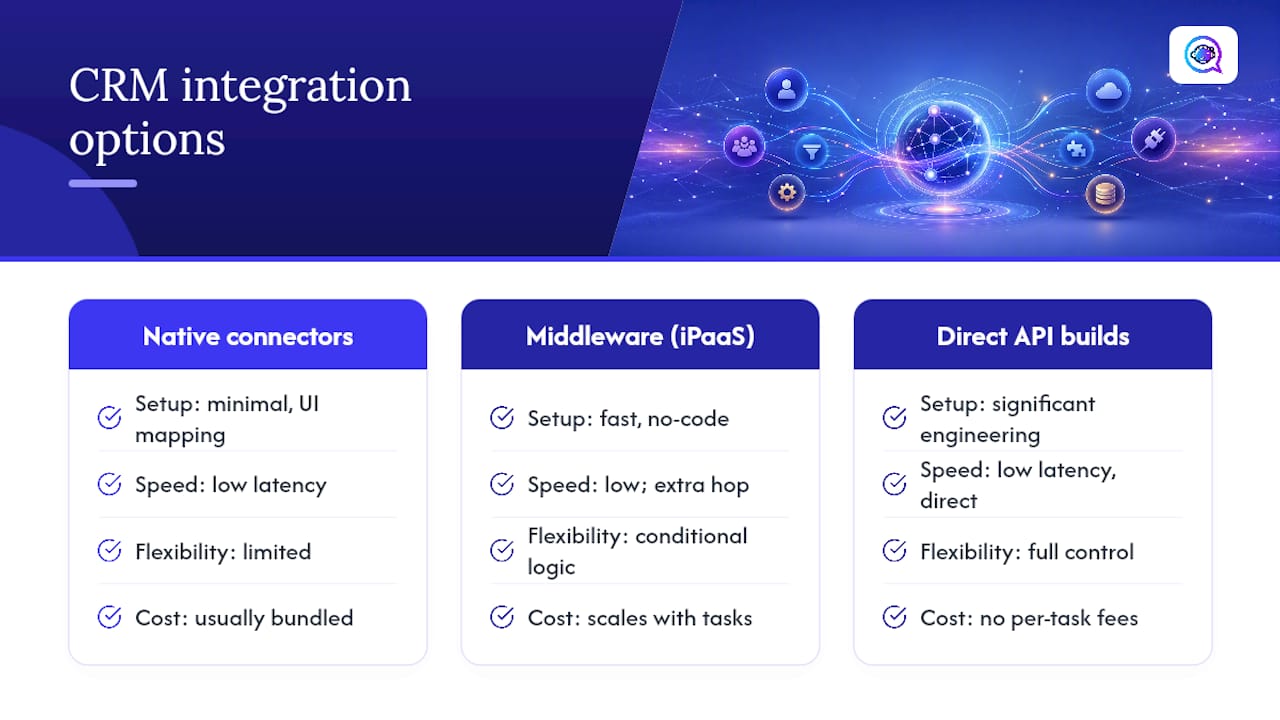
Native CRM apps are built by the CRM vendor or a partner and require the least setup. You install, authorize, and map fields through a UI. Engineering effort is minimal, cost is usually bundled into your CRM plan, and latency is low. The tradeoff: you’re limited to whatever logic the app supports, and you inherit its bugs and update schedule.
Middleware and iPaaS tools, like Zapier, Make (formerly Integromat), and LeadsBridge, sit between your lead source and CRM and let you build multi-step workflows without writing code. They’re the most popular starting point because they balance speed and flexibility: you get conditional logic, filters, and multi-app chains without hiring a developer. Cost scales with task volume, and complex workflows can get expensive at scale. Latency is generally low but adds a hop compared to direct integration.
Direct webhook-to-API builds give you full control over payload structure, retry logic, and error handling. This path takes real engineering time upfront but eliminates per-task fees and scales cleanly at high volume. Arkesel’s SMS CRM integration guide frames this as a spectrum rather than a single choice: teams often start on an iPaaS for speed, then migrate to direct API and webhook builds once volume or compliance needs outgrow what middleware handles cleanly.
Choose native when you want simplicity, middleware when you need flexibility fast, and direct builds when volume or data control demands it.
Your Step-by-Step CRM Integration Checklist
Whether you’re building this from scratch or auditing an existing setup, work through these steps in order.
Inventory every lead source currently generating leads, including ones marketing added without telling ops.
Map fields from source to CRM, deciding what happens when a field is missing (default to blank, flag for review, or reject the record).
Define your deduplication key, usually email plus phone, so the same lead submitting twice doesn’t create two records.
Set consent and PII flags at ingestion so opt-in status travels with the record from day one.
Build routing and scoring rules based on source, territory, or product interest.
Create test records using fake data to confirm the full pipeline before going live.
Enable logging and retry logic so failed deliveries don’t silently disappear.
Plan your monitoring and resync process for when (not if) something breaks.
A field-mapping example makes this concrete. If your website form collects “Phone Number” but your CRM expects “mobile_phone” as a formatted E.164 string, your transformation step needs to reformat before the record lands, or you’ll get validation errors piling up in your logs.
Pro Tip: Build idempotency into every webhook by including a unique lead ID in the payload, and verify authenticity with an HMAC signature before processing. This one pairing prevents duplicate records from retries and blocks spoofed submissions from ever reaching your CRM.
Three Lead-to-CRM Workflows You Can Copy
Workflow A: Website form to instant reply. A visitor submits your contact form, which fires a webhook straight to your CRM, creating a contact record in seconds. An AI-driven reply goes out immediately, the lead gets scored based on form answers, and it routes to the appropriate rep, all within the same minute. Log the webhook receipt with a timestamp so you can prove delivery if a lead later claims they never heard back.

Workflow B: Ad platform lead to nurture sequence. A Facebook Lead Ads submission flows through middleware like Zapier or Make, which enriches the record with campaign and intent data before pushing it into the CRM. From there it enters a multi-touch nurture sequence rather than an immediate call, since ad leads typically need more warming.
Workflow C: Chat widget to booked appointment. A visitor engages your chat widget, and the conversation either hands off to a live rep or triggers a scheduling flow that creates a meeting directly in the CRM. Time-to-first-contact here should be measured in seconds, not minutes, since the visitor is still actively on your site.
Testing and Monitoring: Keeping the Pipeline Healthy
An integration that works on launch day and breaks silently three weeks later is worse than no integration at all, because you stop checking your CRM manually once you trust the automation.
Before launch, run through this testing checklist:
Send sample payloads with realistic and edge-case data (empty fields, special characters, duplicate submissions).
Validate field-level formatting, especially phone numbers and email addresses.
Test your resync process by intentionally failing a delivery and confirming it retries correctly.
Confirm idempotency by submitting the same lead ID twice and checking only one record results.
Once live, monitoring separates a healthy integration from one that’s quietly losing leads. Vendors and plugins built for CRM integration typically include error logs and resync options as standard features. Set an alert rule such as “more than 1% delivery errors in 24 hours triggers a notification,” and assign someone to actually respond when it fires rather than letting alerts pile up unread.
Pro Tip: Run a daily spot check comparing your lead source’s submission count against your CRM’s new-record count. A gap of even a handful of leads is often the first sign of a silent failure, long before an alert threshold trips.
How Long and How Much Should You Budget?
Timeline scales with team size and complexity, not just lead volume.
Small implementations (a single form or one ad platform into a CRM) typically take a few days to two weeks using native connectors or basic middleware.
Mid-size projects (multiple lead sources, custom scoring, SMS integration) usually run two to six weeks, factoring in field mapping and testing cycles.
Enterprise implementations (multiple CRMs, compliance review, custom API builds) commonly take six to twelve weeks or longer.
Cost drivers include iPaaS subscription tiers, developer hours for custom webhook and API work, CRM add-on fees, and SMS or messaging credits if texting is part of your workflow. Tooling subscriptions and messaging credits are largely fixed, predictable costs. Developer hours and ongoing maintenance are the variable line items, and they’re where most budgets run over if testing gets rushed.
Protecting Lead Data: Security and Compliance Basics
Every integration you build handles personally identifiable information, which means security isn’t optional infrastructure. It’s the foundation.
Cover these basics before going live:
Rotate API keys on a schedule rather than leaving the same credential active indefinitely.
Apply least-privilege permissions so each connector only accesses what it needs.
Verify incoming payloads with HMAC signatures to confirm they’re genuinely from your lead source.
Confirm data is encrypted in transit (HTTPS/TLS) and at rest within your CRM.
Store consent and opt-in flags at the point of capture, and make sure opt-out requests sync back across every workflow that touches that contact.
Pro Tip: If SMS is part of your lead workflow in the United States, register your brand and campaign under the 10DLC framework before sending bulk texts. Skipping this step is one of the fastest ways to get your messages filtered or blocked by carriers.
Why an AI-Driven Integration Platform Changes the Equation
Everything covered so far assumes you’re building or maintaining the pipeline yourself. For many service professionals, that’s exactly where the trouble starts: real estate agents, contractors, and mortgage brokers don’t have a developer on staff to maintain webhook logic or debug a broken Zapier automation at 9 p.m.
Astreaux approaches CRM integration for leads differently by combining the connector layer with a conversational AI response layer so that the integration doesn’t just move data. It acts on it immediately.
Instant AI-generated replies engage new leads within moments of capture, before response time becomes a lost deal.
Two-way messaging keeps the conversation going through appointment booking without a rep touching the keyboard.
Connectors to over 7,000 apps mean most CRMs, ad platforms, and form tools plug in without custom development.
Built-in field mapping, deduplication, and routing handle the technical checklist covered earlier in this guide automatically.
Logging and delivery tracking give you the audit trail that testing and monitoring sections above call for by default.
Real estate agents using integrated, instant-response workflows see fewer missed opportunities simply because the AI is trained on their voice and responds the moment a lead arrives, not hours later when a rep finally checks their notifications.
The industry fit is specific. Contractors use it to turn estimate requests into booked appointments without playing phone tag. Mortgage brokers use it to qualify and schedule consultations while a borrower’s interest is still fresh. Real estate agents use it to cut no-show rates by nurturing leads automatically between the first inquiry and the showing.
The pattern across every vertical is the same: shorter time-to-contact, fewer manual handoffs, and a CRM record that’s accurate because the AI captured it correctly the first time.
What Teams Consistently Get Wrong
The technical parts of a CRM integration usually aren’t what breaks it. The organizational parts are.
Consent flags get skipped because whoever built the form didn’t think about compliance, and by the time legal asks for an audit trail, six months of leads have no opt-in record attached. Idempotency gets treated as a nice-to-have instead of a requirement, so a single retried webhook creates three duplicate contacts and three confused reps calling the same person.
The bigger blind spot is ownership. Marketing builds the lead capture form. Sales owns the CRM. Nobody owns the connection between them, so when a middleware automation quietly breaks, it can sit broken for weeks because it’s not clearly anyone’s job to check.
Fragile middleware configurations often fail silently when a source platform changes its field names or API version.
Handoff gaps between marketing and sales are where most “we never got that lead” complaints actually originate.
Assign one person to own the integration end to end, even if they didn’t build it.
Get Leads Into Your CRM the Moment They Arrive
Zapier, Make, and LeadsBridge solve the connection problem: they get lead data from point A to point B. What they don’t do is act on that lead once it lands. That gap between “the record exists in my CRM” and “someone actually replied” is where deals go cold.

Astreaux closes that gap by pairing the integration with an AI-driven response that fires the instant a lead comes in, learns your business’s voice, and books the appointment without waiting on a rep to open their inbox. For real estate agents, contractors, and mortgage brokers juggling dozens of leads across multiple sources, that’s the difference between a CRM that stores leads and one that converts them. With connectors to over 7,000 apps, your existing forms, ad platforms, and CRM plug in without a developer rebuilding your stack from scratch.
If missed follow-ups and slow response times are costing you booked appointments, start with Astreaux and see how instant engagement changes your conversion numbers within the first week.
Sources
For deeper technical setup guidance, LeadsBridge’s overview of CRM integration strategies covers definitions and common approaches. For a webhook-first build pattern with signed payloads, see MeritsOnly’s guide to CRM integration for lead forms. For a WordPress-specific, no-middleware setup, review the Integrate with HubSpot CRM plugin documentation. For SMS-specific architecture decisions, Arkesel’s SMS CRM integration guide compares native, iPaaS, and API paths.
FAQ
What Is CRM Integration?
CRM integration connects an external lead source, like a website form or ad platform, to your CRM so new prospects automatically become contact records and trigger follow-up workflows without manual entry.
What Is the Best CRM for Tracking Leads?
The best CRM for tracking leads is the one your team actually configures well: it needs clean field mapping, deduplication rules, and automation triggers, which is why the integration setup matters as much as the CRM brand itself.
Which CRM Is Best for Lead Generation?
There’s no single best CRM for lead generation since fit depends on your lead volume and sources, but pairing any CRM with an AI-driven response layer like Astreaux improves speed-to-contact regardless of which CRM you use.
What Is a CRM for Leads?
A CRM for leads is a system that stores prospect information, tracks their status through your pipeline, and, when integrated properly, triggers scoring, routing, and nurture actions automatically as new leads arrive.
How Long Does a CRM Integration Take to Set Up?
Small integrations using native connectors or basic middleware take a few days to two weeks, while enterprise builds involving multiple CRMs and custom APIs can run six to twelve weeks or longer.