


Instant Lead Engagement: How to Reply in Seconds
Instant lead engagement means replying to a new inquiry within seconds or a few minutes, on the channel the lead used, with a message that sounds like you and moves the conversation toward an appointment. It matters because a prospect’s interest is highest at the moment they reach out, and it fades fast. This guide covers what the research says, the workflow to build, the channels to use, the U.S. consent rules to respect and the numbers to watch.
Astreauxcalendly.comRespond to Leads in SecondsAstreaux uses conversational AI to send personalized replies to new leads and help service professionals streamline scheduling and follow-up.Book a call
TL;DR
Instant lead engagement is an automatic, personalized first reply that goes out within seconds of a form fill, call, text or ad lead.
The best-known research found that contacting a lead within five minutes made qualification far more likely than waiting 30 minutes.
A working setup has five parts: capture, instant reply, qualification, scheduling and a human handoff.
In the U.S., automated texts and calls need documented consent, and email needs CAN-SPAM basics such as an opt-out.
Track time to first response, contact rate, booked appointments and no-shows, then adjust your messages.
What instant lead engagement actually means
You may also hear it called speed to lead. The idea is simple: the time between a prospect raising their hand and hearing from you should be as short as you can make it. For a real estate agent, that is the portal inquiry that arrives while you are at a showing. For a contractor, it is the estimate request that lands at 9 p.m. For an insurance agent, it is the quote form someone filled out on their lunch break.
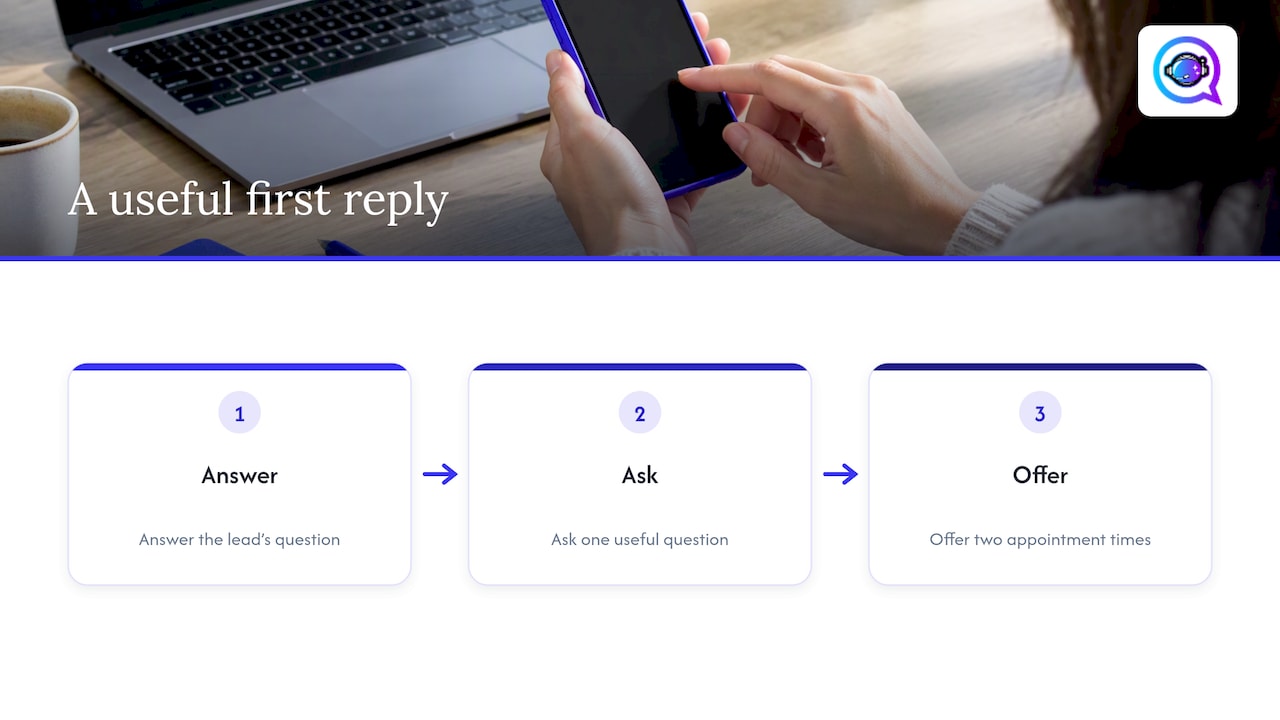
The “engagement” half matters as much as the “instant” half. An auto-reply that says “Thanks, we’ll be in touch” is a receipt, not engagement. Real engagement answers the question the lead asked, asks one useful question back and offers a clear next step, such as two appointment times.
Why does timing carry so much weight? Practitioners point out that a prospect’s intent peaks at the moment of inquiry and decays quickly, and that a slow reply competes with whatever has already pulled their attention elsewhere, as one real estate lead response analysis puts it. Most people who fill out a form are also contacting two or three providers at once. The first useful reply often sets the terms for everyone who follows.
What the research shows about response time
Two studies sit behind almost every speed-to-lead statistic you will see, so it is worth knowing what they actually measured.
The Lead Response Management study (2007). Dr. James Oldroyd, working with InsideSales.com, found that responding within five minutes of lead capture made businesses 100 times more likely to make contact and 21 times more likely to qualify the lead than waiting 30 minutes. Those multipliers compare five minutes with 30 minutes, not five minutes with “never.” We unpack the details in our post on what the Lead Response Management study really proves.
The Harvard Business Review audit (2011). Oldroyd, Kristina McElheran and David Elkington studied 2,241 U.S. companies. Among firms that responded within 30 days, the average response time was 42 hours, and 23% never responded at all. The same research found that firms contacting leads within an hour were nearly seven times more likely to qualify them than firms that waited longer.

Take two lessons from this. First, the gap between what is possible (seconds) and what is typical (hours or days) is where the opportunity sits. Second, these are averages across many industries and older datasets. Treat them as a strong directional signal, then measure your own response time and conversion rate. Our lead response time benchmark walks through what “fast” should mean for different kinds of leads.
The instant lead engagement workflow, step by step
You do not need a complicated system. You need five links in the chain, and no gaps between them.
1. Capture every lead in one place
Instant engagement fails first at capture. If web forms go to one inbox, ad leads to another and portal inquiries to a third, nobody replies quickly because nobody sees everything. Route every source into one lead list or CRM. If you are deciding between a simple lead tool and a full CRM, our comparison of lead management vs CRM helps you choose, and the CRM integration setup guide covers the connection itself.
2. Send the first reply automatically
The reply should go out within seconds, on the same channel when possible. A text lead gets a text. A form lead with a mobile number gets a text (if they consented to texts) and an email. Keep it short and specific to what they asked about.
Here is a template with placeholders you can adapt:
Hi {{firstName}}, this is {{agentName}} with {{company}}. Thanks for asking about {{service}} at {{address}}. I can get you a time this week. Does {{slot1}} or {{slot2}} work better?
Notice what it does: names the person, references the inquiry, and ends with a question that is easy to answer with one word.
3. Qualify with two or three questions
Don’t send a ten-question form over text. Ask the questions that decide whether and when you can help:
Real estate: Are you buying or selling, and what is your timeline?
Contractors: What is the project, and what is the property address or zip code?
Insurance: What type of coverage are you comparing, and when does your current policy renew?
Financial advisors: What are you hoping to plan for, and are you working with an advisor today?
Answers let you route the lead: a hot buyer to your phone, a someday-maybe to a nurture sequence.
4. Book the appointment inside the conversation
Every extra click between “yes” and a confirmed time loses people. Offer slots pulled from your real calendar, confirm automatically and send a reminder. Reminders are also your best defense against no-shows, a point we cover in our guide to automating lead follow-up.
5. Hand off to a human at the right moment
Automation should open the conversation, not trap the lead in it. Set clear triggers for a handoff: the lead asks to talk to a person, mentions a budget or deadline, sends a question the system cannot answer, or books a time. At that point you get an alert with the full conversation, so you never ask the lead to repeat themselves.
Which channels work for an immediate reply
Pick the channel the lead used first, then add a second one. Here is how the main options compare:
Channel | Best for | Watch out for |
|---|---|---|
Text (SMS) | Fast, short exchanges and scheduling | Needs documented consent; keep to quiet hours |
Details, documents, confirmations | Easy to ignore; needs an opt-out link and your address | |
Phone call or voicemail | High-value or urgent leads | Automated or prerecorded calls carry the strictest consent rules |
Web chat | Visitors already on your site | Only works while they stay on the page |
Social DMs | Leads from social ads and profiles | Platform rules differ; move to text or email for booking |
Personalization does not have to be elaborate. Use the lead’s name, the property, service or policy type they mentioned, and the source they came from. The bigger lever is tone. A reply that reads like a template gets treated like one, which is why we built our software to learn a business’s own voice from its past messages.
After-hours replies, routing and handoffs
A large share of inquiries arrive when you are not at your desk: evenings, weekends and while you are with another client. This is where automation earns its place.
After-hours: Send the same instant reply, then offer the first available slot the next morning. The lead feels heard and your calendar fills overnight.
Routing: Assign leads by territory, service type, language or lead source, and alert the right person by text or app notification.
Round-robin for teams: Rotate new leads among agents and reassign automatically if the first person does not respond within a set window.
Estimate scheduling: For contractors, collect the address and project type first, then offer estimate windows that account for drive time.
Escalation: If a hot lead has not been touched by a human within your target time, send a second alert to a manager.
For a deeper look at fast replies that keep consent records intact, read our post on instant lead response for service pros, and see how inbound lead automation fits the larger picture.
Consent and compliance in the U.S.
Speed never excuses skipping consent. These rules apply to U.S. outreach, and your state may add its own.
Texts and calls (TCPA). The Telephone Consumer Protection Act governs automated and prerecorded calls and texts. The rules have been in flux: in February 2026 the Fifth Circuit ruled in Bradford v. Sovereign Pest Control of TX that the TCPA does not require prior express written consent for automated telemarketing calls to cellphones, rejecting the FCC’s long-standing interpretation. That ruling does not make consent optional everywhere. Other courts and states may take a different view, and consent of some kind is still required. The safe practice is to keep doing what protects you either way: collect clear opt-in at the form, record when and how it was given, and honor STOP requests immediately. Talk to a qualified attorney about your specific setup. For a trade-specific example of timing and consent, see this guide to SMS follow-up timing and TCPA rules.
Email (CAN-SPAM). The FTC says the law covers all commercial email, including business-to-business messages, and it requires among other things accurate header information and a way for recipients to stop receiving your emails. Put a working opt-out and your physical address in every marketing message, and process opt-outs promptly.
A practical checklist:
Put consent language next to the phone number field on every form.
Store the timestamp, source and wording of each consent.
Identify yourself in the first message and say how to opt out.
Send within reasonable hours for the lead’s time zone.
Suppress anyone who opts out across every channel.
Nurturing the leads who don’t answer right away
Most leads will not reply to the first message. That is normal, not failure. The first reply opens the door; the follow-up sequence keeps it open without becoming a nuisance.
A simple pattern: a text within seconds, an email within the hour, another text the next day with new value (a listing, a project example, a quote comparison tip), and a final check-in a few days later. After that, move the lead into a slower, lower-frequency sequence. If you want a framework for building the longer sequence, this overview of lead nurturing strategies is a good starting point.
Stop the sequence the moment a lead books, replies with a clear no or opts out. Nothing damages trust faster than a reminder to someone who already scheduled.
Metrics that tell you whether it is working
You cannot improve what you do not measure, and these are the numbers that matter most.
Metric | What it tells you | How to use it |
|---|---|---|
Time to first response | How fast you reply, by source and hour of day | Aim to shrink the slowest segments first |
Contact rate | Share of leads who reply or pick up | Test message wording and channel order |
Qualification rate | Share who meet your criteria | Tune your screening questions |
Appointment booked rate | Leads who schedule a time | Offer fewer, clearer time options |
No-show rate | Booked appointments that fail | Adjust reminder timing and content |
Lead-to-client rate | The end result | Compare across sources to cut weak ones |
Break every number down by lead source. A portal lead and a referral behave differently, and an average hides that. Run one A/B test at a time, such as a question versus a statement in the opening line, and give each test enough leads to mean something before you pick a winner.
Our perspective: speed only counts when it sounds like you
We built Astreaux because we kept seeing the same pattern among service professionals: the work that wins business, showing a home, running an estimate, advising a client, is the work that keeps you away from your phone. Leads arrive in those gaps and wait.
Our view is that instant engagement should not feel like automation at all. That is why Astreaux is designed to learn the voice of each business, so the first reply to a new lead reads like something you would write. It then qualifies the lead, books the appointment and passes the conversation to you with the context intact. Because it connects with over 7,000 apps, it can sit on top of the CRM, calendar and ad platforms you already use instead of replacing them.
The goal is not to remove you from the relationship. It is to make sure every lead gets a prompt, relevant, consent-aware first response, so your time goes to the people who are ready to talk.
— Jamaal
Put instant engagement to work
If you are ready to stop losing leads to slow replies, Astreaux gives real estate agents, contractors, insurance agents, therapists and financial advisors an AI that answers new inquiries instantly in their own voice, books appointments and runs follow-up. Start with our walkthrough on instant lead response for service pros to see how the setup works in practice.
For a wider set of ideas to pair with it, our list of speed to lead tactics shows ten ways to win the first reply.
FAQ
How fast is “instant” for lead engagement?
Aim for seconds on automated first replies and under five minutes for any human follow-up. The widely cited Lead Response Management study compared five-minute and 30-minute response times, so five minutes is the benchmark most teams use. Measure your own results and tighten from there.
Do I need consent before texting a new lead?
Yes, plan on getting and recording it. Legal requirements for automated texts and calls have shifted in recent court decisions, and states may add rules. Collect a clear opt-in on your form, store the record and honor opt-outs, then confirm your setup with an attorney.
Will an automated reply feel impersonal?
It does not have to. Replies that use the lead’s name, their specific inquiry and your own tone read as personal. Keep messages short, ask one clear question, and offer an easy path to a real person.
Which channel should I reply on first?
Use the channel the lead used. A text inquiry gets a text, a form with a mobile number gets a text and an email, and a chat visitor gets a chat reply. Add a second channel for anyone who has not responded after a short while.
What should I track first?
Start with time to first response by lead source, then add contact rate and appointments booked. Once those are stable, watch no-show rate and lead-to-client rate to see whether faster replies are turning into business.


