


Landline Texting Setup: How to Text-Enable a Business Number
You can set up landline texting without changing your number or your phone service. A business texting provider “hosts” the text side of your existing landline number, so SMS goes to an online inbox or app while calls keep ringing on your desk phone. The steps are: confirm the number is eligible, choose a provider, prove you own the number, sign a letter of authorization, complete U.S. carrier registration, and send a test message. This guide walks through each one and covers what to prepare so you don’t stall in review.
AstreauxTurn New Texts Into Timely Follow-UpsAstreaux uses conversational AI to respond to new leads instantly and help service professionals streamline scheduling and follow-up.Book a call
TL;DR
A standard landline can’t send or receive texts on its own. Texting is added through a hosting service, and voice stays with your current carrier.
Setup usually means an eligibility check, a verification call, a signed letter of authorization, and U.S. carrier registration for business messaging.
Texting a landline that isn’t enabled doesn’t fail silently. Some carriers convert the text to a recorded voice call, as Verizon’s consumer service does.
Get consent before you send marketing or automated texts. The FCC treats robotexts sent with an autodialer as covered calls under the TCPA.
Plan for days, not minutes, because registration and routing changes take time on the carrier side.
What landline texting actually is
A traditional landline has no SMS inbox. It was built for voice. When people talk about “texting a landline,” they mean one of two different things, and mixing them up causes most of the confusion.
The first is a consumer feature: someone sends a text to a landline and the carrier reads it aloud as a phone call. The second is business text-enablement: your existing landline number is connected to a messaging platform so customers can text the number they already call, and your team replies from a computer or phone.
This article is mostly about the second. It’s the one that lets a contractor, an agent or a front desk answer “Can you do Thursday at 2?” in writing, from the number printed on the truck, the yard sign or the website.
What happens when someone texts a landline that isn’t enabled
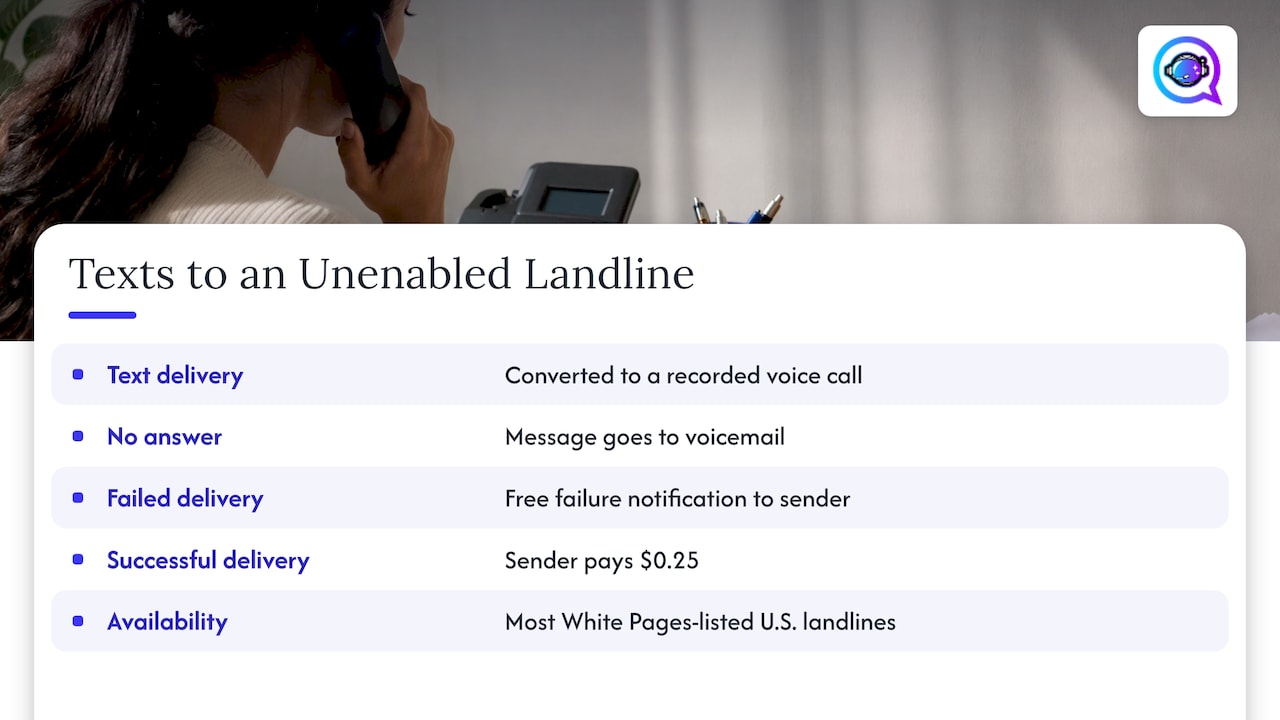
It depends on the carrier. Verizon’s Text to Landline service converts texts to recorded voice calls. If nobody answers, the message goes to voicemail, and a failed delivery triggers a free failure notification to the sender. Verizon says the service is generally available for most White Pages-listed U.S. landlines and excludes categories such as unlisted numbers, fax machines, medical facilities and numbers outside the 50 states.
Verizon also says successful delivery costs the sender $0.25, and the sender has to accept that charge when prompted. So a customer who texts your unenabled landline may get a voice call delivered to you, not a conversation you can manage. That is a poor way to run lead follow-up, which is why most businesses text-enable the line properly.
How text-enabling works behind the scenes
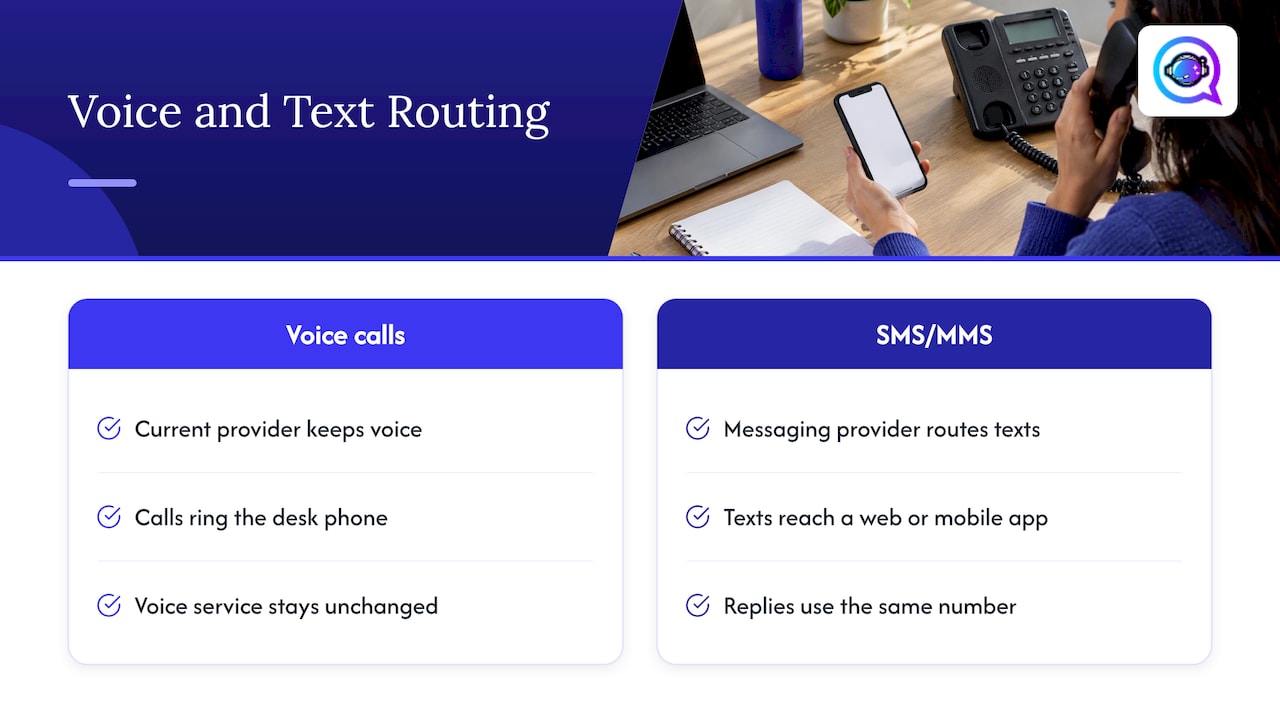
The model is simple. Your landline number stays with your current phone provider for voice. A messaging provider takes over only the SMS and MMS routing for that number. Inbound texts land in a web or mobile app, and replies go out from the same number. Your desk phone keeps working as before.
AT&T’s developer documentation describes the same idea from the carrier side: a landline texting API that adds SMS and MMS sending and receiving to existing toll-free and landline numbers through software and connected devices. It also notes that message charges may still apply to the user.
Because nothing is ported, you avoid the usual risks of moving a number: no downtime on calls, no new contract with your voice carrier and no reprinting of cards or signage.
Before you start: a pre-setup checklist
Most delays come from missing paperwork, not from technology. Gather these first:
The number and the account holder. Know whose name is on the phone bill. The person who signs authorization paperwork generally needs to be the account holder, the billing contact or another recognized authorized person at the voice provider.
Your voice carrier’s details. Account number, billing address and any PIN the carrier asks for.
The business identity. Legal business name, address, website and tax ID if you have one. Carrier registration uses these.
Someone who can answer the line. Ownership is usually verified with an automated phone call to the number, so a person has to be at the desk or have the line forwarded.
A consent plan. Know how customers opt in, and have a privacy policy and texting terms published on your site.
A named inbox owner. Decide who watches incoming texts and who replies after hours.
If the line is a VoIP service or a toll-free number, tell the provider up front. Many hosting services accept traditional landlines, VoIP and toll-free numbers, but your own voice carrier still has to allow the routing change.
Step-by-step landline texting setup
Step 1: Confirm the number is eligible
Start by asking the texting provider you are considering to check the number. Eligibility depends on the number type and on your voice carrier, not just on the fact that it is a 10-digit U.S. number. Be ready for a no on numbers that are in the middle of a port, are on certain legacy or specialty services, or belong to carriers that don’t permit text routing.
If the number isn’t eligible, you still have options. You can get a new local or toll-free number for texting, or move to a voice service that supports texting natively. Our guide on long code vs toll-free SMS explains how those number types differ in practice.
Step 2: Choose the type of service that fits your team
Without naming brands, there are three common types:
Service type | Best for | What to look for |
|---|---|---|
Shared-inbox texting app | Front desks and small teams answering inbound questions | Assignment of conversations, templates, mobile app |
Texting built into a CRM or lead platform | Teams that want every text tied to a contact record and pipeline stage | Contact sync, automation, appointment booking |
Developer messaging API | Businesses with a developer who builds a custom workflow | Hosted-number support, registration help, logging |
If your goal is faster replies to new leads, pick something that connects texting to the place your leads already live. Real estate agents, contractors, insurance agents and financial advisors usually care less about the raw inbox and more about what happens in the first five minutes after a form submission. Our rollout guide on deploying TCPA-safe AI texting covers that workflow in five steps.
Step 3: Submit the number and verify you control it
The typical flow has you enter the landline number and then receive an automated call with a PIN or code. You enter the code to prove you control the line. This is why someone needs to be able to answer the phone at that moment.
Step 4: Sign the letter of authorization
Carriers want written permission from the account holder before they change how text messages route for a number. Providers handle this with an electronic Letter of Authorization, often called an LOA. Make sure the name and address on the LOA match what is on your voice carrier’s bill exactly. A mismatch is the most common reason these get kicked back.
Step 5: Complete U.S. carrier registration
If you send business texts from a standard 10-digit number in the U.S., carriers expect your brand and your messaging use case to be registered. This is called A2P 10DLC registration. Registration typically asks for:
Your business identity and website
A description of what you text about and who you text
Sample messages
How customers opt in, plus your privacy policy and texting terms
Most providers want registration finished before the number is activated. Take the sample messages seriously: vague or mismatched examples are a frequent cause of rejection. We break the process down in our A2P 10DLC registration guide.
Registration is a form of launch planning too. If your business is brand new, a general step-by-step business launch guide can help you line up the legal name, address and website details that registration asks for before you submit anything.
Step 6: Wait for routing, then test
Two clocks run here: the registration review and the carrier’s routing change. Providers describe the total in days, and some quote registration approval at one to three business days when the submission is correct, with the routing change adding more time. Check your chosen provider’s current documentation for its timeline rather than relying on a general estimate.
When activation is confirmed, test it:
Text the landline from your own mobile phone.
Confirm the message appears in the inbox.
Reply and confirm it arrives from the landline number.
Call the landline and confirm voice still rings normally.
Test a photo message if you plan to receive pictures of jobs, documents or properties.
Consent and compliance: set this up on day one
Text-enabling a line makes it easy to message people, which is exactly when mistakes happen. The FCC’s 2025 declaratory ruling says the TCPA generally requires prior express consent for covered automated calls, and the Commission interprets robotexts, including SMS sent with an autodialer, as covered calls.
In practice, that means:
Collect opt-in clearly. A checkbox or form line that names texting, your business and message types.
Keep a record. Store the time, the source page and the wording the customer agreed to.
Honor stops fast. Treat STOP as final across every channel.
Separate service from marketing. A reply to a customer who just texted you is different from a promotional blast.
For deeper detail, read our TCPA compliance guide for SMS and the double opt-in guide. If you work in healthcare or therapy, the rules around patient information differ, so see our HIPAA text reminder guide before you automate anything.
This article is general information, not legal advice. For a specific campaign, ask a communications or privacy attorney in your state.
How to use landline texting once it works
The point of setup is what you do afterward. These are the use cases that pay off fastest for service businesses:
Estimate and appointment scheduling. A contractor gets “Can someone look at our roof this week?” and offers two time slots by text.
Appointment confirmations and reminders. Fewer no-shows, fewer phone tag loops.
Quote follow-up. An insurance agent sends a short message after a quote request and keeps the thread in one place.
Lead nurturing. A financial advisor or mortgage broker checks in on a schedule that matches the buyer’s timeline.
Missed-call recovery. When nobody picks up, an automatic text from the same number invites the caller to say what they need.
Keep the first message short, say who you are and offer one clear next step. Here’s a template with placeholders:
Hi {{firstName}}, this is {{agentName}} at {{businessName}}. Thanks for reaching out about {{service}}. Would {{timeOption1}} or {{timeOption2}} work for a quick call? Reply STOP to opt out.
For more wording you can adapt, see our paste-ready SMS calls to action.
Make your number easy to trust
Customers are more likely to text a number they recognize. Your Google Business Profile, website and ads should show the same number you enabled. If you also use chat features in search listings, it helps to know what replaced Google Business Messaging, so your listing sends people to texting that actually works.
Common setup problems and fixes
The verification call never arrives. The line may be forwarded to voicemail or an auto-attendant that doesn’t pass the code. Temporarily route the line to a person.
The LOA is rejected. The signer is not the account holder, or the name and address differ from the bill. Correct them and resubmit.
Registration is rejected. Sample messages are generic, the opt-in method isn’t visible, or the website lacks a privacy policy and texting terms.
Texts arrive but replies fail. Registration or routing may not be finished. Ask the provider for the number’s status.
Customers say they got a robot voice. Someone texted before activation, and the carrier converted it to a voice call, as described above.
Group MMS or photos don’t work. Check which message types the provider supports on hosted numbers.
Perspective: why the first five minutes matter more than the number type
We talk to service professionals who set up texting and then still lose leads, and the cause is almost never the line. It’s the gap between a new inquiry and the first useful reply.
Text-enabling a landline fixes the channel. It doesn’t fix response time. If a form fill comes in while you’re on a roof, in a showing or in a session, the best text in the world still waits until you’re free.
That’s the problem Astreaux is designed to solve. Our conversational AI is built to learn the voice of your business and reply to new leads instantly, so qualified prospects get a prompt, personal message and a path to book. Our platform is designed to connect with the CRM and ad tools you already use, and it supports bulk SMS campaigns, appointment booking and analytics for pipeline performance.
Our view: get the number registered properly, get consent right, then automate the first reply and the follow-ups. That order protects your sender reputation and your time.
Jamaal
Put texting to work on every new lead
If you want to move from a texting-enabled number to a system that answers new leads for you, Astreaux is built for real estate agents, contractors, insurance agents, therapists, mortgage brokers and financial advisors. It’s AI lead management and sales engagement software that responds to inquiries in your voice, books appointments and keeps nurturing prospects.

To see how the pieces fit together, from consent to first reply to follow-up sequences, start with our guide to rolling out TCPA-safe AI texting for service teams.
FAQ
Can you set up a landline to receive text messages?
Yes, with a text-enablement service. A texting provider routes SMS for your existing number to an app or web inbox, while calls stay with your current phone carrier. Without that, a carrier feature such as Verizon’s Text to Landline converts a text into a voice call or voicemail instead.
Is there a landline phone that can text?
Not in the way a mobile phone does. A standard landline handset has no text inbox. The practical answer is to text-enable the number and read and reply from a computer or smartphone, while the landline phone continues to handle calls.
Can I send a text message to a landline?
Sometimes. If the number is text-enabled, the message arrives in the owner’s inbox. If it isn’t, some carriers convert the text to a recorded call. Verizon’s service, for example, excludes unlisted numbers and charges the sender $0.25 for a successful delivery.
Do I need to port my number to text from it?
Usually not. Hosted messaging leaves voice with your current carrier and moves only the SMS routing. You will still need to prove ownership, sign an authorization letter and finish carrier registration for business texting.
Do I need customer consent before texting from my landline number?
For automated or marketing messages, yes. The FCC’s 2025 ruling says the TCPA generally requires prior express consent for covered automated calls, and it interprets autodialed robotexts as covered. Get written opt-in, keep records and honor opt-outs right away.


