


AI Appointment Setting for U.S. Service Professionals
If you run a service business in the United States and want conversational booking that syncs live with your calendar and CRM, Astreaux is the platform to start with. It learns your business’s voice, qualifies leads the moment they come in, and writes confirmed appointments directly into your source system — no manual reconciliation, no missed follow-ups. Most service teams complete their pilot within two to four weeks and see measurable booking lift before they scale. Request a demo, define your lead flow, and expect your first qualified bookings within days of go-live.
What does an AI appointment setter actually do?
AI appointment setting is the practice of using a conversational AI agent to handle the full booking cycle: qualifying inbound leads, checking real-time availability, confirming appointments, sending reminders, and rescheduling when conflicts arise. The term “AI appointment setter” is the common shorthand; the industry standard phrase is conversational scheduling automation, which signals that the system understands natural language rather than routing callers through a scripted menu.

Modern platforms operate across SMS, web chat, voice, WhatsApp, and email from a single policy set, running inbound and outbound campaigns at scale without adding headcount. On the integration side, credible solutions connect bidirectionally with Google Calendar, Outlook, and major CRMs, handling round-robin distribution, buffer times, and multi-service scheduling that static booking forms simply cannot manage.
Core capabilities to expect from any credible solution:
Conversational lead qualification before a slot is offered
Real-time calendar read and write (not a holding queue)
CRM deal-stage awareness to prioritize high-value prospects
Automated follow-up and reminder sequences
Rescheduling and cancellation handling
Multi-channel coverage (SMS, voice, web widget, WhatsApp)
Live handoff to a human when a conversation exceeds agent authority
Customizable voice and tone to match your brand
Pro Tip: Ask any vendor to show you a live booking created during the demo appearing instantly in your target calendar. If they show you a screenshot or a “sync happens every 15 minutes” message, the system is using a shadow queue — not true two-way integration.
What business outcomes can you realistically expect?
The shift from human setters to AI is about capacity and consistency as much as cost savings. A single human setter handles a limited number of leads before fatigue degrades response quality; AI agents can process thousands of leads daily without that degradation, maintaining response-time SLAs around the clock.
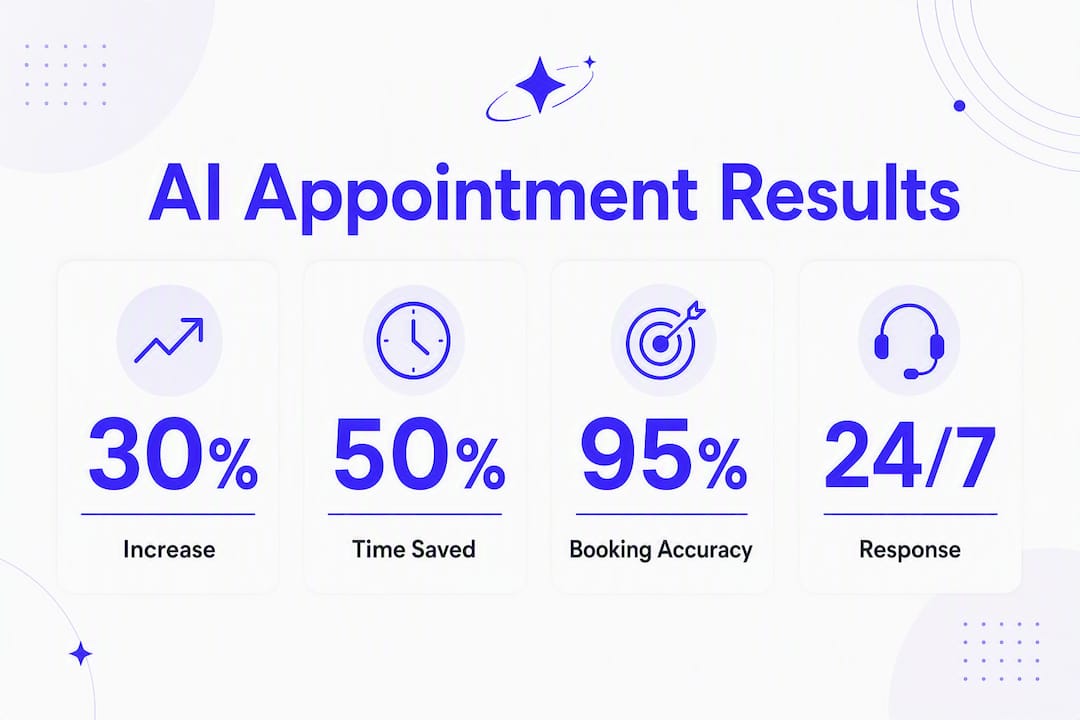
On booking rates, vendor-reported benchmarks for agencies and service businesses show 30–40% booked-call rates on inbound leads when the system is properly configured and tuned. That range assumes clean lead data, a well-designed qualification flow, and bidirectional calendar sync. Expect 30% during your pilot and up to 40% after four to six weeks of optimization.
A simple ROI framing for a small service business:
Typical monthly platform cost falls within a moderate range for small businesses
The math changes fast when you factor in the human setter cost you are replacing or the after-hours leads you were previously losing entirely.
Metrics that move when AI appointment scheduling is working:
Time-to-first-response drops from hours to seconds
No-show rates fall as automated reminders replace manual calls
Lead-handling capacity scales without adding staff
Qualification consistency improves because the AI applies the same rules every time
For a deeper look at how these numbers play out in real estate specifically, the AI lead generation ROI breakdown for realtors on the Astreaux blog walks through the full funnel math.
Which features and integrations actually matter?
Integration depth separates genuine AI booking assistants from glorified contact forms. The critical requirement is two-way, real-time sync: the agent must read availability and CRM context, then write the confirmed appointment back to the source system. If the AI can only write to calendars without reading CRM deal stages, it cannot prioritize high-value leads — and that gap causes lost revenue that never shows up in your booking rate metric.
Feature Category | What to Verify |
|---|---|
Calendar integration | Bidirectional read/write; Google Calendar and Outlook at minimum |
CRM sync | Deal-stage awareness; lead scoring passed to booking logic |
Lead qualification | Custom rules, disqualification paths, conditional branching |
Multi-channel support | SMS, voice, web widget, WhatsApp, email from one policy set |
Escalation/live handoff | Trigger conditions, warm transfer, context passed to human |
Customization | Voice/tone training, brand-specific scripts, A/B test support |
Security/compliance | HIPAA BAA availability, audit logs, data residency disclosure |
EHR integration | Required for health customers; verify connector scope and access limits |
On the integration side, Astreaux connects to over 7,000 apps via Zapier, which covers the vast majority of CRMs, ad platforms, and telephony tools a U.S. service business is likely running. For healthcare customers, HIPAA-aware EHR connections and defined authority limits are non-negotiable — scheduling agents must operate within auditable scopes and escalate sensitive cases to humans.
Pro Tip: During your demo, ask the vendor to create a booking that conflicts with an existing calendar event. A true conversational AI will detect the conflict, offer the next available slot, and confirm the new time in the CRM — all in the same conversation. A scripted bot will either ignore the conflict or error out.
How does conversational AI appointment setting work, and what does setup look like?
The agent reads your calendar availability and CRM context in real time, conducts a natural-language conversation to qualify the lead, then writes the confirmed appointment directly into your source system. No holding queue. No manual reconciliation. The booking exists in your calendar and CRM the moment the prospect confirms.

Under the hood, modern implementations combine a large language model for intent understanding, an orchestration layer for routing logic, and direct API connections to calendar and CRM endpoints. Open-source reference architectures use tools like FastAPI, LangGraph, and Cal.com API to illustrate these patterns, though production platforms abstract that complexity behind a configuration interface.
Typical deployment sequence:
Contract and access — sign the agreement, grant calendar and CRM API access, confirm data residency and HIPAA requirements if applicable.
Integration setup — connect calendar platforms, CRM, SMS/voice providers, and ad platforms for lead sync.
Voice and tone training — upload brand guidelines, sample conversations, and qualification rules so the AI responds in your business’s voice.
Policy configuration — define booking rules: buffer times, round-robin logic, disqualification triggers, escalation conditions.
Sandbox testing — run end-to-end booking flows, reschedule scenarios, conflict handling, and CRM deal-stage updates in a test environment.
Pilot launch — open to a controlled lead segment for two to four weeks to gather real booking data.
Scale — expand channels and lead volume once qualification accuracy and booking rates meet your targets.
Pre-go-live sign-off checklist:
End-to-end booking confirmed in calendar and CRM simultaneously
Reschedule flow tested with a conflicting event in place
Disqualification path tested with a lead that fails qualification rules
Live handoff tested: context passes cleanly to the human agent
Reminder and follow-up sequences verified across all active channels
Pro Tip: Build your AI-enabled lead funnel before you configure the AI. If you cannot draw the qualification logic on a whiteboard, the AI will not execute it consistently.
What do AI appointment setter pricing models look like, and how do you estimate ROI?
Most platforms use one of three pricing shapes: subscription tiers (flat monthly fee by feature level), per-booking or per-lead fees (variable cost tied to volume), or seat-based pricing (per user or per agent). Enterprise contracts often blend a base subscription with usage-based overages.
The levers that most influence your actual ROI are setup fees, per-lead charges at scale, the number of integrations included in your tier, and SLA guarantees for uptime and response time. A low headline price with expensive integration add-ons can cost more than a higher-tier plan that bundles everything.
Cost/Value Item | Sample Figures |
|---|---|
Incremental booked appointments (AI, per month) | appointments at a booking rate |
Negotiation points worth pushing for:
A two-to-four-week paid pilot with a capped lead volume before full commitment
SLA credits if booking accuracy or uptime falls below agreed thresholds
Integration scope spelled out in the contract (which CRMs, which calendar platforms, which channels)
Data deletion and portability terms in case you switch vendors
Short pilots of two to four weeks with a controlled lead flow give you real booking rate and qualification accuracy data before you commit to a full subscription. That data also gives you leverage in pricing negotiations.
How do you evaluate AI appointment setting vendors?
Use this checklist during every vendor demo. Score each criterion 1–5, weight the top three (integration depth, booking accuracy, security/compliance) at double, and any vendor below 70% of the maximum weighted score should not make your shortlist.
Evaluation criteria:
Integration depth — bidirectional calendar and CRM sync, direct write to source system (not a shadow queue)
Booking accuracy — rate of correctly qualified and confirmed appointments in a live demo flow
Customization — voice/tone training, conditional scripts, A/B testing capability
Security and compliance — HIPAA BAA availability, audit logs, data residency, limited access scopes
Escalation design — trigger conditions, warm handoff, context preservation
Support and onboarding — launch timeline, training sessions, account manager access
Scalability — channel expansion, volume caps, enterprise upgrade path
Demo script questions to ask live:
“Show me a booking created right now appearing in our target calendar and CRM deal stage.”
“Show me a lead that fails qualification — what does the disqualification path look like?”
“Trigger a calendar conflict mid-booking. How does the agent respond?”
“Show me a live handoff to a human with context passed.”
“Where does our data reside, and who can access it?”
Red flags to watch for:
Sync described as “near real-time” or “batch updates” (shadow queue)
Demo uses a scripted menu rather than a free-form conversation
No HIPAA BAA offered for healthcare use cases
Integration list is a logo wall with no API depth documentation
Vendor cannot show a disqualification path or conflict-handling flow
Pro Tip: Design your demo scenarios to include a calendar conflict, a multi-service booking, and a buffer-time enforcement test. These three scenarios exercise the vendor’s routing and policy rules under realistic conditions and reveal integration gaps that a clean demo hides.
Astreaux in action: how it works for U.S. service professionals
Astreaux is built specifically for the service verticals where appointment setting directly drives revenue: real estate agents, contractors, therapists, insurance agents, mortgage brokers, and financial advisors. The platform’s conversational AI engages new leads within seconds of inquiry, qualifies them against your defined criteria, and books confirmed appointments into your calendar and CRM without human intervention.
Deployment steps for a typical service professional:
Day 1–3: Connect your CRM, calendar, and lead sources (Facebook Ads, Google Ads, web form, or SMS inbound).
Day 3–5: Configure qualification rules and upload your brand voice guidelines for AI tone training.
Day 5–7: Run sandbox tests across booking, reschedule, and disqualification flows.
Week 2–4: Pilot with a controlled lead segment; review booking rate and qualification accuracy daily.
Week 4+: Scale to full lead volume and activate additional channels.
Astreaux connects to thousands of apps, so whether your CRM is a major platform or a niche industry tool, the integration path is typically available without custom development. For real estate agents, prebuilt templates handle buyer and seller lead qualification. Contractors get estimate-booking workflows that capture project type and budget before the appointment is confirmed. Therapists and counselors benefit from HIPAA-aware intake automation that routes sensitive cases to a human before any clinical information is collected.
Support includes done-for-you setup assistance, a template library organized by industry vertical, and account manager access during onboarding. You are not handed a configuration panel and left to figure it out. For a practical look at how AI turns more leads into clients for real estate professionals, the Astreaux blog covers workflow examples and conversion benchmarks specific to that vertical.
What does a typical launch timeline look like, and which KPIs matter most?
Phased launch timeline for a small service business:
Week 1 (Prep and integration): API connections, CRM and calendar sync, lead source configuration, qualification rule setup.
Week 2 (Voice training and testing): Tone training, sandbox testing of all booking flows, sign-off on escalation paths.
Week 3–4 (Pilot): Live with a controlled lead segment; daily review of booking rate and qualification accuracy.
Week 5+ (Scale): Full lead volume, additional channels activated, optimization of underperforming flows.
KPIs to track in the first 90 days:
Leads handled: total volume processed by the AI agent
Booked rate: confirmed appointments divided by leads handled
Qualified-to-book rate: leads that passed qualification and then confirmed an appointment
No-show rate: appointments that were confirmed but not attended
Time-to-first-response: seconds from lead inquiry to AI first contact
CRM deal-stage accuracy: percentage of bookings correctly logged at the right pipeline stage
After go-live, the first optimization target is almost always your qualification rules. If your booked rate is high but your close rate is low, the qualification criteria are too loose. If leads are dropping out before booking, the conversation flow has a friction point — usually a question that feels intrusive or a channel mismatch between where the lead came from and where the AI is reaching them.
Pro Tip: Run an A/B test on your opening message within the first two weeks. The first message the AI sends has an outsized effect on conversation completion rates. Test a question-first opener (“Hi {{firstName}}, quick question about your project — what’s the timeline you’re working with?”) against a benefit-first opener and let the data decide.
Key Takeaways
AI appointment setting delivers the highest ROI when the platform combines true bidirectional calendar/CRM sync with conversational qualification and a two-to-four-week pilot that generates real booking data before full commitment.
Point | Details |
|---|---|
Bidirectional sync is non-negotiable | The AI must read CRM deal stages and write directly to your source calendar — shadow queues cause reconciliation errors and lost leads. |
Realistic booking rate benchmark | Vendor-reported benchmarks show 30–40% booked-call rates on inbound leads when the system is properly configured. |
Pilot before you commit | A two-to-four-week controlled pilot generates real qualification accuracy and booking rate data for procurement decisions. |
HIPAA compliance for health verticals | Healthcare customers must require a HIPAA BAA, audit logs, and defined EHR access scopes before go-live. |
Astreaux for U.S. service professionals | Astreaux connects to thousands of apps, offers industry templates for real estate, contractors, and therapists, and includes done-for-you onboarding. |
When should you use AI appointment setting, and when do you keep humans in the loop?
The conventional wisdom says AI appointment setters are a cost-cutting tool. That framing undersells what they actually do well and obscures where they still fall short.
AI excels at three things: speed, scale, and consistency. It responds in seconds at any hour, handles thousands of leads without degradation, and applies your qualification rules the same way every time. Those are not human strengths. A human setter who handles 40 leads a day is doing well; an AI agent handles that volume before 9 AM.
Where humans still add clear value is in conversations that require judgment beyond a decision tree. A high-value prospect who pushes back on pricing, a therapy intake where a client discloses a crisis, a contractor negotiation where scope is genuinely ambiguous — these are not scripted flows. The AI should recognize when it has reached the edge of its authority and hand off cleanly, with full context, to a human who can take it from there.
The hybrid model that works best for most U.S. service businesses looks like this: AI handles first contact, qualification, and routine scheduling for the majority of leads. Humans handle high-value prospects flagged by CRM deal stage, escalations triggered by sentiment or complexity, and any conversation where clinical or legal sensitivity is present. That division lets your team focus on the conversations where their judgment actually changes the outcome, while the AI manages the volume that was previously slipping through the cracks.
Full automation makes sense when your lead flow is high-volume, your qualification criteria are well-defined, and your average deal value is consistent enough that every qualified lead deserves the same booking process. A real estate agent running Facebook Ads at scale, a contractor receiving estimate requests from a Google Local Services campaign, or an insurance agency processing inbound referrals — these are full-automation candidates. A wealth management firm handling ultra-high-net-worth introductions is not.
The mistake most service businesses make is waiting until they are overwhelmed to automate. By then, the leads they lost during the delay are already with a competitor who responded in 30 seconds.
Astreaux is built for the service professional who is done losing leads to slow follow-up
Every day a qualified lead waits more than five minutes for a response, the probability of booking that appointment drops sharply. Astreaux closes that gap by engaging leads the moment they come in, qualifying them against your criteria, and confirming the appointment in your calendar before a human setter would have even seen the notification.

The platform is purpose-built for U.S. service professionals: real estate agents get lead outreach and follow-up workflows tuned to buyer and seller funnels. Contractors get estimate-booking automation that captures project scope before the call. Therapists and counselors get HIPAA-aware intake automation that handles sensitive routing without exposing clinical data to the AI layer. All three verticals connect to over 7,000 apps, so your existing CRM and calendar stack stays in place.
The fastest way to see what this looks like for your business is a live demo. Visit Astreaux to book your pilot, define your lead flow with the onboarding team, and have your first AI-booked appointments confirmed within days.
This article is for general informational purposes. For healthcare deployments, confirm HIPAA compliance requirements with a qualified compliance professional before go-live.
Sources and further reading
Turenchotara/Appointment-Scheduling — GitHub: open-source reference architecture illustrating LLM, orchestration, and calendar API integration patterns.
Astreaux — AI Automation for Service Professionals: primary product landing page with demo and pilot CTAs.
Astreaux — AI Lead Generation ROI for Realtors: full funnel ROI modeling for real estate professionals.
Astreaux — How to Create AI-Enabled Lead Funnels: step-by-step funnel design and lead routing guidance.
Astreaux — Why AI Sales Agents Are Replacing SDRs in 2026: capacity and ROI analysis supporting the case for AI-driven appointment setting.


