
How to Automate Lead Follow-Up for SMB Sales Teams
Automate lead follow-up by capturing every inbound lead in your CRM and triggering a timed, multi-channel sequence that replies within minutes. That single action, done consistently, is where most small and service-based businesses recover the revenue they’re quietly losing every week.
Here’s where to start right now:
Capture and deduplicate. Every lead source (web forms, ads, referrals, chat) should push contacts into one CRM with duplicate-checking active before any sequence fires.
Fire an instant autoresponse. Your first reply should go out within five minutes of a lead submitting their information. After that window, reply rates drop sharply.
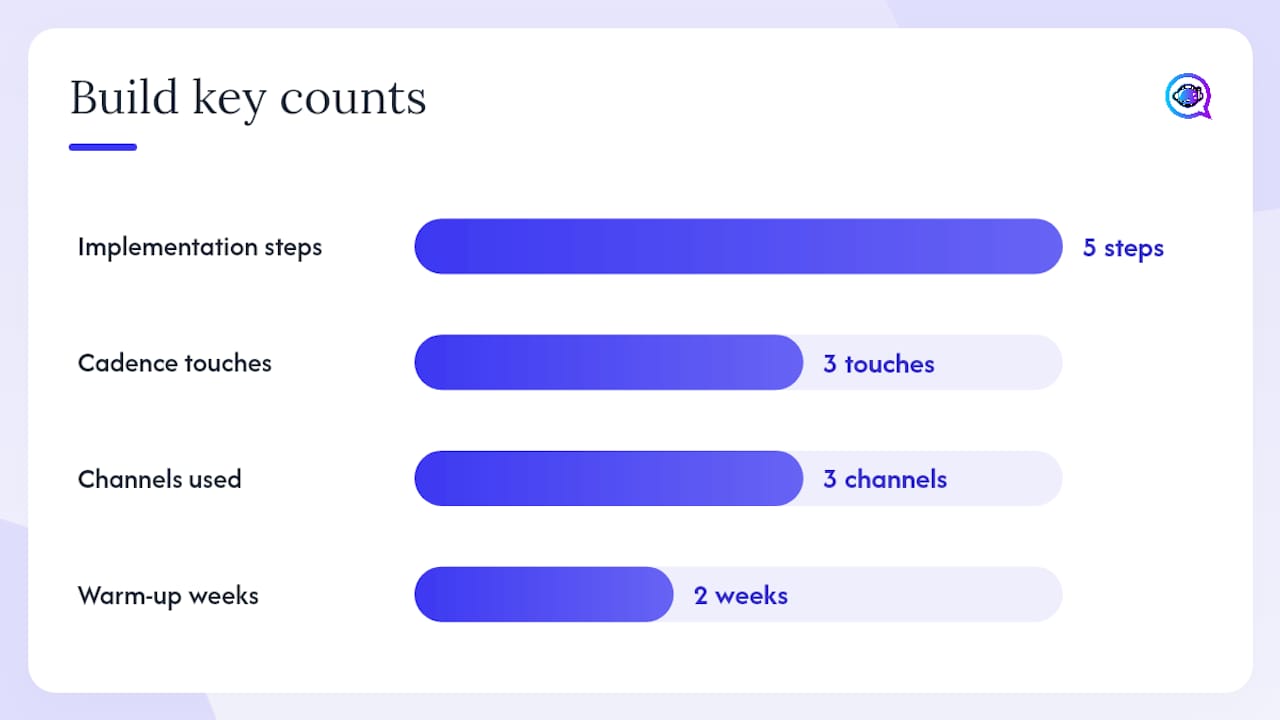
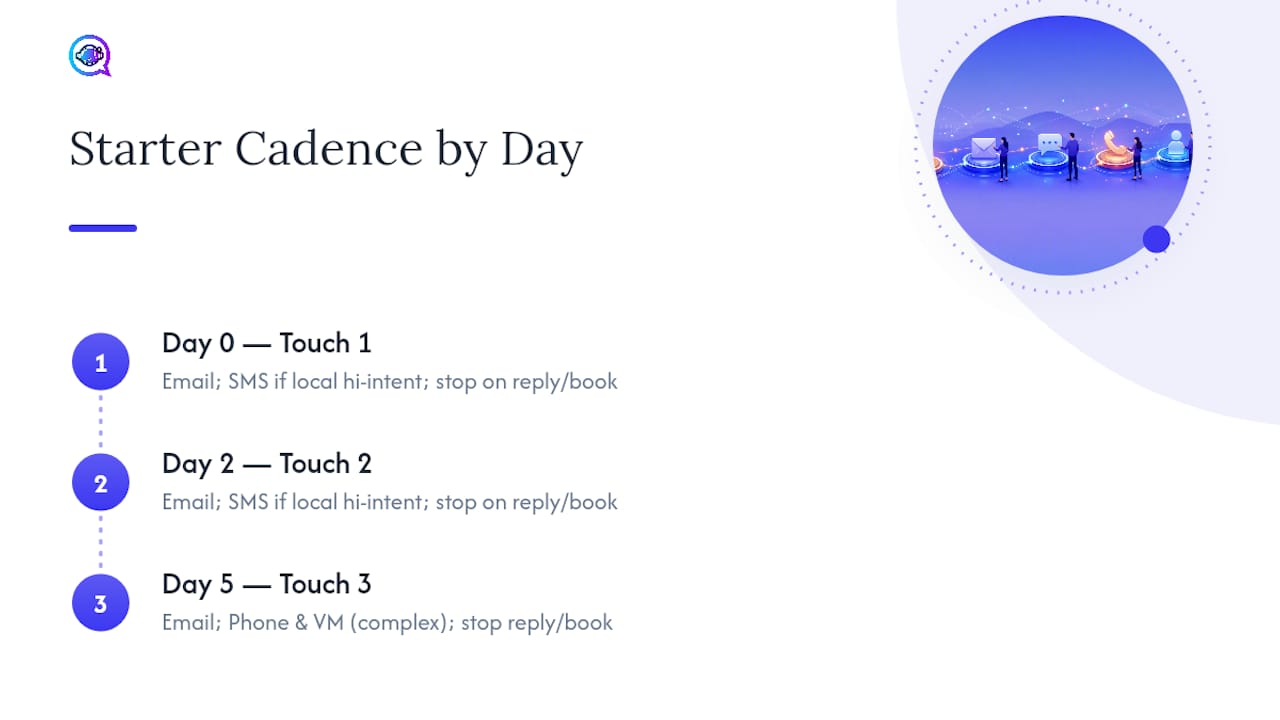
Schedule a 3-touch starter cadence. Day 0 (instant reply), Day 2 (value follow-up), Day 5 (direct meeting ask) across email, SMS, and phone covers most SMB use cases without overwhelming prospects.
Two U.S. compliance frameworks govern this work from day one: the CAN-SPAM Act for commercial email and the TCPA (Telephone Consumer Protection Act) for SMS and automated calls. Gartner projects that AI agents in sales workflows will grow dramatically by 2028, but fewer than 40% of sellers currently report improved productivity from them. That gap is a setup problem, not a technology problem. This guide closes it.
Key Takeaways
Automating lead follow-up works when you combine instant response, a structured multi-touch cadence, clear stop conditions, and consistent measurement from day one.
Point | Details |
|---|---|
Instant first reply | Fire your first automated response within five minutes of lead capture to maximize reply rates. |
3-touch starter cadence | Use Day 0, Day 2, and Day 5 touches across email, SMS, and phone as your default SMB sequence. |
Stop conditions are required | Sequences must pause automatically when a prospect replies, books, or opts out. |
Track five core KPIs | Monitor reply rate, meetings booked, conversion rate, time-to-first-response, and cost per booked meeting. |
Astreaux accelerates setup | Astreaux’s prebuilt conversational AI templates and 7,000+ integrations get your first sequence live in days. |
What does an automated lead follow-up system actually do?
An automated lead follow-up system combines rules, templates, triggers, and routing logic to send timely outreach and create hand-off tasks without requiring a rep to manually send each message. Lead follow-up automations capture leads from multiple channels, enrich their profiles, and trigger perfectly timed outreach through connected integrations.
Channels in scope:
Email — primary documentation channel; best for longer value messages and attachments
SMS — high-open-rate channel for time-sensitive nudges and appointment confirmations
Phone/voicemail drops — effective for complex services where a human voice builds trust faster
Web chat and IM — real-time engagement for leads still on your site
CRM task creation — automated rep notifications and activity logging that keep the pipeline current
What this system is not: a replacement for high-touch consultative selling, and not a one-size-fits-all outbound blasting tool. When a prospect replies, books a call, or signals high intent, the automation should stop and a human should take over. That hand-off rule is what separates a well-built system from one that annoys prospects into silence.
Why automated follow-up matters more than most SMBs realize
Consistent, near-instant follow-up recovers revenue that manual processes routinely lose. The math is simple: a rep managing 50 leads per week cannot personally send a timely first reply, two follow-ups, and a breakup message to every contact. Automation handles that volume without adding headcount.
The business case for SMBs comes down to four concrete gains:
Faster response time. Some AI lead management platforms reduce median first-response time to under 60 seconds and operate around the clock across multiple channels.
Fewer missed leads. Every lead that doesn’t get a reply within the first hour is a lead your competitor may be talking to.
Higher conversion per rep. When automation handles the first two or three touches, reps spend their time on prospects who have already shown interest, not cold outreach.
Lower cost per lead handled. Automated sequences cost a fraction of the rep hours required to do the same work manually.
Gartner’s research on AI agent adoption in sales underscores a critical nuance: the technology alone doesn’t guarantee productivity gains. Teams that define clear triggers, stop conditions, and hand-off rules see the lift. Teams that deploy automation without those guardrails often see the same productivity numbers they had before.
Stat to benchmark against: Optimized reactivation sequences on ghosted but previously qualified leads can recover a notable portion of those contacts when the timing and messaging are right.
What components do you need to build this system?
Before you write a single template, audit your stack against this component list. Missing any one of these creates a gap where leads fall through.
Lead capture layer — web forms, ad platform webhooks, chat widgets, and referral intake all feeding one destination
Deduplication and enrichment — logic that prevents the same contact from entering two sequences and appends missing data (company, phone, source)
Lead scoring and segmentation — rules that separate high-intent leads (requested a quote, booked a call) from cold inquiries so routing decisions are automatic
Trigger engine — the workflow logic that fires sequences based on form submission, tag change, page visit, or inactivity
Multi-channel message engine — sends email, SMS, and voicemail drops; logs every touch in the CRM
Tasking and escalation — creates rep tasks when a lead replies, books, or hits a score threshold
Analytics and dashboarding — tracks reply rate, meetings booked, and time-to-first-response at the sequence level
Data and consent management — stores opt-in records, processes unsubscribe requests, and maintains suppression lists
A minimal integration stack for most SMBs looks like this: CRM + form/webhook connector + SMS provider + calendar booking tool + analytics. The required data fields for basic personalization are first name, lead source, service interest, and phone number. Everything else is an upgrade.
Pro Tip: Invest first in capture, instant reply, and routing. Those three components deliver the majority of the conversion lift. Personalization depth and advanced segmentation are valuable, but they’re a second-phase investment.
For lead routing and prioritization logic, the rule of thumb is straightforward: any lead that requests a quote, schedules a call, or visits a pricing page more than once should route to a rep immediately, bypassing the standard nurture sequence.
How do you build the system in five steps?
Follow these five steps to go from zero to a live automated sequence. Each step has a clear owner and a QA check before you move forward.
Set up your stack. Connect your lead sources to your CRM using webhooks or native integrations. Confirm that every form submission creates a contact record and that duplicates are flagged automatically. QA check: submit a test lead from each source and verify it appears once in the CRM with the correct fields populated.
Map your goals and triggers. Define what action fires each sequence (form submit, ad click-through, chat inquiry) and what action stops it (reply received, meeting booked, opt-out). Document these in a simple trigger map before building anything. QA check: walk through each trigger scenario on paper and confirm no lead can enter two sequences simultaneously.
Build your sequences. Start with the 3-touch starter cadence (Day 0, Day 2, Day 5). Use your CRM’s workflow builder or a connected automation tool to schedule each message. Set channel order: email first, SMS second, phone third for most service businesses. QA check: send the full sequence to an internal test contact and review every message for formatting, links, and personalization fields.
Personalize and set approval workflows. Add dynamic fields ({{firstName}}, {{serviceInterest}}, {{repName}}) to every template. For AI-generated variants, set an approval step so a human reviews the first batch of messages before they go live at scale. QA check: confirm dynamic fields resolve correctly and that no placeholder text appears in a sent message.
Test, launch, and iterate. Run the sequence on a small segment first (20–50 leads). Review reply rates and meeting bookings after seven days before rolling out to the full lead volume. Schedule a weekly review for the first month. QA check: pull a sequence performance report and confirm KPIs are being captured.
Pro Tip: Throttle your sending volume during the first two weeks. Starting at 50–100 emails per day on a new domain and ramping gradually protects your sender reputation and keeps deliverability high from day one. For AI-driven outreach at scale, this warm-up period is non-negotiable.
Ready-to-use starter sequences and templates
Use a 3-touch starter cadence as the default for most SMB use cases. It’s short enough to avoid annoying prospects and long enough to catch leads who weren’t ready on day one.
Template snippets
Touch 1 — Instant autoresponse (Day 0, within 5 minutes) Subject: Quick note from {{repName}} at {{companyName}}
Hi {{firstName}}, thanks for reaching out about {{serviceInterest}}. I’ll be in touch shortly, but wanted to confirm we received your info. In the meantime, here’s a quick look at how we typically help: [link]. Talk soon, {{repName}}
Touch 2 — Value follow-up (Day 2, email or SMS) Email subject: One thing most {{serviceType}} clients ask us first
Hi {{firstName}}, most people in your situation want to know [key benefit or FAQ answer]. Here’s a short resource that covers it: [link]. Happy to answer any questions on a quick call — [calendar link].
SMS variant (Day 2): “Hi {{firstName}}, this is {{repName}} from {{companyName}}. Did you get a chance to review our info? Happy to answer questions — reply here or grab a time: [link].”
Touch 3 — Direct meeting ask (Day 5)
Hi {{firstName}}, I don’t want to keep filling your inbox if the timing isn’t right. If you’re still exploring options, here’s a direct link to book 15 minutes: [calendar link]. If not, no worries at all — just let me know and I’ll stop following up.
Voicemail script (Day 3 or 4, between email touches):
Cadence timing by lead intent
Channel preference by touch: Email leads every sequence for documentation and deliverability. SMS works best for high-intent local leads (contractors, real estate, mortgage) where a quick text feels personal rather than intrusive. Phone and voicemail drops belong at touch 3 or 4 for complex services where a human voice accelerates trust. Stop all channels the moment a prospect replies or books.
Which KPIs tell you if your sequences are working?
Prioritize five metrics: reply rate, meetings booked, conversion rate, time-to-first-response, and cost per booked meeting. Track them at the sequence level, not just the account level, so you can isolate which touch or channel is underperforming.
Reply rate — percentage of contacts who respond to any message in the sequence. A healthy baseline for cold outreach is typically in the single digits; warm leads should perform meaningfully higher.
Meetings booked — the clearest signal that your sequence is doing its job. Track this per sequence and per rep.
Conversion rate — meetings that become paying clients. This is the downstream metric that justifies the automation investment.
Time-to-first-response — how quickly your system sends the first message after lead capture. Under five minutes is the target.
Cost per booked meeting — total sequence cost (tool fees + rep time) divided by meetings booked. Use this to compare automation ROI against manual outreach.
Email marketing benchmarks from Oberlo give you useful baselines when setting A/B test hypotheses for subject lines and send times. One important nuance: a subject line that improves open rate doesn’t always improve reply rate. Test both metrics independently.
Testing checklist
For your weekly dashboard, include: sequence reply rate, meetings booked by source, time-to-first-response average, unsubscribe/opt-out rate, and bounce rate.
What pitfalls and compliance rules should you watch for?
Over-messaging, missing consent records, and skipping unsubscribe links are the three fastest ways to damage your sender reputation and expose your business to regulatory risk. Address them before you launch.
Deliverability checklist:
Warm your sending domain for at least two weeks before full-volume sends
Keep daily send volume below 200 emails per domain during the first month
Include a one-click unsubscribe link in every commercial email (CAN-SPAM requirement)
Maintain a suppression list and process opt-outs within 10 business days (CAN-SPAM standard)
Monitor bounce rates and spam complaint rates weekly; pause sending if complaints exceed 0.1%
U.S. compliance basics:
CAN-SPAM Act (email): Every commercial email needs a physical mailing address, a clear opt-out mechanism, and honest subject lines. Deceptive headers are prohibited.
TCPA (SMS and automated calls): You need prior express written consent before sending marketing texts or using an auto-dialer. “STOP” replies must immediately halt all SMS from your system. Violations carry statutory damages per message.
Compliance note: TCPA rules for SMS and robocalls are enforced by the FCC and have been updated in recent years. Check the FCC’s current guidance before launching any SMS campaign.
Common operational pitfalls:
Running sequences past the point where a prospect has already replied (missing stop conditions)
Failing to route replies to a human rep, leaving interested leads waiting in an automated queue
Using the same sequence for B2B and B2C leads without adjusting tone, length, or channel preference
Poor deduplication that sends the same lead two simultaneous sequences from different sources
B2B leads generally respond better to email-first sequences with longer intervals and value-focused content. B2C leads, particularly in real estate, home services, and insurance, often respond faster to SMS and phone touches with shorter, more direct messaging.
How Astreaux accelerates your setup and improves conversion
Astreaux speeds time-to-live by providing prebuilt conversational AI templates, CRM integrations, and appointment booking flows that most SMB teams would otherwise spend weeks configuring manually.
Implementation steps with Astreaux:
Connect your lead sources via Astreaux’s native integrations or webhooks (the platform supports 7,000+ app connections)
Configure your conversational AI templates using Astreaux’s voice-training feature, which learns your business’s tone and response style
Activate appointment booking flows that sync directly with your calendar, reducing no-shows through automated reminders
Set stop conditions so sequences pause the moment a lead replies or books
Review analytics in the Astreaux dashboard to track reply rates, meetings booked, and time-to-first-response from day one
Expected early outcomes:
First automated reply firing within minutes of lead capture
Appointment bookings increasing as calendar friction is removed from the sequence
Rep time shifting from manual outreach to conversations with already-engaged prospects
For AI appointment setting specifically, Astreaux automates the booking confirmation, reminder, and rescheduling flow so your team doesn’t have to manage calendar back-and-forth manually.
What most teams get wrong after they go live
The playbook above works. What breaks it, almost every time, is the post-launch adjustment period that teams underestimate.
Three adjustments come up repeatedly in real implementations. First, timing. The Day 0/Day 2/Day 5 cadence is a starting point, not a fixed rule. B2B leads in longer sales cycles often respond better to Day 0/Day 4/Day 9 spacing. Run the sequence for three weeks before changing timing, and change one variable at a time.
Second, escalation rules. Define exactly what score or behavior triggers a rep task. “High intent” means different things to different teams. A lead who visits your pricing page twice and opens two emails is a clear escalation signal. A lead who opened one email six days ago is not. Write the rule down and put it in your CRM so every rep applies it the same way.
Third, personalization depth. You don’t need a custom message for every lead.
Pro Tip: Mark any prospect who replies but doesn’t book as “warm, not ready” in your CRM and move them to a low-frequency nurture sequence (one touch every 30 days). Don’t let them fall into silence, but don’t keep them in the aggressive starter cadence either.
Astreaux gets your first sequence live faster
Most SMB sales teams have the intent to build automated follow-up but stall on the setup. Astreaux removes that bottleneck. With prebuilt templates trained to your business voice, native integrations across 7,000+ apps, and appointment booking built into the sequence flow, your first automated cadence can be live within days rather than weeks.

Real estate agents use Astreaux to reply to new listing inquiries within minutes and book showings automatically. Contractors use it to confirm estimate requests and follow up on quotes without a rep manually chasing every lead. Mortgage brokers use it to nurture pre-approval inquiries through a compliant, multi-touch sequence that keeps prospects warm until they’re ready to move forward. Personal injury attorneys use Astreaux’s intake automation to capture case details and book consultations the same day a prospect reaches out.
Book a guided demo at Astreaux to map your first automated sequence, see the integrations that fit your current stack, and get a clear picture of what your pipeline looks like 30 days after launch.
Sources
Gartner press release: Gartner predicts by 2028 AI agents will outnumber sellers by 10x yet fewer than 40 percent of sellers will report AI agents improved productivity
Lead Follow-Up — Zapier automation template and explanation
Email marketing statistics — Oberlo
This article is general information, not a substitute for advice from a qualified lawyer. Consult a qualified legal professional about your own circumstances before acting on anything here.
FAQ
What does it mean to automate lead follow-up?
Automating lead follow-up means using CRM workflows, triggers, and pre-written templates to send timely, multi-channel messages to prospects without a rep manually initiating each outreach. The system fires based on lead actions (form submit, ad click) and stops when the prospect replies or books.
How quickly should the first automated response go out?
Your first automated reply should send within five minutes of lead capture. Waiting longer significantly reduces the chance of getting a response, as prospects are most engaged in the minutes immediately after submitting their information.
What U.S. laws apply to automated lead follow-up?
The CAN-SPAM Act governs commercial email and requires an opt-out mechanism, a physical address, and honest subject lines. The TCPA governs SMS and automated calls and requires prior express written consent before sending marketing texts. Both carry real penalties for violations.
How many touches should a starter follow-up sequence include?
A 3-touch starter cadence (Day 0, Day 2, Day 5) covers most SMB use cases. Hot leads (quote requests, pricing page visits) can receive a tighter sequence with touches on Day 0, Day 1, and Day 3 before routing to a rep.
Can Astreaux handle multi-channel follow-up for service businesses?
Yes. Astreaux automates follow-up across email, SMS, and phone with conversational AI templates trained to your business voice, and connects to 7,000+ apps for CRM sync, calendar booking, and analytics tracking.