


Lead Management vs CRM: Which Does Your Team Need?
Lead management handles everything from first contact to qualified opportunity; CRM takes over once a lead becomes a real prospect and tracks the relationship through close and beyond. Use a lead-management layer when inbound volume or response speed is the bottleneck. Use your CRM when pipeline visibility, forecasting, and account history are the priority. Most growing teams need both, connected by a clean handoff.
TL;DR — Quick Reference
You need a lead-management layer when new inquiries sit uncontacted for more than a few minutes, when routing is manual, or when your CRM is filling up with unqualified contacts.
CRM alone suffices for small teams with low inbound volume and a simple pipeline where every rep handles their own follow-up.
Run both when you have meaningful inbound volume, multiple lead sources, or a defined sales team that should only receive sales-qualified leads (SQLs).
Add conversational AI on top of lead management when 24/7 instant replies and automated booking are the gap between inquiry and appointment.
Industry research confirms that contacting leads within minutes dramatically increases qualification odds compared to waiting hours — a gap that manual CRM-only workflows routinely create.
What lead management and CRM actually do, and where each fits
These two terms get used interchangeably, and that confusion costs teams real revenue. Here are clean definitions before anything else.
Core definitions:
Lead management — is the operational discipline covering capture, enrichment, scoring, routing, and qualification of new inquiries before they become opportunities. It is a process supported by tools, not a single platform category.
CRM (Customer Relationship Management) — is a system of record for contacts, accounts, pipeline stages, and post-sale activity. It stores the definitive relationship history and drives forecasting.
Marketing automation — captures behavioral signals (email opens, page visits, form fills) and scores leads at campaign scale. It feeds the lead-management layer with intent data.
Sales engagement platforms automate multi-channel outreach sequences (email, phone, SMS) and log every activity back to the CRM. They act as the execution layer while the CRM remains the record. G2 Learn’s breakdown of sales engagement software describes this complementary relationship clearly.
Where each system sits in the customer lifecycle:
Marketing automation and lead management overlap at the top of the funnel; CRM and sales engagement overlap at the middle. The handoff between lead management and CRM is where most teams lose leads. Constant Contact’s comparison of CRM vs marketing automation notes that CRMs are systems of record while marketing automation handles campaign-scale engagement — two distinct jobs that require distinct ownership.
Pro Tip: Set a written response-time SLA before you configure any routing rule. If your SLA is “first reply within 90 seconds,” every tool decision flows from that constraint. Without a stated SLA, teams default to whatever the CRM’s notification email delivers, which is rarely fast enough.
How lead management and CRM compare across every key dimension
The table below maps both systems across the dimensions that matter most when you are deciding what to buy, configure, or integrate. Labels are category-neutral; no vendor names are used.
Dimension | Lead Management | CRM |
|---|---|---|
Primary purpose | Capture, qualify, and route new inquiries | Track relationships, pipeline, and post-sale activity |
Funnel stage | Top of funnel (pre-opportunity) | Mid to bottom funnel and post-sale |
Typical owners | Marketing Ops, SDRs, RevOps | Account Executives, Sales Managers, CS |
Lead capture | Native forms, ad integrations, API ingestion | Manual entry or import from lead management |
Enrichment | Real-time data append (firmographics, intent) | Minimal; relies on rep input |
Routing | Rules-based or AI routing with SLA tracking | Assignment by manager or round-robin |
Data model | Leads as anonymous or semi-qualified records | Contacts, Accounts, Opportunities |
Automation | Instant reply, scoring, deduplication, handoff | Workflow triggers, task creation, email sequences |
Reporting | Source attribution, response time, lead-to-MQL | Win rate, deal size, forecast accuracy, CLTV |
Integrations | Ad platforms, enrichment tools, CRM sync | ERP, billing, support, marketing automation |
Time to value | Days to weeks (high-volume impact fast) | Weeks to months (pipeline data builds over time) |
Cost driver | Volume of leads processed, enrichment API calls | Seats, storage, add-on modules |
Where overlap creates confusion: Both systems can hold a “contact” record and both can trigger follow-up tasks. That overlap is exactly where teams go wrong. Opportunity management sits at the boundary — some lead-management tools create draft opportunities, some CRMs have basic lead queues. The rule of thumb: if a record is not yet qualified, it belongs in the lead-management layer. Once it meets your SQL definition, it converts to an opportunity in the CRM.
Must-have pre-sale features your lead-management layer needs:
Real-time enrichment at the moment of capture (not a nightly batch)
Sub-minute routing to the right rep or queue
SLA tracking with escalation alerts when a lead ages past threshold
Deduplication against existing CRM records before creating a new contact
A Harvard Business Review-cited finding makes the urgency concrete: response-time cliffs are steep. Reaching a lead within minutes versus hours is not a marginal improvement — it is the difference between a live conversation and a voicemail that never gets returned. Runo.ai’s decision guidance reinforces this: start with a CRM for basic pipeline order, then add a lead-management layer when inbound volume or response SLAs demand speed and routing.
Who should own lead management vs CRM on your team
Ownership gaps are the most common reason a clean system architecture still produces messy data. Here is how responsibilities should map across a mid-size revenue team.
Role-to-responsibility mapping:
Marketing Ops owns lead capture configuration, form-to-CRM field mapping, enrichment vendor contracts, and lead scoring model maintenance.
SDRs / BDRs work the lead-management queue: they respond, qualify, and decide whether a lead meets SQL criteria before passing it to an AE.
RevOps governs the handoff definition, SLA rules, routing logic, and the single-source-of-truth data model that spans both systems.
Account Executives own CRM records from SQL conversion through close. They should never receive a raw, unqualified lead.
Customer Success owns post-close CRM records: renewal dates, health scores, expansion opportunities.
Handoff checklist — what must be true before an SDR passes a lead to an AE:
Lead source and campaign attribution are populated.
Lead score meets or exceeds the agreed SQL threshold.
Qualification notes (budget, authority, need, timeline) are logged.
No duplicate account record exists in the CRM.
Activity history (calls, emails, replies) is synced to the CRM contact record.
RevOps governance note: Define one canonical definition of “qualified lead” in writing and store it in a shared document both marketing and sales have signed off on. Every routing rule, scoring model, and handoff checklist should reference that definition. When the definition changes, update the rules first, then retrain the team.
KPIs that tell you whether each system is working
Tracking the wrong metrics in the wrong system is a fast way to miss a process failure until it shows up as a missed quota.
Lead management KPIs:
Lead response time — average minutes from capture to first contact attempt
CRM KPIs:
Forecast accuracy — committed pipeline versus actual revenue in a period
Sample formulas:
Metric | Formula |
|---|---|
MQL-to-SQL conversion rate | (SQLs created ÷ MQLs generated) |
Average lead response time | Sum of all first-reply times ÷ total leads contacted |
Win rate | (Deals won ÷ total deals closed) |
Cost per qualified lead | Total lead-gen spend ÷ SQLs produced |
Dashboard ownership: Lead-management KPIs belong on a Marketing Ops or RevOps dashboard reviewed weekly. CRM KPIs belong on a Sales Manager dashboard reviewed in the weekly pipeline call. When both dashboards feed a single RevOps report, you can trace a closed deal back to its original source and response time — that attribution is where integrating marketing automation with CRM pays off most visibly.
How to connect your lead-management layer to your CRM cleanly
A clean handoff is a configured process, not a hope. Here is a step-by-step approach that works for most mid-size teams.
Define your SQL criteria in writing. Budget, authority, need, and timeline (BANT) or your equivalent framework. No lead converts to an opportunity without meeting this definition.
Map every field before you build. Decide which lead-management fields must populate CRM fields at conversion: source, lead score, qualification notes, activity history, and assigned rep.
Configure enrichment at capture. Append firmographic and contact data the moment a form submits or an ad lead arrives — not in a nightly batch.
Set routing rules with SLA timers. Route by territory, product line, or rep capacity. Attach an SLA timer that escalates to a manager if the lead is not contacted within your stated window.
Auto-convert to opportunity on SQL trigger. When an SDR marks a lead as SQL, the system should automatically create a CRM opportunity, populate mapped fields, and notify the assigned AE.
Sync activity history, not just the record. Every call, email, and reply from the lead-management stage must appear on the CRM timeline so the AE does not re-qualify from scratch.
Field-mapping checklist (minimum viable set):
Lead source and campaign name
Lead score at time of conversion
SDR qualification notes (free text)
First contact date and response time
Number of touches before SQL
Opt-in status and consent timestamp
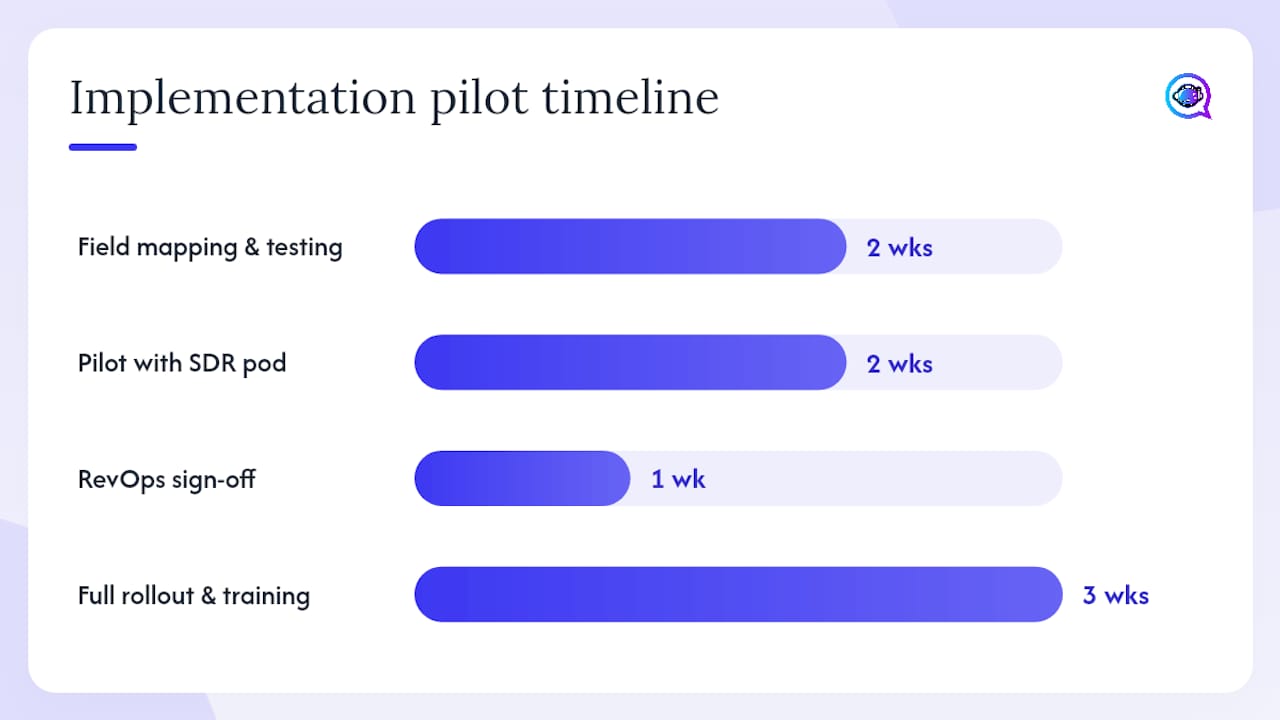
Implementation timeline (typical pilot):
Weeks 1–2: Field mapping, SLA definition, routing rule configuration, CRM sandbox testing
Weeks 3–4: Pilot with one SDR pod and one lead source; measure response time and MQL-to-SQL rate
Week 5: RevOps sign-off review; fix routing gaps and field-mapping errors
Weeks 6–8: Full rollout, team training, dashboard activation
IVRistech’s phased rollout guidance recommends exactly this pilot-first approach before committing to a full integration build.
Pro Tip: When the AE receives an SQL, the CRM timeline should show every prior touchpoint. If it does not, the AE will call the prospect and ask questions the SDR already answered — a fast way to lose a warm lead’s trust.
Common mistakes teams make when they confuse lead management with CRM
Most of these mistakes are architectural, not behavioral. Fixing them requires changing the system, not just coaching the team.
The mistakes and their corrective actions:
Using CRM as a raw capture queue. Every web form dumps directly into CRM contacts, creating thousands of unqualified records. Fix: add a lead-management layer that enriches and scores before any record touches the CRM. Syngrid’s analysis describes this as the single most common cause of slow response times and bad CRM data.
No response-time SLA. Leads sit in a queue until a rep checks their email. Fix: set a written SLA (e.g., 5 minutes for inbound web leads) and configure an automated first reply that fires immediately.
Missing enrichment. Reps receive a name and email with no company, title, or intent signal. Fix: connect an enrichment tool at the capture stage so reps see context before they dial.
Routing by rep preference, not rules. Senior reps cherry-pick leads; junior reps get leftovers. Fix: configure rules-based or round-robin routing with territory and capacity logic.
No activity sync. Lead-management call logs and emails never reach the CRM. AEs re-qualify prospects from zero. Fix: configure a bi-directional sync that writes every activity to the CRM timeline at conversion.
Treating MQL and SQL as the same thing. Marketing passes every form fill to sales; sales ignores most of them. Fix: define both thresholds in writing and enforce them in the routing logic.
Red-flag metrics that signal a broken process:
CRM contact churn rate rising (contacts going stale or being deleted in bulk)
Duplicate contact records exceeding 10% of total database
Lead-to-opportunity conversion rate falling quarter over quarter
AE complaints about “cold” leads that were supposed to be qualified
How AI changes the lead-management equation
Conversational AI does not replace the lead-management layer — it accelerates it. The practical benefits are concentrated in the first few minutes after a lead arrives, which is exactly when human availability is lowest.
What AI adds to lead management:
Instant replies, 24/7. An AI agent responds to a new inquiry in seconds, confirms receipt, and asks qualifying questions before a human is available.
Automated appointment booking. Qualified leads can self-schedule a call or demo without rep involvement, reducing the scheduling back-and-forth that kills momentum.
Faster qualification. Conversational AI collects BANT signals through natural dialogue and populates lead-management fields automatically.
Higher conversion rates. Responding within minutes versus hours produces materially better contact and qualification rates, as industry research confirms.
Integration checklist for adding an AI agent to your lead-management stack:
Define data permissions: which fields the AI can read and write
Configure conversation handoff: when and how the AI escalates to a human rep
Build a QA loop: review AI conversation transcripts weekly for accuracy and tone
Sync AI-collected data to your lead-management system and CRM in real time
Test opt-in and consent flows before going live
Compliance note: Automated SMS and voice outreach in the U.S. must follow FCC guidance on robocalls and texts, including TCPA opt-in requirements. Build consent collection into your capture forms and AI conversation flows before you launch any automated outreach campaign. Penalties for non-compliance are significant.
Sales engagement platforms that integrate with AI agents create a full execution stack: AI handles the first response and qualification, sales engagement handles the multi-touch sequence, and CRM holds the record of everything that happened.
You can explore how AI sales automation fits into this stack and how AI appointment setting reduces the gap between inquiry and booked meeting.
Key Takeaways
Lead management and CRM are not interchangeable: lead management owns the pre-sale speed and qualification layer, while CRM owns the pipeline record and post-sale relationship — and connecting them with a clean handoff is what turns inbound volume into closed revenue.
Point | Details |
|---|---|
Separate the systems by funnel stage | Lead management handles pre-opportunity records; CRM takes over at SQL conversion. |
Set a response-time SLA first | Define your target reply window before configuring any routing rule or automation. |
Map fields before you build | Source, lead score, qualification notes, and activity history must flow to CRM at handoff. |
Track distinct KPIs per system | Lead response time and MQL-to-SQL rate belong in lead management; win rate and CLTV belong in CRM. |
Astreaux as your lead-management layer | Astreaux automates instant replies, appointment booking, and CRM sync so qualified leads reach your pipeline faster. |
What actually works when you roll this out
The teams that get the most from separating lead management and CRM are the ones that start with a single, painful constraint and fix it first. Usually that constraint is response time. A real estate agent missing inquiries overnight, a contractor whose web leads go cold by morning, a mortgage broker whose competitors call back in two minutes — these are not CRM problems. They are lead-management problems, and adding more CRM fields does not solve them.
The practical recommendation: start your pilot with one lead source and one team. Measure response time before and after you add a lead-management layer with automated routing. If that metric improves, the rest of the architecture follows naturally. RevOps should own the pilot design and the sign-off criteria, because they are the ones who will govern the handoff definition long after the initial rollout.
The mistake most teams make is trying to configure everything at once — scoring models, enrichment vendors, routing rules, CRM field mapping, and AI agents — in a single sprint. That approach produces a system nobody trusts and everyone works around. A phased rollout, as IVRistech’s implementation guidance describes, consistently outperforms the big-bang approach.
Astreaux closes the gap between inquiry and booked appointment
Most lead-management problems are not strategy problems. They are speed problems. A prospect fills out a form at 9 PM, and by the time a rep calls back the next morning, that prospect has already booked with someone else. Astreaux is built specifically for that gap.

Astreaux’s conversational AI replies to new leads in seconds, asks qualifying questions in your business’s own voice, and books appointments directly into your calendar — without a rep lifting a finger. For real estate agents, contractors, therapists, and mortgage brokers, that means qualified appointments booked automatically while you are focused on the clients already in front of you.
What Astreaux brings to your lead-management stack:
Instant, personalized replies to new inquiries around the clock
Automated appointment booking with no-show reduction built in
Bulk SMS campaigns for nurturing leads that are not yet ready to book
Native integrations with over 7,000 apps, including your existing CRM
Analytics that show which sources produce the leads that actually convert
Start with a demo at Astreaux.ai and see how fast your response time can drop.
Useful sources and further reading
External authorities cited in this article:
Lead Management vs CRM: Understanding the Critical Differences - 2026 Guide
CRM vs Lead Management: Which One is Right for Your Business? - Runo.ai
Lead Management vs. CRM: Which One Does Your Business Actually Need? - Syngrid
CRM vs Marketing Automation: Do You Need Both? (2026) - IVRistech
Astreaux resources for next steps:
Best lead routing software — routing patterns and tool comparisons for teams building a lead-management layer
AI sales automation — how conversational AI fits into a modern sales stack
AI appointment setting — automated booking workflows and no-show reduction
How-to guides — practical implementation checklists for lead workflows and CRM integrations
FAQ
Is lead management part of CRM?
Lead management is a distinct discipline that feeds into CRM, not a feature inside it. CRM platforms often include a basic lead queue, but a dedicated lead-management layer handles capture, enrichment, scoring, and routing at a depth that most CRMs do not match natively.
What are the four types of CRM?
The four commonly recognized CRM types are operational (automating sales, marketing, and service workflows), analytical (reporting and forecasting on customer data), collaborative (sharing customer information across departments), and strategic (long-term relationship and retention focus). Most commercial CRM platforms combine operational and analytical features.
Which CRM is best for lead generation?
No single CRM is best for lead generation on its own, because lead generation is a lead-management function, not a CRM function. The most effective setup pairs a dedicated lead-management or conversational AI layer, like Astreaux, with a CRM for pipeline tracking — so leads are qualified before they ever enter the CRM.
Is Monday.com a CRM or a CMS?
Monday.com is a work management platform that offers CRM-style features as a configurable template. It is not a purpose-built CRM or a content management system (CMS), though teams use it for lightweight pipeline tracking when a full CRM is more than they need.
When should you use both lead management and CRM together?
Run both when you have meaningful inbound volume, multiple lead sources, or a sales team that should only receive qualified leads. A lead-management layer handles speed and qualification; the CRM handles pipeline and post-sale history. Connecting them with a clean handoff, as described in this article, is what makes the combination work.


