


Speed to Lead: 10 Tactics That Win Faster for Sales Teams
Speed to lead is the elapsed time between a prospect’s qualifying inbound action and your first meaningful sales contact. Treat it as an automation problem before a people problem, and you can get below the five-minute window that research consistently ties to higher contact and qualification rates.
Three things you can do in the next 24 hours:
Enable real-time routing so leads are assigned the moment they hit your CRM, not when a manager checks the queue.
Set a written SLA for demo requests (target: under five minutes during business hours) and make it visible to every SDR on your team.
Push mobile or Slack notifications to reps so they receive a lead alert on their phone, not just an email they’ll open an hour later.
The evidence for urgency is hard to ignore. An HBR audit of 2,241 U.S. companies found an average response time near 42 hours, with roughly 23% of companies never responding to test leads at all. A 2026 operational audit of 114 B2B organizations found that more than 99% failed to respond within five minutes. The gap between best practice and actual execution is enormous, and that gap is your competitive opportunity.
Key Takeaways
Treating speed to lead as an automation and routing problem, not just a rep behavior problem, is the single highest-leverage shift a revenue team can make.
Point | Details |
|---|---|
Define the right clocks | Measure processing time and rep response time separately; SLAs belong on clocks 2 and 3, not successful contact. |
Use intent-based SLAs | Demo requests target under 5 minutes; pricing inquiries under 15 minutes; content downloads under 4 hours. |
Automate processing first | Webhook ingestion, lead-to-account matching, and priority routing cut processing time from minutes to seconds. |
Measure all leads, not just contacted ones | Including no-contact leads in your denominator reveals routing failures that averages hide. |
Astreaux AI | Automates instant first response, qualification, and booking so reps engage prospects at peak intent. |
What speed to lead actually measures
Speed to lead sounds simple until you try to instrument it. The definition that matters operationally: the elapsed time from a qualifying inbound event (a demo request, a pricing form submission, a live chat initiation) to the first logged, meaningful outreach by a human rep or an AI-driven response system.
Two details trip up most teams. First, “first contact” is not the same as “first attempt.” A voicemail left at 9 PM is an attempt; a two-way conversation is contact. Second, the start event varies by channel, and your measurement should reflect that.
IVRistech frames this as four separate clocks, and the model is worth adopting:
Clock | What it measures | SLA appropriate? |
|---|---|---|
Received | Lead created in CRM | No (system event) |
Assigned | Lead routed to a rep | Yes |
First attempt | Rep’s first outreach action | Yes |
Successful contact | Two-way conversation confirmed | No (rep can’t control prospect availability) |
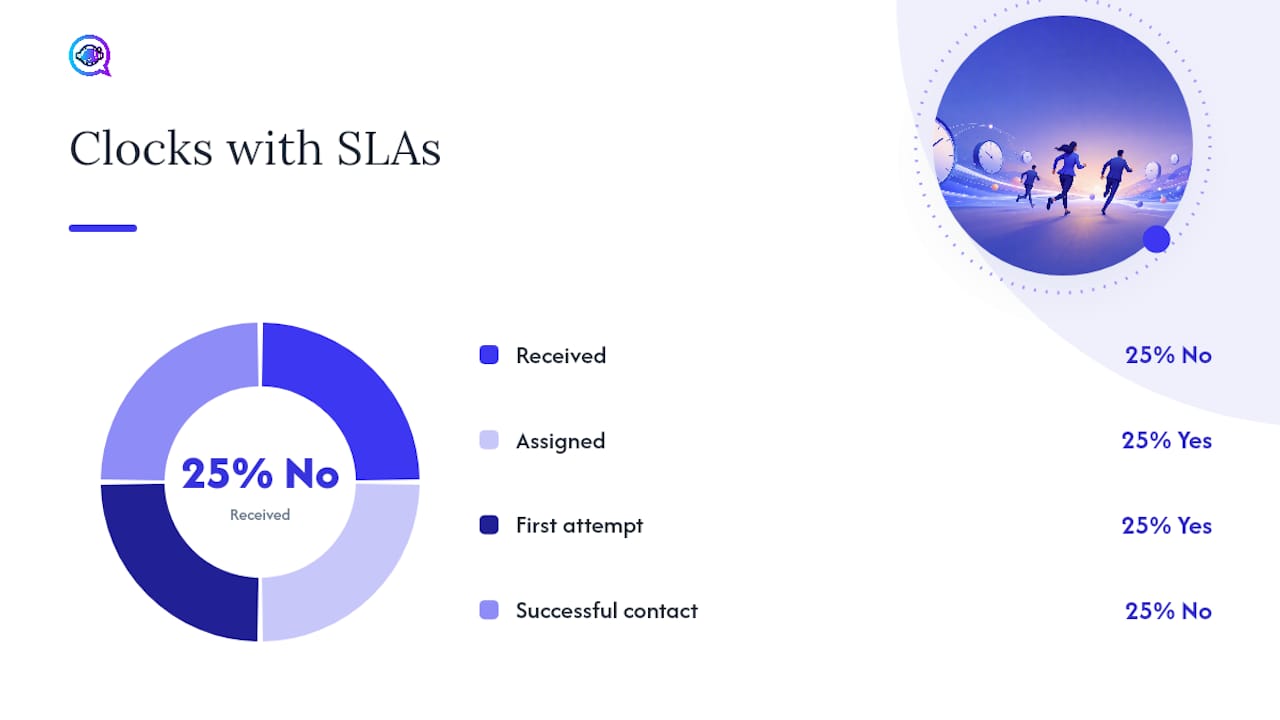
Clocks 2 and 3 are where your SLAs belong. Holding a rep accountable for successful contact is unfair and produces gamed metrics. Hold the system accountable for assignment speed and the rep accountable for attempt speed.
Channel expectations also differ. A live chat visitor expects a reply in under 30 seconds. A contact-form submission can reasonably wait 15–30 minutes before the prospect notices the delay. Mixing these into a single average obscures where you’re actually losing leads.
Channel | What “first contact” means | Realistic target window |
|---|---|---|
Live chat | First agent/bot message | Under 30 seconds |
Phone (inbound) | Call answered or callback initiated | Under 2 minutes |
SMS | First outbound text | Under 5 minutes |
Demo request form | First call or personalized email | Under 5 minutes |
Pricing inquiry | First call or email | Under 15 minutes |
Content download | First nurture email or call | Under 4 hours |
Why your lead response time is costing you revenue
The five-minute benchmark has a specific origin. A 2007 Lead Response Management study measuring more than 15,000 leads and 100,000 call attempts across six companies found dramatically higher odds of contact and qualification when teams responded within five minutes versus 30 minutes. LeanData summarizes the study’s findings, noting the large odds ratios for near-instant outreach. The exact figures (often cited as “100x contact odds” and “21x qualify odds”) come from that specific sample, so treat them as directional evidence rather than universal law.
What’s harder to dispute is the HBR audit: 42-hour average response times and nearly one in four companies never responding at all. If your team responds in under an hour, you’re already ahead of most of the market.
A before/after example: A mid-market SaaS team running manual lead assignment averaged 4.5 hours from form submission to first call. After switching to automated routing with mobile push alerts, their average dropped to 11 minutes. Pipeline created from inbound leads increased materially in the following quarter, not because they hired more reps, but because the same reps reached prospects while intent was still high.
The revenue logic is straightforward:
Higher contact rates mean more conversations from the same lead volume.
More conversations at peak intent mean higher qualification rates.
Better qualification means less wasted rep time on cold follow-up.
Faster response improves marketing ROI because the leads you paid to generate actually get worked.
One caution worth noting: LeadSource reviewed several widely-shared conversion statistics and found that some popular figures (like “78% of customers buy from the first company to respond”) lack transparent primary sources. Stick to the verified studies when making the case internally.
Benchmarks and SLA targets by lead type
Not every lead deserves a five-minute response, and pretending otherwise burns out your team. The right benchmark is intent-based. MetricGen’s benchmark guidance recommends tiering SLAs by lead type, which maps well to how most revenue teams already segment their funnel.
Priority matrix:
Demo requests: Under 5 minutes during business hours. These are your highest-intent signals. A prospect who just asked to see your product is actively evaluating.
Pricing inquiries: Under 15 minutes. Strong intent, but slightly less time-sensitive than a demo request.
Contact form (general): Under 30 minutes. Varies by context; treat as high-intent if the form includes budget or timeline fields.
Content downloads (gated): Under 4 hours. Lower intent; a nurture sequence is often more appropriate than an immediate call.
Live chat: Under 30 seconds. Anything longer and the visitor navigates away.
When a longer SLA is defensible: enterprise accounts with complex routing, after-hours coverage gaps, and high-touch qualification flows can justify longer windows, provided you have an automated acknowledgment holding the prospect’s attention in the interim. That acknowledgment is not a substitute for human contact; it’s a bridge.
Sample SLA language for ops docs:
“All demo request leads submitted during business hours (Monday–Friday, 8 AM–6 PM local time) must receive a first outreach attempt within five minutes of CRM assignment. Leads submitted outside business hours must receive a first attempt within 15 minutes of the next business day’s open. Unworked leads trigger an automatic escalation notification to the SDR manager at the 10-minute mark.”
How to measure speed to lead correctly
The core formula is simple: Lead Response Time = Processing Time + Rep Response Time.
LeadAngel documents this split clearly, showing that processing time (enrichment, matching, routing) is often the larger contributor to total latency, and the one most amenable to automation.
Dashboard fields your CRM should capture:
lead_sourceandlead_type(for segmenting averages by intent tier)created_at(when the lead record was created)assigned_at(when the lead was routed to a rep)first_attempt_at(first logged outreach action)first_contact_at(first confirmed two-way interaction)sla_status(met / breached / pending)owner(for rep-level scorecarding)
Key metrics to track:
Processing time:
assigned_atminuscreated_atRep response time:
first_attempt_atminusassigned_atTotal lead response time:
first_attempt_atminuscreated_atSLA breach rate: percentage of leads where
first_attempt_atexceeds the SLA thresholdContact rate: percentage of leads reaching
first_contact_at
Working-time vs. wall-clock: Wall-clock time counts every minute, including nights and weekends. Working-time counts only business hours. Both matter, but for different reasons. Wall-clock time reflects the prospect’s experience; working-time reflects rep performance. Report both and label them clearly. Mixing them without labeling produces averages that look better than reality.
Proven strategies to shorten your lead response time
The LeadAngel framework identifies automating pre-rep steps as the single highest-leverage change most teams can make. Here’s the full tactical sequence:
System-side (processing time):
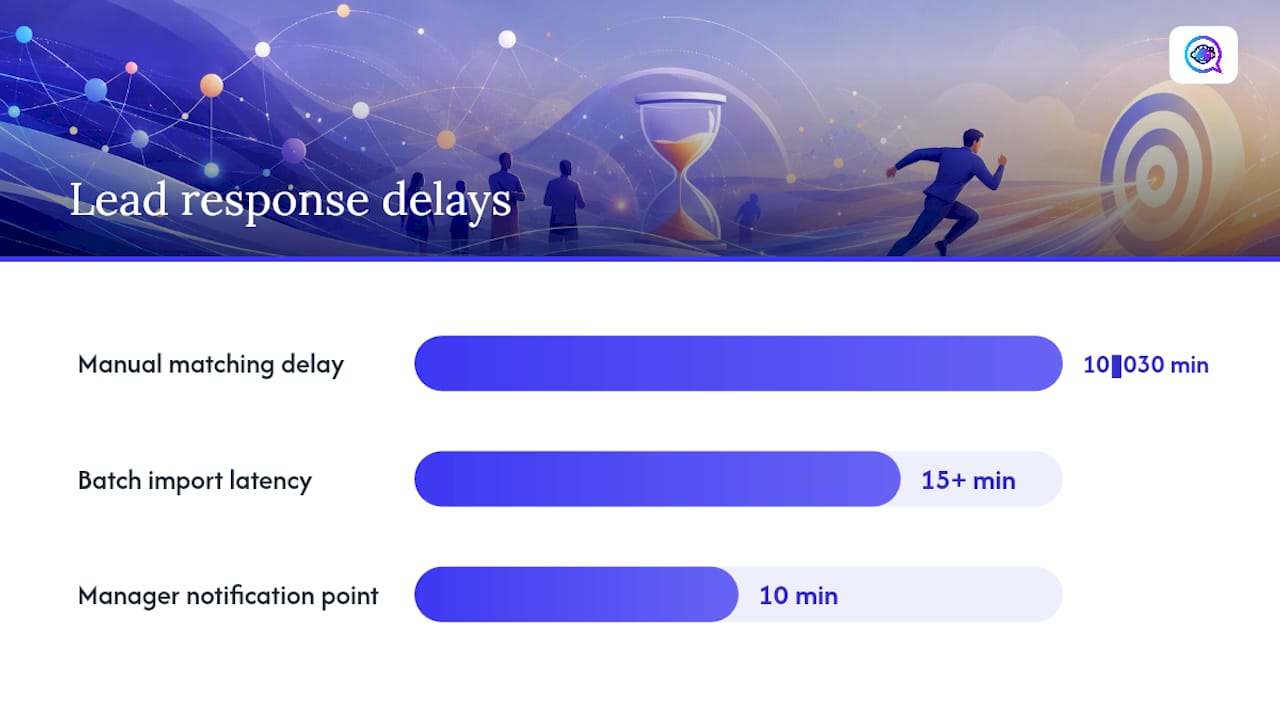
Real-time webhook ingestion: Push leads from your ad platforms, website forms, and chat tools into your CRM the moment they’re submitted. Batch imports that run every 30 minutes add 15+ minutes of invisible latency before a rep ever sees the lead.
Instant lead-to-account matching: Match new leads to existing accounts automatically so reps know immediately whether this is a new prospect or an expansion opportunity. Manual matching is a common source of 10–30 minute delays.
Priority-based routing: Route by intent tier first, then by geography, time zone, product line, or rep capacity. A demo request from a target account should never sit in a general queue.
SLA escalation rules: Configure automatic reassignment when a lead sits unworked past the SLA threshold. Set a manager notification at the 10-minute mark and an auto-reassign at 15 minutes.
Mobile and Slack push notifications: Email notifications are too slow. Push alerts to a rep’s phone or Slack channel cut the time between assignment and first attempt significantly.
Rep-side (response time):
Dedicated triage SDR: During peak hours, assign one SDR whose only job is working inbound leads. This role eliminates the context-switching that slows response when reps are mid-call or in a meeting.
Pre-built response templates: Give reps a library of personalized opening messages for each lead type. A rep who can send “Hi {{firstName}}, saw you requested a demo of [Product] — are you free for 15 minutes today?” in 20 seconds will always outperform one writing from scratch.
Context packing: Attach enriched data (company size, industry, recent ad click, page visited) to the lead record before it reaches the rep. A rep who can act in under 60 seconds needs to see intent signals at a glance, not dig through five tabs.
Response scorecarding: Track rep-level response time weekly and share it in team meetings. Visibility alone tends to move averages.
What to look for in your lead response tech stack
Your tech stack needs to handle two distinct jobs: shrinking processing time (system work) and shrinking rep response time (notification and workflow work). Most CRMs handle the data model but need additional tooling for real-time routing and multi-channel outreach.
Feature checklist for evaluation:
Real-time webhook ingestion from ad platforms and forms
Lead-to-account matching with configurable rules
Multi-channel outbound capability (SMS, email, phone, chat)
SLA tracking with breach alerts and escalation triggers
Time-based rerouting (auto-reassign after X minutes)
Audit logs for compliance and coaching
Native CRM integration (not just middleware glue)
Integration tiers to consider: Native CRM integrations run faster and break less often than middleware-dependent setups. If your routing tool connects to Salesforce or HubSpot natively, processing time drops to seconds. If it relies on a Zapier chain, you’re adding latency and a failure point.
AI-driven platforms take this further by handling the initial outreach itself. Rather than waiting for a rep to send the first message, an AI system can respond to a new lead in under a minute, qualify intent through a conversational exchange, and book a meeting directly on the rep’s calendar. Astreaux AI does exactly this: it learns your business’s voice, sends personalized first responses the moment a lead comes in, and integrates with over 7,000 apps to fit into your existing stack. For real estate agents and contractors, where a lead’s intent window can close in minutes, that kind of instant engagement is the difference between a booked appointment and a missed call.
Pro Tip: In a pilot, test the system-side clocks first (processing time and assignment speed) before optimizing rep behavior. If your processing time is 20 minutes, coaching reps to respond faster won’t move your total lead response time meaningfully. Fix the pipe before you pressure the people.
Your 30/60/90 day implementation plan
30-day quick wins
Audit your current
created_attofirst_attempt_atgap across the last 90 days of inbound leads.Enable real-time webhook ingestion from your top two lead sources.
Configure mobile and Slack push notifications for all inbound leads.
Write and publish SLA targets for demo requests and pricing inquiries.
Build a five-template library of opening messages for your top lead types.
60-day process improvements
Implement priority-based routing rules segmented by intent tier.
Add SLA breach alerts and automatic escalation to the SDR manager.
Build a live dashboard tracking processing time, rep response time, and SLA breach rate by lead source.
Run the first rep-level response time scorecard review.
Add lead-to-account matching to eliminate manual triage.
90-day scale steps
Deploy AI triage for after-hours and overflow inbound volume.
Extend routing logic to cover time-zone-based fallbacks and cross-channel orchestration.
Review SLA targets against actual conversion data and adjust thresholds by lead type.
Establish a monthly ops review cadence to catch routing drift and new source gaps.
Measurement gates to graduate from pilot to full launch: Processing time under two minutes for 90% of leads; SLA breach rate under 10% for demo requests; rep response time under five minutes for high-intent leads during business hours.
Sample escalation flow:
T+0: Lead assigned to rep, push notification sent.
T+5 min: If no attempt logged, manager receives Slack alert.
T+10 min: Lead auto-reassigned to backup rep or triage SDR.
T+15 min: Manager receives second alert; lead flagged for daily review.
Common pitfalls that quietly kill your speed gains
Getting faster on paper while staying slow in practice is more common than most teams realize.
Pitfall 1: Treating auto-acknowledgments as contact. An automated “Thanks for reaching out!” email confirms receipt, not contact. If your CRM logs that email as first_contact_at, your metrics look better than your pipeline does. Keep auto-acknowledgments in the system but never count them as a human outreach event.
Pitfall 2: One SLA for all leads. A content download and a demo request are not the same signal. Applying a single four-hour SLA to both means you’re moving too slowly on your hottest leads and creating unnecessary urgency around low-intent ones.
Pitfall 3: Excluding no-contact leads from your averages. If you only calculate response time for leads that were actually contacted, you’re hiding your worst cases. Include all inbound leads in the denominator, even the ones that were never worked.
Pitfall 4: Routing without fallbacks. A routing rule that assigns to a rep who is on vacation, or to a territory with no coverage, creates an invisible black hole. Every routing path needs a fallback: a backup rep, a triage queue, or an AI-driven first response.
Red flags to watch in your ops dashboard:
High percentage of leads with no
assigned_attimestamp (routing failure)SLA breaches clustered by a single lead source (ingestion or routing rule problem)
Repeated reassignments on the same lead (ownership conflict or coverage gap)
Large gap between
assigned_atandfirst_attempt_atduring business hours (rep behavior or notification failure)
Quick remediation: surface no-contact leads in a daily Slack digest to the SDR manager. Most routing failures become visible within 24 hours when someone is looking at the right report.
What actually moves the needle, in practice
The most common failure mode I see isn’t a technology gap. It’s a measurement gap. Teams invest in routing tools and AI platforms, then continue measuring response time only for leads that were successfully contacted. That selection bias makes the numbers look fine while the real problem, the leads that fall through entirely, stays invisible.
The fix that works fastest is almost always the same: instrument all four clocks, expose the data to the people who own the process, and set a weekly review. Within two to three weeks, the worst failure modes surface on their own. Routing gaps, coverage holes, and rep notification failures all show up in the data before they show up in lost pipeline.
System fixes consistently outperform headcount additions as a first move. Adding a rep to a broken routing process just means one more person receiving leads too late. Fix the pipe first. The teams that see the sharpest improvements in contact rates and pipeline creation are the ones that treat processing time as a system engineering problem, not a motivation problem.
Astreaux AI shortens your lead response time from day one
Responding to every inbound lead in under a minute, around the clock, without adding headcount is the core problem Astreaux AI solves. The platform sends personalized first responses the moment a lead comes in, qualifies intent through a conversational AI exchange, and books meetings directly on your rep’s calendar, so your team’s first human touchpoint is a scheduled conversation, not a cold call into a prospect who has already moved on.

For service professionals where speed is the margin, real estate agents fielding listing inquiries, contractors receiving estimate requests, and insurance agents handling quote forms, Astreaux’s instant engagement capability means no lead sits unanswered while a rep finishes another call. The platform integrates with over 7,000 apps, fits into your existing CRM and ad stack, and learns your business’s voice so responses feel personal, not templated.
See how Astreaux AI works and book a demo to see the response-time impact for your specific lead volume and team size.
Sources
The claims in this article draw on a small set of verified studies. When you use these internally, cite the primary source and note the sample context.
Speed to Lead Explained: Definition and 4 Ways to Improve It
Lead Response Time: Why It Matters & How to Improve It in 2026
Lead Response Time: Benchmarks, Impact on Conversion & How to Improve | MetricGen
A note on the five-minute claim: The benchmark is real and directionally sound, but the specific odds ratios (100x contact, 21x qualify) come from a 2007 study of six companies. Apply them as motivation, not as a universal guarantee. Your own data, once instrumented, will give you a more reliable conversion curve for your market and lead type.
FAQ
What does speed to lead mean?
Speed to lead is the elapsed time between a prospect’s qualifying inbound action (a form submission, demo request, or chat initiation) and your team’s first meaningful outreach attempt. Shorter response times consistently correlate with higher contact and qualification rates.
How important is speed to lead for conversion?
Very. An HBR audit of 2,241 U.S. companies found an average response time near 42 hours, and a 2026 audit of 114 B2B organizations found more than 99% failed to respond within five minutes. Responding faster than your competitors is one of the most direct ways to improve contact rates from the same lead volume.
What is the ideal response time for a demo request?
Under five minutes during business hours. MetricGen’s benchmark guidance recommends this threshold for high-intent leads like demo requests, with pricing inquiries targeted at under 15 minutes and content downloads under four hours.
Can automation actually replace a human first response?
For the initial outreach, yes. AI-driven platforms like Astreaux AI can send a personalized first message, qualify intent conversationally, and book a meeting in under a minute, so the rep’s first touchpoint is a scheduled call rather than a cold attempt hours later.
What is the biggest measurement mistake teams make?
Excluding no-contact leads from their response-time averages. When you calculate average response time only for leads that were actually worked, you hide your worst cases and make your process look healthier than it is. Always include all inbound leads in the denominator.


