

Cut No Shows Up to 50%: Scheduling That Qualifies Leads for Agents
The winning approach to real estate appointment scheduling combines three moves: self-service booking links, an intake step that qualifies leads before they hit your calendar, and automated confirmations that stick. Harvard Business Review research on online sales leads found response speed drives conversion, and platforms with AI-driven auto-reply now respond to real estate inquiries within minutes. That combination, not a fancier calendar app, is what actually fills your showing schedule.
TL;DR:
Responding to inquiries within minutes significantly increases the chance of booking and reduces the likelihood of no-shows.
Essential features include calendar synchronization, buffer times, intake fields, automated reminders, and team routing controls for efficient scheduling.
Setting up self-service booking involves creating event types, syncing calendars, publishing links, and testing reminder cadence within a few hours.
Intake questions should be limited to four key fields such as purchase timeline, budget, financing status, and preferred contact method to qualify leads effectively.
Implementing an AI-driven workflow, with instant replies and automated follow-up messaging, can be operational within a week for most agents and teams.
Astreauxcalendly.comRespond Faster, Book More AppointmentsAstreaux helps real estate agents engage new inquiries instantly, qualify prospects, and streamline scheduling through conversational AI.Book a call
What Real Estate Appointment Scheduling Actually Needs to Do
Good scheduling isn’t just about putting times on a calendar. It has to do three jobs at once, whether you’re booking a showing, a listing appointment, or fielding open-house follow-ups.
Book fast. A buyer who requests a showing at 9 p.m. wants a confirmed time before they lose interest, not a callback the next morning.
Qualify before confirming. Not every click deserves 45 minutes of your Saturday. Financing status and timeline separate serious buyers from window shoppers.
Secure attendance. A booked appointment that no one shows up for is worse than no appointment. It burns a slot a real buyer could have used.
The lead-response research matters here: prospects contacted within minutes convert far better than those who wait hours, according to HBR’s analysis of online sales leads. For agents, that translates into fewer wasted drives, more qualified showings, and clients who feel like they’re dealing with a real estate scheduler, not a phone tag partner.
What Features Should You Actually Require?
Not every scheduling tool needs every bell and whistle, but a few features are non-negotiable if you’re serious about running a tight showing calendar. Here’s the checklist to bring into any vendor conversation or setup session:
Calendar sync across every device you use. Your booking system needs a live view of your Google or Outlook calendar, so double-bookings never happen.
Buffer times between appointments. A 30-minute buffer between showings across town prevents the awkward “running 15 minutes late” text. Standard scheduling platforms treat this as a baseline feature, not an upgrade, per industry product pages like Schedly’s real estate scheduling overview.
Intake fields at booking. Budget, timeline, and financing status collected before confirmation, not after.
Automated reminders by SMS and email. Confirmations sent instantly, reminders sent close to the appointment.
Team routing and availability controls. If you manage a small team, leads should route to whoever’s actually free, not sit in one inbox.
Brokerage teams need routing and shared visibility into who’s booked where, especially during open-house season when three agents might be covering the same neighborhood.
Pro Tip: Test your buffer times against your actual drive routes, not a flat 15-minute default. A cross-town showing in heavy traffic needs more cushion than a same-block listing.
How to Set Up Self-Service Booking This Week
You don’t need a quarter-long rollout to fix this. Here is a setup you can finish in a few sittings.
Create event types and intake fields. Set up separate booking types for showings, buyer consultations, and listing appointments. Ask for name, phone, budget range, timeline to buy, and financing status on every intake form.
Sync your calendar and set travel buffers. Connect your primary calendar, block commute buffers between showings, and mark out personal blackout windows so nothing double-books.
Publish booking links everywhere buyers already are. Add the link to listing pages, your email signature, and social bios. A plugin like the Koalendar booking widget makes embedding a booking page on a WordPress listing site simple, even for agents without a developer on call.
Configure your reminder cadence and test it end to end. Set confirmation on booking, a reminder 24 hours out, and a final nudge two hours before.
Before you call it done, run two tests: book a showing as if you were a buyer to see what the confirmation email actually says, and send yourself a test reminder to check the timing feels right, not annoying.
What Should Your Intake Form Actually Ask?
The fields you collect before a showing decide whether that appointment is worth your drive time. Keep the list short. Buyers abandon long forms, but four fields tell you almost everything:
Timeline to purchase (this month, this quarter, just looking)
Budget range
Financing status (pre-approved, still shopping lenders, cash buyer)
Preferred contact method (text, call, email)
A booking-confirmation script can be as simple as: “You’re confirmed for {{time}} at {{address}}. Reply here anytime with questions.” An SMS reminder script works just as well short: “Hi {{firstName}}, quick reminder about your showing at {{time}} today. Reply CONFIRM or call/text if you need to reschedule.”
Triage from there: pre-approved buyers with a tight timeline go to the top of your calendar. Someone still shopping lenders with no set timeline might get a virtual tour link before you commit a Saturday afternoon to them.
How Do You Stop No-Shows Before They Happen?
No-shows aren’t random. They’re a symptom of weak confirmation habits, and they’re fixable with the right cadence.
Send a reminder 24 hours out and another 2 hours before. SMS reminders in particular can cut no-shows by 20% to 50% for service businesses, a meaningful swing when your calendar is already tight.
Add a one-click reschedule link to every reminder. A buyer who can’t make it will reschedule instead of ghosting if it takes ten seconds.
Build a reconfirm step into gated or occupied properties. If a showing needs a lockbox code or seller notice, include those logistics directly in the confirmation message so nobody arrives to a locked door.
Set open-house policies in the confirmation itself. Parking instructions, entry point, and sign-in expectations belong in the reminder text, not a separate email nobody reads.
The math works in your favor here: even a modest drop in no-shows recovers hours you’d otherwise spend driving to an empty appointment.
How Does an AI-Driven Booking Workflow Actually Run?
Here’s what a conversational AI setup looks like end to end, using a pattern typical for AI-driven real estate lead engagement platforms. A lead fills out a form on a listing page or messages through a social ad. The AI replies immediately, often within 1 to 5 minutes, asks the intake questions, and books directly into your synced calendar if the buyer qualifies. Confirmation and reminder texts go out automatically, and the lead’s details land in your CRM without you touching a keyboard.
Instant reply engages the lead before they call the next agent on their list.
Intake questions run inside the same conversation, no separate form to abandon.
Calendar, CRM, and SMS integrations connect through a platform supporting over 7,000 apps, so most existing tech stacks plug in without custom development.
SMS reminders fire on the cadence you set, reducing the no-show rate discussed above.
Most agents can have this live within a week if intake fields and calendar sync are already sorted. Facet Cloud’s feature overview is a useful reference if you’re weighing team permissions and calendar access controls alongside your scheduling setup.
Pro Tip: Start the AI workflow on your highest-volume lead source first, whether that’s Zillow inquiries or Facebook ads, so you see the time-savings fastest.
What Metrics Actually Prove This Is Working?
Track five numbers, not fifteen. Lead response time, show-rate (percentage of booked appointments that happen), no-show rate, appointments booked per lead, and conversion to close. Everything else is noise.
Pricing for scheduling tools generally scales with seats, SMS volume, and integration depth. A solo agent on a basic plan pays less than a ten-agent team sending thousands of text reminders monthly, and adding CRM or ad-platform integrations typically bumps the tier up.
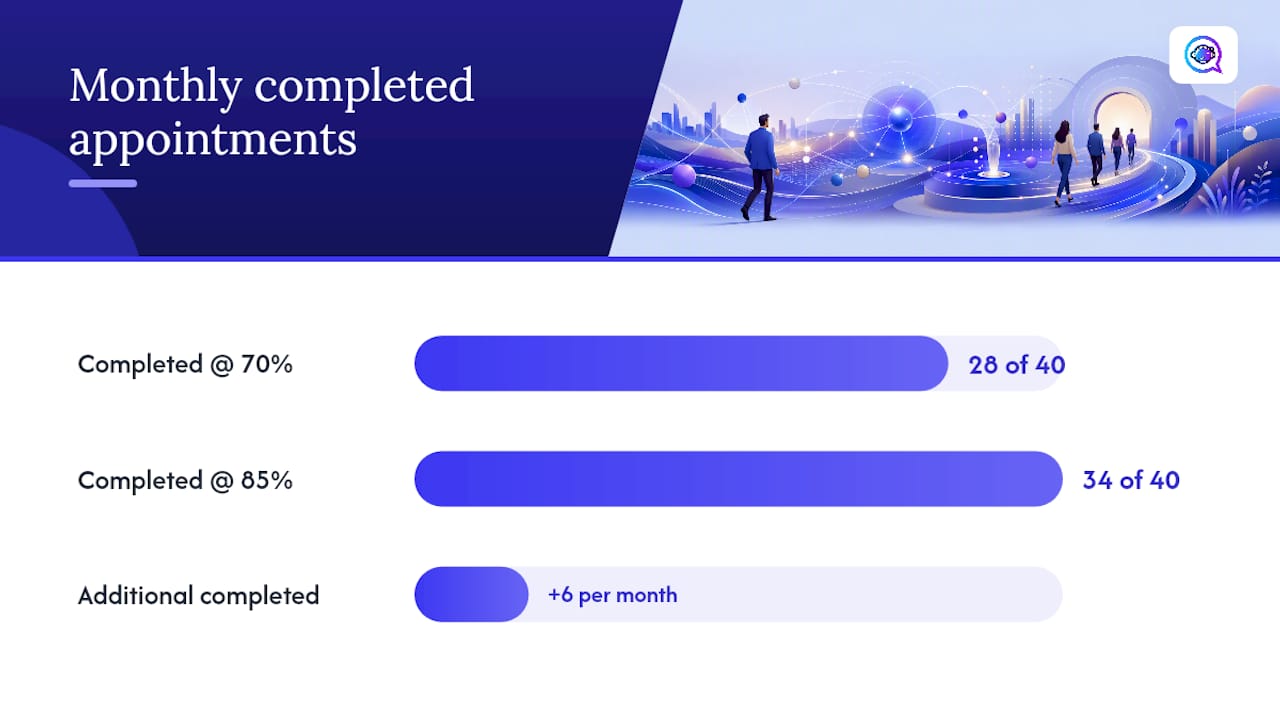
A quick ROI example: if automated qualification and reminders lift your show-rate from 70% to 85% on 40 monthly showings, that’s roughly 6 more completed appointments a month.
At even a modest closing rate, a few extra completed showings a month can mean one additional closed deal a quarter, which on a typical transaction dwarfs the cost of the software.
What I Learned Testing One Small Scheduling Change
Adding a single intake question, financing status, changed which showings I prioritized more than any calendar tool did. Pairing it with a same-day SMS reminder cadence cut the number of confirmed-but-empty showings noticeably within a month. If you try one thing, run a 30-day test: add that one intake field and one extra reminder text, then compare your show-rate before and after.
— Jamaal
How Astreaux Puts This Workflow Into Practice
Astreaux is the alternative to juggling five disconnected tools for showings, follow-ups, and reminders.

Solo agents get the most value from the instant-reply and reminder combination alone, since it recovers hours otherwise spent on manual follow-up. Brokerage teams add the most value from routing and the platform’s integrations with over 7,000 apps, which means your existing calendar, CRM, and ad platforms likely connect without custom setup. If you’re managing outreach on the go, the mobile-first workflow keeps replies moving even between showings.
Real estate teams looking to reduce admin and book more showings can start with the real estate agent page to see the workflow in action, and a trial or demo is the fastest way to see how it fits your current lead volume.
Sources
FAQ
What is the 3-3-3 rule in real estate?
It’s not a scheduling rule, but agents often reference it when discussing buyer readiness during intake.
How long should realtors schedule showings for?
Most agents block 20 to 30 minutes per showing, with additional buffer time built in for travel between properties. Larger homes or serious buyers exploring multiple rooms may warrant 45 minutes.
How do I politely schedule an appointment with a client?
Offer two or three specific time windows rather than asking “when works for you,” and confirm in writing immediately after they choose. A booking link that shows real-time availability removes the back-and-forth entirely.
How much would a real estate agent make on a $300,000 house?
Commission structures vary, but a common range is 5% to 6% of the sale price split between listing and buyer agents, meaning an individual agent’s share on a $300,000 sale often falls between $4,500 and $9,000 before brokerage splits.