
Start With 3 Merge Field Real Estate Text Scripts for U.S. Agents
Start with three scripts: an instant new-lead auto-reply, a showing confirmation, and a three-message follow-up sequence. Copy those first, personalize the placeholders, and send. Every template below is organized by use case so you can grab what fits your current situation, but before you send anything, confirm the lead consented to texts and that your message includes a clear opt-out.
TL;DR:
Automated first responses reach new leads within five minutes, significantly reducing drop-off and increasing response chances with personalized, concise messages.
Follow-up cadences spaced over weeks keep prospects engaged, with specific timing and messaging tailored for active, portal, or dormant leads.
Open house texts should clearly invite, confirm, and gather feedback, avoiding false scarcity claims to maintain trust.
Templates for buyers, sellers, objections, referrals, and scheduling boost efficiency and consistency, but require regular updates and testing.
Comply with legal rules by obtaining clear consent, including opt-out options, and keeping messages natural, relevant, and within recommended timing.
AstreauxRespond To Leads Without DelayAstreaux helps real estate agents automate inquiry responses, schedule appointments, and nurture qualified prospects through conversational AI.Book a call
How to Use These Real Estate Text Templates
You’ll find nine categories of real estate text templates below, covering everything from first contact to post-closing review requests. Each one is built to be copied, personalized, and sent within seconds.
Use them in this order of priority:
New lead replies for the first 5 minutes after a lead comes in
Follow-up cadences for leads who haven’t responded yet
Open house scripts for event-day invites and next-day follow-ups
Buyer templates for showings, offers, and financing check-ins
Seller templates for valuations, listing updates, and price talk
Automated and review templates for post-close nurture
Every script uses merge fields, which are placeholders you swap for real details before hitting send. The three you’ll use constantly are {{firstName}}, {{address}}, and {{time}}. A message that reads “Hi {{firstName}}, confirming your showing at {{address}} on {{time}}” becomes “Hi Maria, confirming your showing at 214 Birchwood Lane on Thursday at 4:00 PM” in about two seconds.
Before you hit send on anything, run this quick checklist:
Did this contact opt in to text messages, or are you responding to an inbound text?
Does your message include opt-out language somewhere in the conversation (even just once, near the start)?
Is the time zone correct for the recipient, not just for you?
Would this message make sense if it landed at 6:00 AM on a Saturday?
Store your approved templates inside your CRM or SMS platform rather than in a personal notes app. This keeps your language consistent across a team and makes it easy to update a script once and have everyone use the new version. Real estate email templates and text templates work best when they live in one shared library, not scattered across a dozen agents’ phones. Practical guides on copy-paste email templates apply the same logic to texting: a small set of enforced placeholders and a pre-send checklist prevents errors and keeps your brand voice consistent at scale.
Instant Reply Scripts for New Leads
The first five minutes after a lead submits a form or texts you determine whether they stay engaged or move on to the next agent in their browser tab. Short, value-first messages that ask a single question tend to get more replies than long paragraphs, especially when that question has an easy answer like BUY, SELL, or a number.
Here are ten ready-to-send options:
“Hi {{firstName}}, this is {{agentName}} with {{brokerage}}. Thanks for reaching out about {{address}}! Are you looking to buy or sell? Reply BUY or SELL.”
“Hi {{firstName}}! Got your info on {{address}}. Quick question: is this for a home you’d live in, or an investment property?”
“Thanks for your interest, {{firstName}}! I can get you a private showing this week. Does Tuesday or Wednesday work better?”
“Hi {{firstName}}, I saw you’re interested in {{neighborhood}}. Want me to send 3 similar listings that just hit the market?”
“Hey {{firstName}}, this is {{agentName}}. What’s your timeline for making a move? Reply 1 for ASAP, 2 for 3 to 6 months, 3 for just browsing.”
“Hi {{firstName}}! Before we chat, are you already working with an agent, or is this your first inquiry?”
“Thanks for reaching out, {{firstName}}. Have you been pre-approved yet, or would a lender intro help?”
“Hi {{firstName}}, quick one: what’s your ideal move-in timeline? That helps me pull the right listings for you.”
“Hey {{firstName}}, I’d love to grab 10 minutes on the phone. Here’s my calendar: {{shortLink}}. Any time work?”
“Hi {{firstName}}, thanks for your interest in {{address}}. I’ll send full details in a moment. In the meantime, what’s your budget range?”
When you shorten a calendar link for texting, use a link shortener tied to your own domain rather than a generic public one. Recipients trust a branded link more, and it’s easier to track click-through in your CRM.
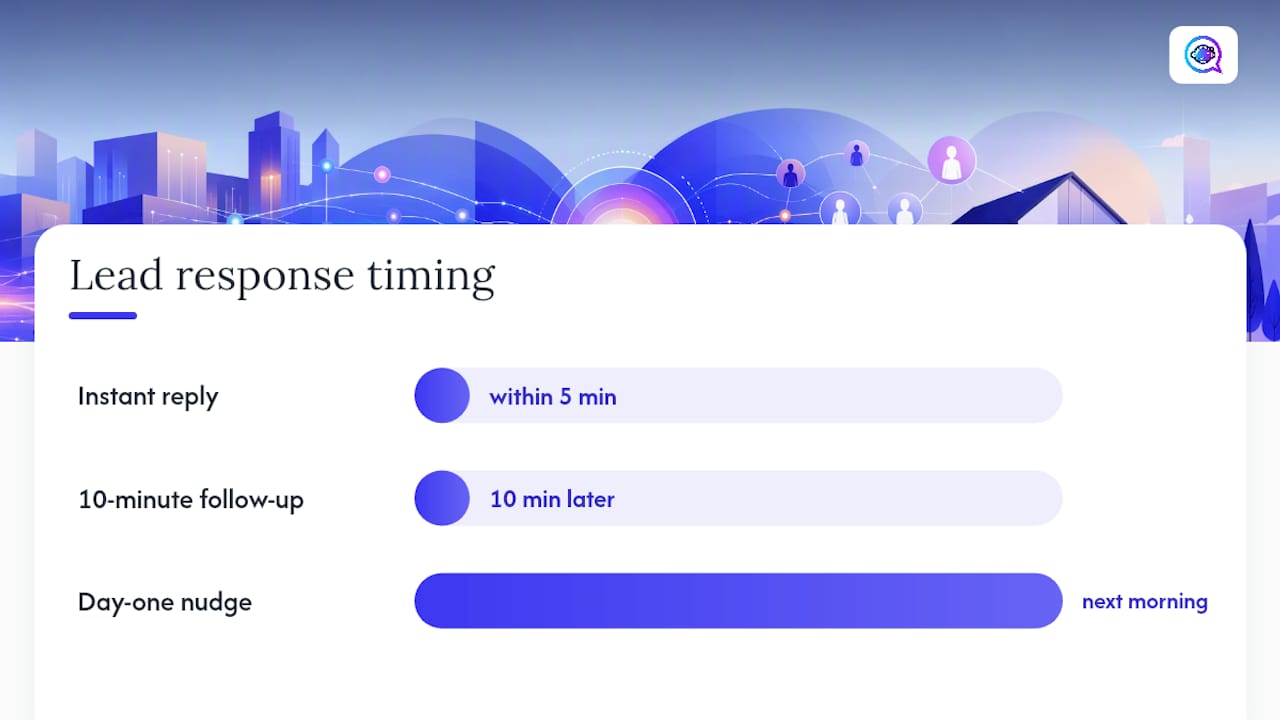
A recommended three-message micro-sequence looks like this: an instant reply within 5 minutes, a follow-up 10 minutes later if there’s no response (“Still there? Happy to answer any quick questions.”), and a day-one value nudge the next morning (“Here are 3 homes in {{neighborhood}} you might like: {{shortLink}}”).
Pro Tip: Ask one question per text. A message that asks about budget, timeline, and financing all at once usually gets ignored. A message that asks just one thing usually gets answered.
Follow-Up Cadences That Keep Leads Warm
Most leads don’t convert on the first touch. They convert on the fifth or sixth, spread out over weeks. A follow-up cadence gives you a repeatable schedule so you’re not guessing when to reach back out.
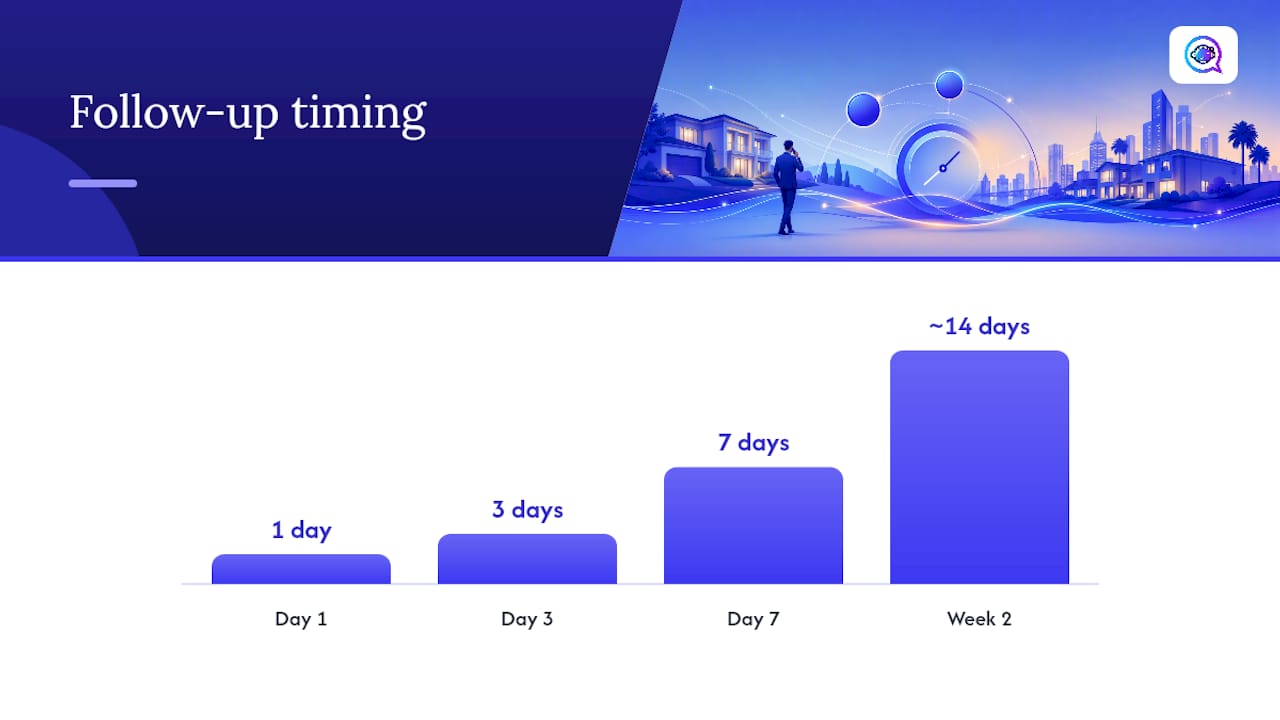
A reliable cadence looks like this:
Day 1: “Hi {{firstName}}, following up on {{address}}. Still interested? Happy to set up a showing.”
Day 3: “Hey {{firstName}}, just checking in. Any questions about {{neighborhood}} pricing or schools I can answer?”
Day 7: “Hi {{firstName}}, new listing just came up that matches what you’re looking for. Want me to send it over?”
Week 2: “Hi {{firstName}}, no pressure at all, just want to make sure you’re still in the loop. Reply STOP if you’d rather not get updates.”
For a portal lead (someone who came in through a third-party listing site rather than your own site or a referral), keep the first message even shorter and less assumptive, since they may have inquired about several properties at once: “Hi {{firstName}}, thanks for your interest in {{address}} through your recent search. Still looking, or already found something?”
A simple rule for frequency: no more than one text every 2 to 3 days for an active lead, and no more than one per week for a cold one. If a lead hasn’t responded after two attempts, switch to a phone call or email rather than sending a third text in a row.
For leads that have gone quiet for 30 to 90 days, a re-engagement script works well: “Hi {{firstName}}, it’s been a bit since we last connected about {{neighborhood}}. Market’s shifted since then, happy to send an update if you’re still curious.”
Open House Invitations and Follow-Up Texts
Open houses generate foot traffic, but the real value comes from what happens before and after the event. A short invite with a clear reason to attend outperforms a generic announcement.
Invitation: “Hi {{firstName}}, open house this Saturday 1 to 3 PM at {{address}}. Reply YES and I’ll save you a spot.”
RSVP confirmation: “You’re all set for Saturday at {{address}}! I’ll text you the morning of as a reminder.”
Same-day check-in: “Hi {{firstName}}, open house starts in an hour at {{address}}. See you soon!”
Post-event thanks: “Thanks for stopping by {{address}} today! What did you think? Happy to answer any questions.”
Feedback request: “Hi {{firstName}}, curious what stood out most about {{address}}. Was it the price, layout, or location?”
If you’re using scarcity or VIP language (“early access before it hits the market”), only use it when it’s true. A private preview before the public open house is a legitimate reason to text; a fake deadline is not, and repeat clients notice the difference fast.
Text Templates for Buyers: Showings, Offers, and Financing
Buyers need frequent, low-friction updates. The goal with every buyer-facing text is to reduce no-shows and keep the transaction moving without overwhelming their inbox.
Showing confirmation: “Confirmed: showing at {{address}} on {{time}}. I’ll meet you out front.”
Day-of reminder: “Reminder: we’re touring {{address}} today at {{time}}. See you soon!”
Post-showing check-in: “Hi {{firstName}}, what did you think of {{address}}? On a scale of 1 to 5, how close was it to what you’re looking for?”
Offer submitted: “Just submitted your offer on {{address}}. I’ll update you the moment I hear back.”
Offer accepted: “Great news, {{firstName}}! Your offer on {{address}} was accepted. Next step is the inspection, I’ll send details shortly.”
Pre-approval nudge: “Hi {{firstName}}, before we tour more homes, let’s get you pre-approved so you can move fast on the right one. Want an intro to a lender?”
Financing check-in: “Hi {{firstName}}, how’s the pre-approval process going? Let me know if you hit any snags.”
Each of these does double duty: it informs the buyer and it gives you a reason to keep the conversation active without sounding like a sales pitch.
Text Templates for Sellers: Valuations, Updates, and Milestones
Sellers want two things from you: proof you can get them a good price, and steady reassurance that something is happening. These templates cover both.
Valuation teaser: “Hi {{firstName}}, homes in {{neighborhood}} have moved quickly lately. Want a free, no-obligation estimate of your home’s value?”
Listing appointment confirmation: “Confirmed: I’ll be at {{address}} on {{time}} to walk through the listing plan.”
Weekly seller update: “Hi {{firstName}}, quick update: {{numShowings}} showings this week and strong interest from buyers researching {{neighborhood}}.”
Open house feedback: “Hi {{firstName}}, feedback from Saturday’s open house: buyers loved the kitchen, a few mentioned the price. Want to discuss strategy?”
Price adjustment: “Hi {{firstName}}, based on recent feedback and comparable sales, I’d recommend adjusting the price. Can we talk today?”
Contract milestone: “Good news, {{firstName}}! We’re under contract on {{address}}. Inspection is scheduled for {{date}}.”
Referral ask: “So glad we got {{address}} closed, {{firstName}}! If you know anyone thinking about buying or selling, I’d love an introduction.”
Time that referral ask for right after closing or right after a big win, like an accepted offer above asking price. That’s when sellers are most likely to say yes.
Automated Templates and Review Requests
Some templates work better as automated triggers than as manual sends. A review request or an anniversary check-in doesn’t need a human deciding when to hit send. It just needs a trigger and a clean template.
Review request (7 days post-close): “Hi {{firstName}}, hope you’re settling into {{address}}! If you have 60 seconds, a quick review would mean a lot: {{reviewLink}}”
One-year anniversary: “Happy home anniversary, {{firstName}}! Hard to believe it’s been a year at {{address}}. Let me know if you ever want a market update.”
Booking reminder: “Reminder: your appointment with {{agentName}} is tomorrow at {{time}}.”
Post-close nurture (90 days): “Hi {{firstName}}, checking in now that you’ve had a few months at {{address}}. Anything you need a local recommendation for?”
Automated messages should sound almost identical to what you’d type manually. The tone gap between a human text and a triggered one is usually what makes a review request feel like spam instead of a genuine ask.
Pro Tip: Trigger review requests off a closing date in your CRM, not off a fixed calendar day. A message sent exactly 7 days after close reads as thoughtful. The same message sent at a random time reads as automated.
Best Practices and U.S. Compliance Rules for Texting
Keep every text under 160 characters when possible, and never send anything that wouldn’t sound natural if you read it out loud. Personalization matters more than length: a text with the recipient’s first name and their actual address outperforms a generic blast every time.
Texting also tends to outperform email on speed of response, though exact reply-rate figures vary widely by list and industry, so treat any specific number you see with some skepticism and test your own results.
Time-of-day guidance matters more than most agents realize:
Avoid texting before 8:00 AM or after 9:00 PM local time
Cap outbound messages at 1 to 2 per week for warm leads, fewer for cold ones
Never send a bulk blast to your entire list without segmenting by lead status first
On the compliance side, the FCC’s consumer guidance on unwanted texts and robocalls lays out the baseline rules for consent and unwanted messages that every agent texting clients should understand. In practice, that means:
Get clear consent before texting a new contact, whether through a form, a reply to your first message, or a documented verbal agreement
Include opt-out language somewhere early in the conversation, such as “Reply STOP to opt out”
Keep records of consent and opt-outs; a simple CRM tag is enough
Read Astreaux’s guide to TCPA compliance for SMS for a fuller breakdown of consent and recordkeeping rules, and its companion guide on double opt-in flows for opt-in wording examples
For deliverability, avoid ALL CAPS, excessive punctuation, and spammy phrases like “free” or “act now,” which can trigger carrier filters. Astreaux’s SMS deliverability guide covers the technical side of keeping your messages out of spam folders.
Automating Your Templates Without Losing Your Voice
Once you have a solid template library, the next problem is speed; knowing what to automate versus what to keep manual is critical, as explained in this guide on AI tools for marketers. A lead who submits a form at 9:00 PM on a Sunday doesn’t want to wait until Monday morning for a reply, and manually texting every new lead within minutes isn’t realistic for a busy agent.
A practical automated flow looks like this: a web lead comes in, an AI-driven system sends an instant reply within 1 to 5 minutes, and that reply includes a calendar link so the lead can book a showing without waiting for a callback. Automated instant replies sent within a few minutes can significantly reduce lead drop-off, especially when paired with a direct calendar CTA.
To keep automated texts sounding like you instead of a robot:
Train the system on your actual voice and past messages so its replies match your tone
Use the same merge fields (
{{firstName}},{{address}},{{time}}) across manual and automated messagesConnect your CRM, calendar, and short-link tool so the system pulls real data instead of generic placeholders
Review a sample of automated conversations weekly to catch anything that sounds off
Case studies document 1 to 5 minute auto-replies and integrations across many apps, which is the kind of connective range needed to pull real appointment data into a text automatically. Broader market analysis from Gartner’s digital markets research also points to messaging automation as one of the fastest-growing categories in lead engagement tools.
Templates for Handling Objections and Negotiation
Objection-handling texts work best when they acknowledge the concern instead of brushing past it. A defensive or overly salesy reply tends to end the conversation.
For price objections: “I hear you, {{firstName}}. The market in {{neighborhood}} has been moving fast, but I’m happy to pull comparable sales so you can see exactly how this price was set.”
For “just looking” hesitation: “No pressure at all, {{firstName}}! A lot of buyers start out just browsing. I’ll send updates only when something really matches what you described.”
For competing offer situations: “Hi {{firstName}}, I know there’s another offer on the table. Want to talk through how we can make yours stand out, whether that’s price, terms, or timeline?”
For seller pushback on price adjustments: “I understand wanting to hold firm on price, {{firstName}}. Let’s look at the last 3 showings’ feedback together and decide if a small adjustment makes sense.”
For inspection-related renegotiation: “Hi {{firstName}}, the inspection turned up a few items. I’ll send the full report, then let’s talk about what’s worth negotiating and what’s minor.”
The common thread across all of these: validate the concern in the first sentence, then offer a concrete next step. A text that just says “don’t worry” without a next action rarely moves a stalled deal forward.
Templates for Referrals and Networking Outreach
Referral texts work best when they’re specific about what kind of introduction you’re asking for, rather than a vague “send me anyone.”
To past clients: “Hi {{firstName}}, hope you’re loving {{address}}! If you know anyone starting their home search in {{neighborhood}}, I’d love an intro.”
To other agents for referral partnerships: “Hi {{agentName}}, I work {{neighborhood}} regularly and would love to be your go-to for referrals in that area. Happy to return the favor for your market too.”
To local business contacts (lenders, inspectors, contractors): “Hi {{firstName}}, I refer clients to trusted local pros regularly. Would you be open to a quick call about working together?”
To a lead who didn’t convert but stayed friendly: “Hi {{firstName}}, no worries that the timing wasn’t right! If any friends or family are house hunting, I’d appreciate the introduction.”
Networking texts should never feel transactional. Mention something specific, a shared client, a neighborhood you both work, or a past conversation, so the message reads as a real connection rather than a form letter.
Templates for Scheduling and Rescheduling Appointments
Scheduling texts should always include a specific time and a simple way to confirm or change it.
Initial scheduling: “Hi {{firstName}}, want to grab {{time}} on {{day}} for a showing at {{address}}? Reply YES to confirm.”
Confirmation: “You’re confirmed for {{time}} on {{day}} at {{address}}. See you then!”
Reschedule request from the agent: “Hi {{firstName}}, something came up and I need to move our {{time}} showing. Does {{newTime}} work instead?”
Handling a client’s reschedule request: “No problem at all, {{firstName}}! Let’s find a new time. Does tomorrow at {{newTime}} or Thursday at {{alternateTime}} work better?”
Same-day reminder: “Reminder: we’re meeting at {{address}} today at {{time}}. Text me if anything changes.”
Keep rescheduling texts brief and solution-focused. Offering two specific alternative times instead of asking an open-ended “when works for you?” usually gets a faster answer, since the lead only has to pick one option instead of checking their whole calendar.
An Editorial Take on Using These Templates Well
Templates are a starting point, not a finished product. The scripts in this guide work because they’re short, personal, and built around one clear action, but the exact wording that gets the best response in a fast-moving suburban market may fall flat in a slower luxury segment. Track your open and reply rates by template, not just by campaign, and be willing to cut a script that isn’t pulling its weight even if it “sounds good” on paper.
The agents who get the most out of a template library treat it like a living document. They swap in new phrasing every few months, retire scripts that stopped working, and pay attention to which merge fields actually get used versus which ones get skipped. A/B testing a lead-question opener against a calendar-CTA opener, as Astreaux’s own automation guidance recommends, tends to reveal more about what your specific audience responds to than any general best-practice list ever will.
— Jamaal
How Astreaux Turns These Templates Into a Repeatable System
Copy-paste templates solve the wording problem. They don’t solve the timing problem, which is the harder one, since a lead who waits 20 minutes for a reply is already texting a competing agent. Astreaux closes that gap by sending an instant, personalized reply the moment a lead comes in, using the exact voice and templates you’ve already built.

In practice, that looks like a web lead getting an automated reply within minutes that sounds like you wrote it personally, a closing reminder that fires automatically 7 days out, or a review request that goes out the moment a deal closes in your CRM. Astreaux connects with more than 7,000 apps, so your calendar, CRM, and ad platforms all feed into the same conversation instead of living in separate tools. For agents specifically, the real estate lead outreach and follow-up platform is built around exactly the workflows covered in this guide: instant new-lead replies, scheduled follow-ups, and review nurture, all running without you manually copying a script into every text. Start a demo to see how your own template library would run on autopilot.
Sources
FAQ
What is the 3-3-3 rule in real estate?
The 3-3-3 rule generally refers to contacting a new lead within 3 minutes, following up 3 times, and doing so across 3 different channels (text, call, email) to maximize the chance of a response.
Can you provide some examples of real estate text message scripts?
Yes. Common examples include an instant new-lead reply asking “buy or sell,” a showing confirmation with the address and time, and a post-closing review request. All are covered in the templates above.
What are the 5 P’s in real estate?
Definitions vary by source, but a common version covers Property, Price, Promotion, Place, and People, referring to the core elements agents manage when marketing a listing.
What are some catchy taglines for real estate?
Effective taglines are usually short, specific, and tied to a real benefit rather than a generic phrase, such as referencing local expertise or a fast, personal response, similar to how a good text template leads with one clear value point instead of a vague slogan.
How fast should I reply to a new real estate lead by text?
Aim to reply within 5 minutes using an instant, value-first message; automated tools like Astreaux can send that first reply within 1 to 5 minutes even outside business hours.