
Book Showings Faster: Real Estate Auto Replies in 1–5 Minutes
Turn on instant, personalized auto-replies across email, text, and chat so every new lead gets acknowledged within minutes, receives one useful piece of information, and sees a clear next step. Pair that instant response with a scheduled follow-up cadence and CRM routing, and you turn cold inquiries into booked appointments instead of ghosted leads.
TL;DR:
Automated responses should deliver personalized, channel-specific messages with live listing details and a booking link within minutes to maximize lead engagement.
Proper setup involves configuring trigger events, mapping tokens, integrating MLS data, and scheduling follow-ups within a tested, CRM-linked system.
Using templates that include the lead’s name, specific property references, and one clear call to action significantly improves reply and click-through rates.
Response times under five minutes are critical, with automated follow-ups at 48 hours and continued contact through a 30-day drip sequence to nurture leads.
Connecting your auto-reply system directly to your MLS and CRM prevents stale data, improves credibility, and ensures accurate, timely information is sent to prospective clients.
What a Real Estate Auto Reply Should Actually Do
Speed wins the lead. Agents who answer first typically get the appointment, because a buyer who messages five listings in one evening books with whoever replies while the tab is still open. An auto-reply buys you that window even when you’re in a showing or asleep.
Each channel plays a different role. Email works for detail: property specs, a link to the full listing, a scheduling link. SMS is built for speed and short confirmations. Chat on your site or a landing page should feel conversational and route straight into your pipeline.
The features that separate a real auto-reply system from a generic “thanks for reaching out” bounce message:
Personalization tokens that pull in the lead’s first name and the specific property they inquired about
Automatic listing details insertion (price, beds/baths, address) pulled from live data
An embedded scheduling link so the lead can book a showing without another back-and-forth
Channel-specific formatting, since a 160-character text reads nothing like a full email
How to Set Up Email and Text Auto-Responders
Most CRMs and dashboards, including Astreaux’s real estate tools, let you configure this in under an hour if you follow a sequence instead of clicking around randomly.
Turn on the triggers first. Set your system to fire on two events: a new lead form submission and a listing-specific inquiry (from a portal, your website, or a paid ad). Test each trigger separately so you know which lead source is actually working.
Map your tokens. Connect first name, phone number, property address, and agent name fields so messages populate automatically instead of arriving with “{{firstName}}” still visible. A blank token is worse than no personalization at all.
Insert listing information. Pull price, square footage, and a photo link directly from your MLS feed rather than typing it manually into a template. Manual entry is exactly where stale data creeps in.
Set your SMS sending windows. Restrict outbound texts to reasonable hours, such as morning through late evening, and include opt-out language in every message for compliance and deliverability, a setup step Realtor.com’s support documentation walks through directly.
Test with a real lead before going live. Submit a test inquiry from a phone you control and check that the tokens fill in correctly, the scheduling link works, and the message doesn’t land in spam.
Schedule a follow-up message after a couple of days. Realtor.com’s own guidance recommends an automated follow-up message if the lead hasn’t responded within 48 hours of the first reply, which catches the leads who saw your text but got distracted.
Pro Tip: Send yourself a test inquiry from a personal email address that’s never been in your CRM. It’s the only way to see the message exactly as a stranger would, spam folder and all.
Personalizing Your First Reply: Templates That Convert
The best first-contact message follows a simple structure: greet the lead by name, reference the exact property or search that triggered the inquiry, offer one piece of real value, then end with a single call to action. Two CTAs in one message split attention and lower response rates.
A few starting points you can adapt today:
Listing inquiry: “Hi {{firstName}}, thanks for asking about {{propertyAddress}}! It’s still available. Want to grab a showing time this week? {{schedulingLink}}”
Showing request: “Hi {{firstName}}, I’ve got you down for {{propertyAddress}}. Can you confirm {{time}} works, or would another day be easier?”
Seller lead: “Hi {{firstName}}, thanks for reaching out about selling on {{street}}. I’ll send a comparable-sales snapshot within the hour. In the meantime, what’s your ideal timeline?”
Open-house follow-up: “Hi {{firstName}}, great meeting you at {{propertyAddress}} today. What did you think? Happy to send similar listings if this one isn’t quite right.”
Always send from your real name and a monitored reply address, never a “no-reply” inbox. A lead who hits reply and gets bounced back assumes nobody’s actually there.
When measuring these templates, watch reply rate and click-through rate, not open rate. Apple’s Mail Privacy Protection and similar tools inflate open metrics across the industry, making them an unreliable signal compared to whether someone actually responds or clicks your scheduling link.
Timing Rules: When to Send and How Often to Follow Up
Response speed is the single biggest lever you control. Aim for a first reply in under one to five minutes, since that’s the realistic window before a motivated buyer moves to the next agent on their list.
A cadence that works for most solo agents and small teams:
Immediate: Auto-reply fires within seconds of the inquiry, personalized and channel-appropriate
48 hours: Automated follow-up if there’s been no response, a rule Realtor.com’s own auto-responder settings build in by default
5 days: A check-in message offering a new listing or a market update
Ongoing 12-touch nurture: A drip sequence spread across roughly 30 days, since follow-up guidance from real estate email specialists shows most deals close only after multiple touches, not the first message
Build in limits and honor opt-outs immediately. A lead who unsubscribes and keeps getting texted doesn’t become a client. They become a complaint.
Why CRM and MLS Integration Makes or Breaks Your Auto-Reply
An auto-reply is only as accurate as the data feeding it. Sending a message that quotes last month’s price on a home that’s now under contract does real damage to your credibility, and it creates friction the moment you follow up personally to clean up the mess.
Connect your auto-reply system directly to your MLS feed and CRM rather than relying on manually updated templates. Map your source fields correctly, set routing rules so listing inquiries go to the right agent on a team, and build fallback messaging for when a connector drops. A well-designed fallback simply omits the price and points the lead to the live listing page instead of guessing.
Test with real, current listings before launch, and check your integrations quarterly. Connectors break silently more often than agents expect.
The Metrics That Actually Tell You It’s Working
Skip vanity metrics. Track reply rate, reply-to-call conversion, showing request rate, click-through rate on scheduling links, and deliverability. Those five numbers tell you whether your setup is generating appointments or just noise.
Run short A/B tests, one variable at a time. Swap the CTA in your listing-inquiry template for two weeks and compare reply rates before touching anything else. NAR’s response-time research reinforces that speed correlates directly with lead engagement, which makes reply rate your most honest early signal. Use whatever you learn to rewrite the weakest template first, not the one you personally like best.
Astreaux in Practice: What an AI Auto-Reply Engine Looks Like
Astreaux learns an agent’s voice from existing messages, then replies instantly across email, text, and chat with listing details pulled from connected sources and a booking link embedded automatically. During a demo, ask specifically about MLS/CRM connector options, sample templates for your market, and how long it takes to go live with real data.
My 24-Hour Checklist for Getting This Live
If you do nothing else this week, do this in the next 24 hours: turn on auto-replies across every channel you use, load three templates (listing inquiry, showing request, seller lead), send yourself a test message from a live lead form, and switch on your follow-up sequence before you close your laptop tonight.
The agents who treat this as a “someday” project lose leads to the ones who treat it as a Tuesday afternoon task. Speed compounds. A one-minute reply today beats a perfect template you never finish building.
— Jamaal
Get Instant, Personalized Replies Without Writing a Single Script by Hand
Astreaux is the alternative to manually managing every new lead reply. It learns your voice from real conversations you’ve already had, then handles instant replies, listing detail injection, and appointment booking automatically instead of you copying templates one inbox at a time.

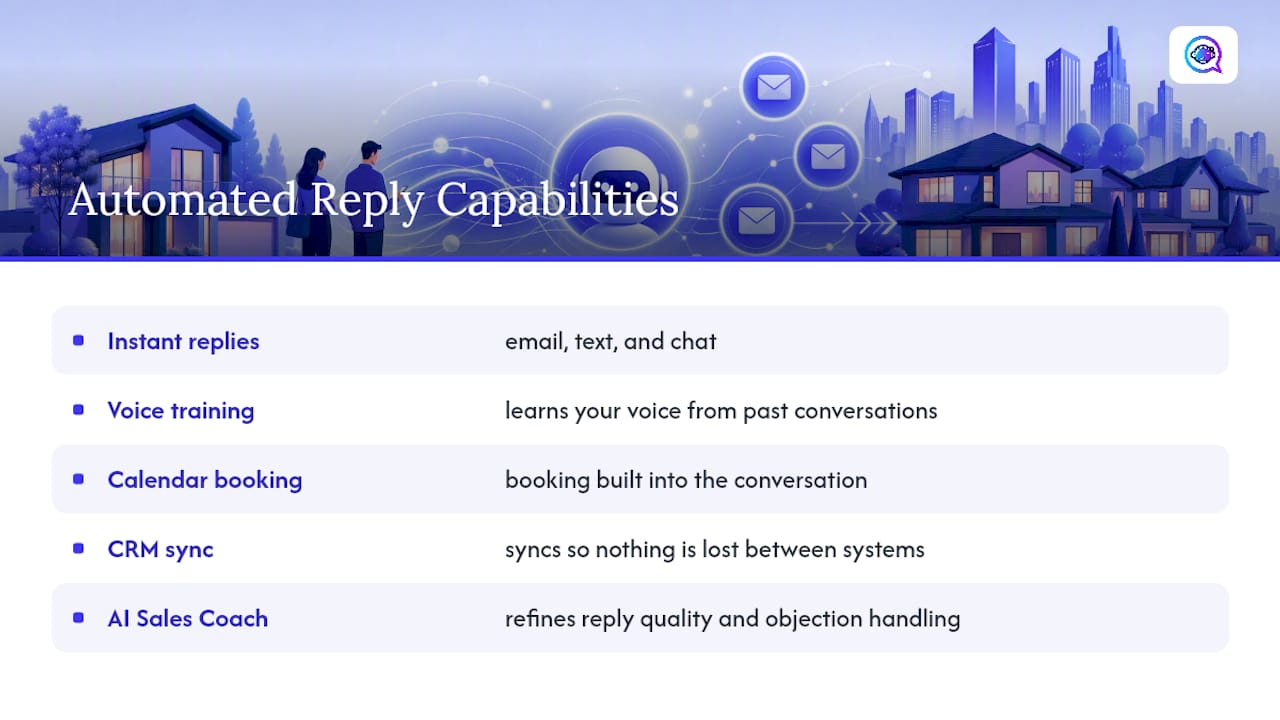
What that looks like in practice: instant replies across email, text, and chat, voice training so responses actually sound like you, calendar booking built into the conversation, and CRM sync so nothing gets lost between systems — a capability enhanced by an AI Sales Coach that helps refine reply quality and objection handling. In a demo, ask how quickly your MLS feed connects, how the voice training handles your specific listings, and how fast a new lead goes from inquiry to booked showing.
If you’re a real estate agent ready to stop losing leads to slow replies, start a demo built for real estate agents and see how fast your first automated reply goes out.
Authoritative Setup and Benchmark Resources
For deeper reading beyond this guide, Realtor.com’s support documentation on auto-responder settings walks through platform-specific configuration, and NAR’s quick real estate statistics offer broader context on buyer and seller response behavior. Astreaux’s own AI sales automation guidance covers related workflow automation for other lead types.
Sources
How to Set Up Email and Text Auto-Responders — Realtor.com Support
Real estate email templates: 20 copy-paste emails (2026) — Jamil Academy
20+ real estate email templates that get replies (2026) — Prospeo
FAQ
What Is a Good Auto-Reply Message for Real Estate?
A good auto-reply greets the lead by name, references the specific property or inquiry, offers one useful detail, and ends with a single clear call to action like a scheduling link. Avoid generic “thanks for contacting us” language with no personalization.
What Is the 3-3-3 Rule in Real Estate?
The 3-3-3 rule generally refers to contacting a new lead within 3 minutes, following up 3 times in the first week, and using 3 different channels (call, text, email) to reach them. Definitions vary slightly by brokerage, but the core idea is fast, multi-channel follow-up.
What Are Examples of Automatic Responses?
Common examples include an instant text confirming a showing request, an email with listing details and a scheduling link after a portal inquiry, and a chat message on your website that captures contact info before routing to a live agent. Platforms like Astreaux generate these automatically using your actual voice and listing data.
What Is a Good Out-of-Office Reply for Real Estate Agents?
A strong out-of-office reply confirms the message was received, sets a specific expectation for when you’ll respond, and offers an alternative contact or scheduling link so the lead isn’t stuck waiting. Something like “I’m currently with clients and will reply by [time]. For an immediate showing request, book here: [link]” keeps the lead engaged instead of moving on.