


14 Insurance Text Templates for Agents With Consent Logging
Below are ready-to-send, compliance-aware insurance text templates organized by use case, from lead follow-up to claims updates. Copy them, swap in your merge fields, and send. The one rule that overrides everything else: never send a marketing text without documented prior express consent and a logged, timestamped record you could produce in an audit tomorrow.
TL;DR:
Recording explicit consent with timestamps and disclosure language before sending marketing texts is essential to remain compliant with TCPA regulations.
Service messages related to existing policies or claims generally have looser requirements but should still be logged, and sensitive information should never be sent via SMS.
Using merge fields for personalization increases response rates, but only with safe placeholders like first names, agent names, dates, and links; avoid sharing protected health or financial details.
Following a 6 to 8 touch sequence over two to three weeks improves lead engagement and conversion, with a mandatory pause-on-reply to prevent unwanted messaging.
Automating compliance through platforms like Astreaux helps agencies manage consent, templates, and follow-up cadence while reducing manual tracking and audit risks.
AstreauxFollow Up With Insurance Leads FasterAstreaux learns your business voice and automates personalized lead engagement, helping insurance agents follow up instantly on quotes.Book a call
Ready-to-Send Insurance Text Templates by Use Case
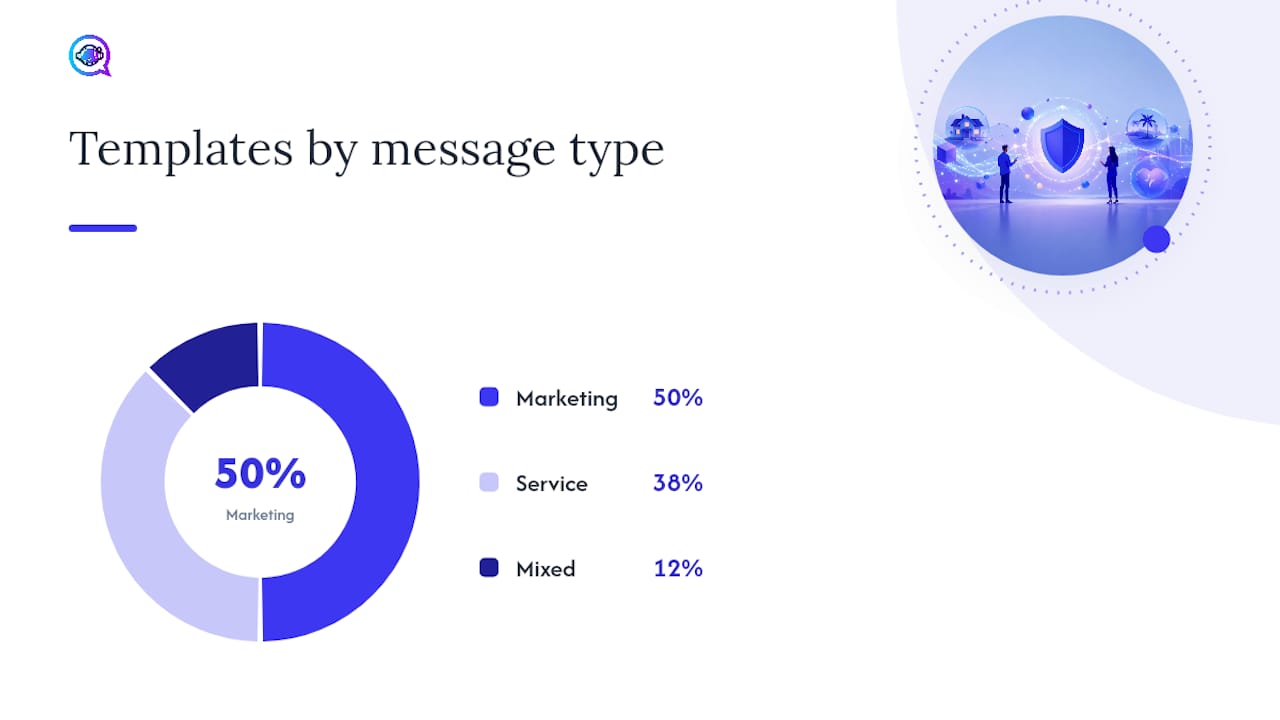
Every template below runs under 160 characters where possible, so it lands as a single SMS segment instead of splitting into a choppy multi-part message. Swap the bracketed fields for your CRM’s merge tags before sending.
1. Lead follow-up (marketing, requires documented opt-in)
“Hi [FirstName], this is [AgentName] with [Agency]. Thanks for requesting a quote. When’s a good time for a 5-minute call?”
“[FirstName], I put together a few auto coverage options for you. Want me to text or email the breakdown?”
“Still shopping for [PolicyType] coverage? I can save you time. Reply YES for a quick quote.”
2. Appointment and confirmation (service message, generally exempt from marketing consent rules)
“Reminder: your policy review with [AgentName] is [Date] at [Time]. Reply C to confirm or R to reschedule.”
“You’re booked for [Date] at [Time], [FirstName]. Address: [OfficeAddress]. See you then!”
3. Renewal reminders (mixed, treat as marketing unless purely administrative)
“[FirstName], your policy #[PolicyNumber] renews on [Date]. Want to review your rate before it locks in?”
“Time-sensitive: your coverage renews soon. Reply CALL and [AgentName] will reach out today.”
4. Payment notices (service message)
“Payment reminder: $[Amount] due [Date] for policy #[PolicyNumber]. Pay online: [Link]”
“Your payment of $[Amount] was received. Thanks, [FirstName]! Questions? Reply here.”
5. Claim updates (service message, handle with extra care around detail)
“Hi [FirstName], your claim #[ClaimNumber] has moved to the next review stage. We’ll update you by [Date].”
“[AgentName] here. Your adjuster will contact you within 24 hours regarding claim #[ClaimNumber].”
6. Re-engagement (marketing, requires opt-in)
“It’s been a while, [FirstName]. Rates have changed since we last talked. Worth a quick recheck?”
7. Review requests (marketing, unless framed strictly as service follow-up)
“Thanks for choosing [Agency], [FirstName]! Mind leaving a quick review? [Link]”
8. Personal touches (marketing if unsolicited, but high-value for retention)
“Happy birthday, [FirstName]! Hope it’s a great one from all of us at [Agency].”
A general industry pattern backs this format: keep the message short, name the agent, and give the recipient exactly one action to take, according to a roundup of insurance follow-up text templates. Marketing messages need a documented opt-in on file before they go out. Service messages tied to an existing policy or claim generally don’t, but the safest move is to log consent for every text type anyway.
How Do You Personalize a Template Without Breaking Compliance?
Merge fields make a template feel individual instead of copy-pasted, but only if you stick to information that’s harmless if it leaks. Safe placeholders include:
[FirstName]— the recipient’s first name only, never full legal name in the body[AgentName]and[Agency]— your identity, required for transparency[PolicyNumber]— fine to reference, but never combine with diagnosis, condition, or claim dollar amounts in the same text[Date]and[Time]— for appointments, renewals, and deadlines[Link]— always a tracked, branded short link, never a raw IP address or unbranded redirect
Before: “Reply YES if you want a quote.” After: “Hi [FirstName], [AgentName] here with [Agency]. Reply YES for your home quote by [Date].” The second version identifies the sender and gives a deadline, both of which raise response rates according to practical field guidance on insurance follow-up templates.
Never text protected health information, diagnosis codes, or specific claim payout figures. Keep those conversations on a phone call or secure portal.
Pro Tip: Test every link with its tracking parameters attached before a campaign goes live. A broken UTM tag won’t stop the text from sending, but it will blind you to which template actually drove the reply.
What Does TCPA Compliance Require for Insurance Texts?
The Telephone Consumer Protection Act governs automated texts and calls, and it draws a hard line between marketing messages and service messages. Marketing texts, quote follow-ups, renewal upsells, review requests, need prior express written consent before you send a single one. Service texts tied to an existing policy or claim carry looser requirements, but treating every text like it needs consent is the safer habit to build.
What to log for every opt-in, at minimum:
The exact timestamp of consent
The channel where it happened (web form, phone call, in-office signature)
The precise disclosure language shown to the customer at that moment
A pointer back to the source page, recording, or document
Reconstructing consent later from vague CRM notes holds up far worse in an audit than a system that captures the disclosure text automatically at the moment of opt-in, per FCC TCPA guidance. Sample consent language: “By providing your number, you agree to receive text messages from [Agency] about your insurance policy. Msg & data rates may apply. Reply STOP to opt out.” Every marketing text also needs visible opt-out instructions, and once someone replies STOP, that’s final. No override, no “just to confirm.”
Beyond individual consent, carriers now require businesses to register their numbers through A2P 10DLC before sending bulk texts, or risk having messages filtered or blocked entirely. Federal rulemaking keeps tightening this space too. A 2024 Federal Register rulemaking strengthened consumer protections around robocalls and business texting, which means the rules you followed last year may already be outdated. For a deeper walkthrough of platform-level setup, Astreaux’s TCPA compliance guide for SMS covers consent recording and opt-out configuration step by step.
What’s the Right Follow-Up Cadence for Insurance Leads?
A 6 to 8 touch sequence across roughly two to three weeks tends to outperform either a single text or a daily barrage, according to Astreaux’s cadence research. A workable sequence:
Day 0: Instant text acknowledgment within minutes of the lead coming in
Day 1: Follow-up call or voicemail
Day 2: Second text with a specific coverage detail
Day 4: Email with more information
Day 7: Third text, softer tone, offering a call
Day 10: Call attempt
Day 14: Final text, low-pressure check-in
Day 21: Re-engagement text if still no response
The pause-on-reply rule matters more than the cadence itself: the moment a lead responds, every scripted follow-up stops until a human reviews the reply. Autoresponders can bridge the gap with something like “Thanks for reaching out! [AgentName] will respond within one business hour” for after-hours texts, or “Got it, checking on that now” for daytime triage. Track response rate, conversion rate, opt-out rate, and deliverability weekly. A cadence that converts well but drives opt-outs above a couple of percent needs a tone adjustment, not more volume.
Setting Up Templates in Your CRM: A Practical Checklist
Getting templates into production takes more than pasting text into a campaign tool. Before launch, confirm your CRM supports the merge fields you’re using, opt-out handling is automatic (not manual), and every send gets logged with a timestamp for audit purposes. If you expect meaningful SMS volume, register your business number under A2P 10DLC before you need it, not after a carrier starts filtering your messages.
Testing matters just as much as setup. Send test messages to a handset matrix covering both iOS and Android across at least two carriers, checking that links render properly and long merge fields don’t get truncated mid-sentence, a practice detailed in Astreaux’s implementation guide. Confirm the STOP keyword actually removes a number from future sends, not just from that one campaign.
Common pitfalls worth avoiding: using a personal cell number instead of a registered business line, sending any protected health information over SMS, skipping consent logging because “it’s just a quick text,” and assuming your existing short code covers new campaign types without re-registration.
How Astreaux Applies This in Practice
Astreaux’s conversational AI learns an agency’s voice and sends personalized replies instantly, while logging every consent event and enforcing pause-on-reply automatically. When a lead texts back mid-sequence, the automation halts scripted follow-ups and flags the conversation for a human. That’s the mechanic that keeps a growing text volume auditable. Gartner projects a rising share of seller work shifting to generative AI within the next few years, and Astreaux’s own cadence guidance reflects that shift already underway in insurance follow-up. For tested scripts built for exactly this kind of workflow, see Astreaux’s SMS lead follow-up templates.
Do Health, Auto, and Life Insurance Texts Follow Different Rules?
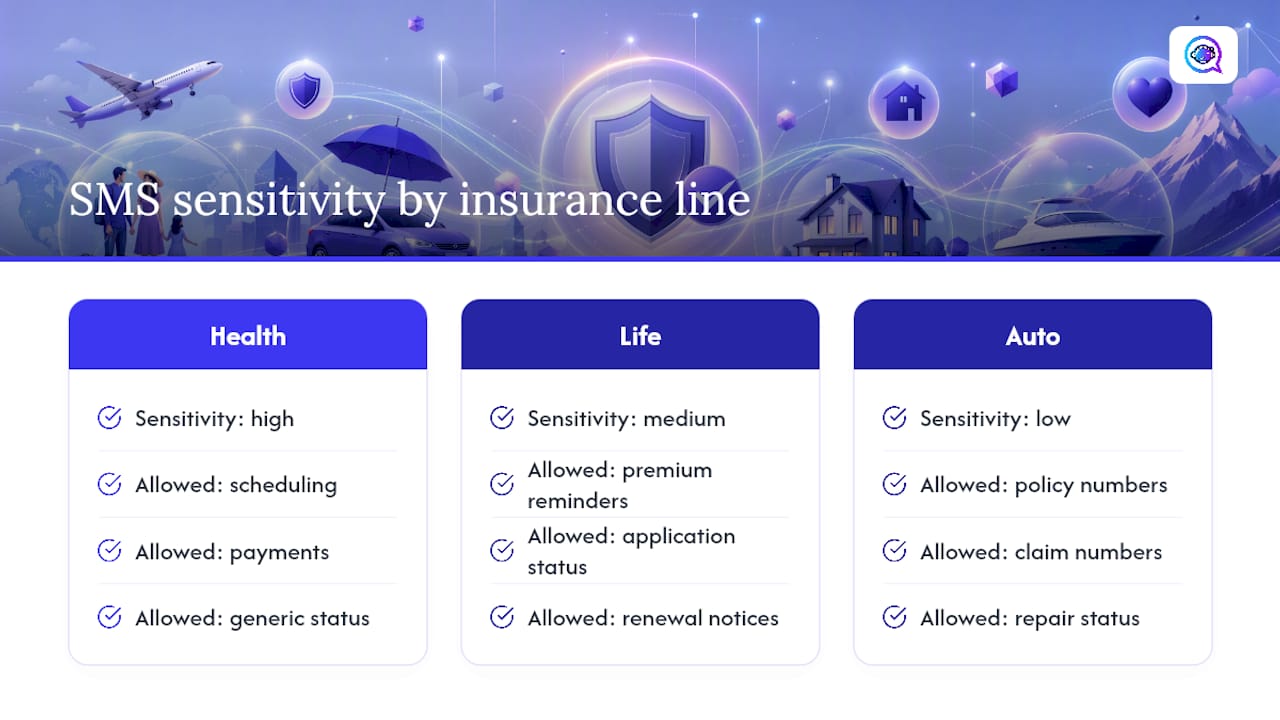
The core TCPA framework applies the same way across every line of insurance, but the sensitivity of what you’re texting about changes case by case. Health insurance carries the highest exposure: never reference a diagnosis, treatment detail, or specific medical claim status in a text, even a service message. Keep health-related texts limited to scheduling, payment, and generic status updates like “your claim is under review.”
Auto insurance texts carry the lowest sensitivity. Policy numbers, claim numbers, and repair status updates are generally fine to send by text since they rarely expose anything a bad actor could exploit. This is where agents have the most room to be specific and helpful in a single message.
Life insurance sits in between. Beneficiary details, underwriting decisions, and medical exam results should never appear in SMS. Premium reminders, application status (“your application moved to underwriting”), and renewal notices are safe.
Across all three, the safest posture is to write every template as if it might be forwarded or seen by someone other than the intended recipient. If a text would embarrass or expose the customer if screenshotted, it doesn’t belong in SMS regardless of the policy type. When in doubt, move the sensitive part of the conversation to a phone call and use the text only to schedule that call.
How Should Agencies Handle Sensitive Information in SMS?
Treat every SMS thread as a semi-public channel, because functionally, it is. Phones get shared, lock screens preview messages, and texts sit in a thread indefinitely unless someone deletes it.
Strip out anything that qualifies as protected health information, full Social Security numbers, or detailed financial account numbers. A policy number is generally safe on its own; a policy number next to a bank account number is not. If your workflow requires collecting sensitive data, direct the customer to a secure web form or portal link rather than asking them to reply with the information over text.
Store consent records and message logs with the same access controls you’d apply to any other customer file, not in a shared spreadsheet visible to the whole office. Limit who can pull historical SMS threads, and set a retention policy so old conversations don’t linger indefinitely as an unnecessary liability. Finally, make sure whatever platform sends your texts encrypts data in transit and at rest. That’s a baseline expectation for any tool touching customer contact information, not an advanced feature.
The Templates Are the Easy Part
Every agency I’ve seen struggle with SMS didn’t fail because their templates were bad. They failed because they treated compliance as a one-time setup task instead of an ongoing discipline. You write the consent language once, feel good about it, and six months later nobody remembers what disclosure text was actually shown to a lead who opted in back in March.
The conventional advice, “just get consent,” undersells the real requirement. Consent that isn’t logged with a timestamp and the exact disclosure shown is functionally unprovable if a regulator or plaintiff’s attorney ever asks. That’s the gap that gets agencies in trouble, not bad templates.
What should you prioritize first? Not more templates. Build the audit trail before you scale the volume. Get the pause-on-reply rule configured correctly in whatever platform you use, because that single setting prevents most of the awkward, compliance-adjacent moments where a scripted text lands right after a customer just told you they’re switching carriers. Volume without discipline just means more exposure, faster.
— Jamaal
Try Astreaux to Manage Templates and Compliance Automatically
Astreaux gives insurance agencies a faster alternative to juggling spreadsheets of templates and manually tracking who opted in when. It learns your agency’s voice, sends instant, personalized replies to new leads, and keeps consent and pause-on-reply logic built into the automation itself rather than left to memory.

For agencies running multiple lines of business, that means one system handling lead follow-up, appointment scheduling, and renewal reminders without a human having to babysit every touchpoint — a key advantage highlighted in these workflow automation examples. Astreaux also integrates with over 7,000 apps, so your existing CRM and calendar tools plug in without a separate migration project. If you’re ready to see how it handles your specific templates and cadence, visit the Astreaux AI product page to request a demo.
This article is general information, not a substitute for advice from a qualified financial advisor. Consult a qualified financial professional about your own circumstances before acting on anything here.
Sources
47 U.S.C. § 227 — Restrictions on use of telephone equipment
Federal Register: Strengthening the ability of consumers to stop robocalls (rulemaking)
FAQ
What Is an Example Script for an Insurance Text Message?
A simple, compliant example is: “Hi [FirstName], this is [AgentName] with [Agency]. Thanks for requesting a quote. Reply YES for a callback.” It names the agent, states the purpose, and gives one clear action, which matches the format recommended by industry template roundups.
How Do Insurance Agents Attract New Customers Through Text?
The strongest approach combines fast response time with a consistent, multi-touch cadence rather than a single blast. Agents who follow up within minutes and continue with a 6 to 8 touch sequence over two to three weeks convert more leads than those who send one message and wait, based on Astreaux’s cadence data.
How Do You Build an Insurance Text Message Template?
Start with the use case, lead follow-up, renewal, claim update, then write one clear sentence under 160 characters with a single action for the recipient. Add merge fields for personalization, include opt-out language if it’s a marketing message, and log the template alongside its intended send trigger in your CRM.
What Are Effective Phrases for Insurance Text Campaigns?
Short, benefit-specific phrases outperform generic ones: “save you time,” “review your rate before it renews,” and “quick 5-minute call” all give the recipient a concrete reason to respond. Avoid vague hooks like “great offers inside,” which read as spam and hurt deliverability over time.
Does Astreaux Handle Insurance Text Compliance Automatically?
Astreaux logs consent events and enforces the pause-on-reply rule as part of its automated workflows, reducing the manual tracking burden on agents. Pricing details are available directly on the Astreaux site.


