Ops Playbook: Round Robin Lead Assignment with CRM Checklist and AI
Round robin lead assignment sends each new lead to the eligible rep who has waited the longest, producing fair, predictable routing when reps have similar skills. It works best for simple territories and teams without major capacity differences. When workloads vary significantly, load balancing that weighs current capacity is usually the better choice.
TL;DR:
Round robin assigns leads based on who has waited the longest, but shared rotation order can be affected by multiple rules pulling from the same pool.
Load balancing is better suited for teams with variable workloads, while round robin works best when workloads are similar and fairness is a priority.
Effective implementation requires pilot testing, monitoring speed-to-lead and unassigned rates, and adjusting filters or capacity thresholds as needed.
Combining AI-driven instant responses and qualification enhances round robin by reducing unassigned leads and matching reps with the right lead.
Maintaining clear ownership, documentation, and regular rule reviews helps prevent routing issues and keeps the system fair and efficient.
AstreauxRespond Faster to Every LeadAstreaux uses conversational AI to engage new leads instantly, personalize responses, and support scheduling for service professionals.Book a call
How round robin assignment works
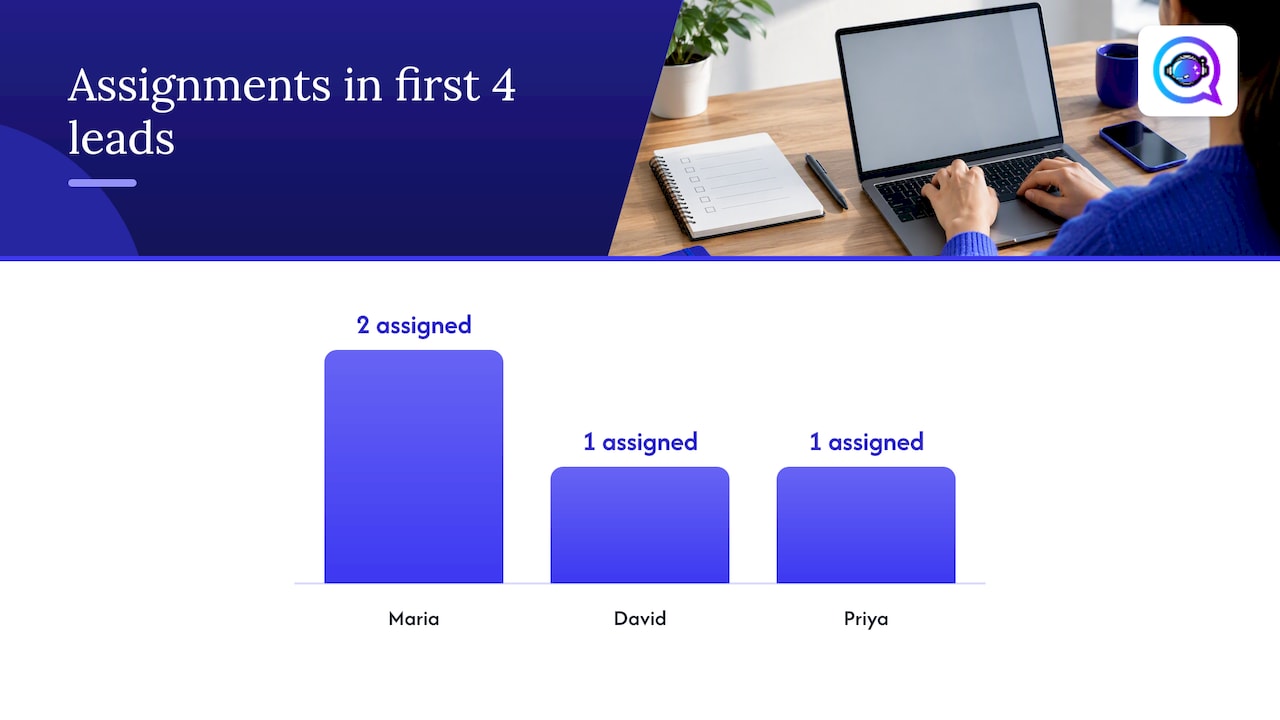
Round robin distribution assigns each new record to the seller who has waited the longest since their last assignment, and that order is stored at the organization level, not per individual rule. This matters because multiple assignment rules can share the same rotation, which means a rep’s position in line depends on every rule pulling from that pool, not just the one you’re configuring.
Picture three reps on a real estate team: Maria, David, and Priya. The rotation starts with Maria, since she was assigned longest ago.
Lead 1 goes to Maria, who moves to the back of the line.
Lead 2 goes to David, the next longest-waiting rep.
Lead 3 goes to Priya, completing the cycle.
Lead 4 returns to Maria, since the rotation has reset.
If David goes on vacation and gets removed from the eligible list, leads 2 and 5 both route around him, which can make the order look like it’s repeating when it’s actually adjusting for eligibility. That’s normal behavior, not a bug, but it’s worth explaining to reps who notice the pattern and assume something broke.
Round robin vs load balancing and other distribution methods
Round robin and load balancing solve different problems, and picking the wrong one creates friction fast. Load balancing checks how many active leads or deals each seller is carrying and routes new work to whoever has the lightest load, which suits teams where capacity varies, such as a mix of full-time and part-time reps.
Choose round robin when reps carry similar workloads and fairness in rotation order matters most.
Choose load balancing when capacity differs, for example after a new hire ramps up slower than veterans.
Build hybrid rules that apply round robin within a capacity filter, so only reps under their lead cap enter the rotation.
Avoid round robin entirely for skill-based routing, like assigning complex commercial deals only to senior brokers.
Quota-sensitive flows also deserve caution. If one rep is close to a bonus threshold and another isn’t, a strict rotation ignores that context entirely, so many teams add a manual override step for high-value leads rather than trusting pure rotation.
Implementation checklist: step-by-step setup in a CRM
A safe rollout starts with clear targets, not with flipping a rule live. Set your objectives before touching configuration: a speed-to-lead target (say, first contact within 5 minutes), a fairness metric (leads per rep within a defined window), and a maximum tolerable rate of unassigned leads.
Map your lead sources and matching criteria. Decide which forms, ad platforms, and referral channels feed the rule, and what fields (territory, product interest, language) determine eligibility.
Build your eligible seller list. Include only active reps who should receive this lead type, and layer in territory or licensing conditions where they apply.
Decide the distribution priority. Choose round robin order, an availability window in hours, and whether the rule requires capacity greater than zero before assigning.
Configure the rule in your CRM. Set the round robin logic, attach the eligible list, and enable logging so every assignment is traceable to a rule and timestamp.
Run a low-volume pilot. Feed synthetic leads through the rule over 48 to 72 hours and watch for skipped reps, duplicate assignments, or unassigned records.
Validate before scaling. Check the distribution histogram for even spread, review SLA breaches, and add escalation rules for leads that sit unassigned past your threshold.
Pro Tip: Keep a rollback version of your previous rule saved and dated, so you can revert in minutes if the pilot surfaces a routing problem.
Testing and observability matter more than most teams expect going in. Operations-focused guidance on Salesforce round robin setups stresses audit logs and staged pilots specifically because misrouted or unassigned leads are hard to spot without them. Before you activate anything broadly, review your lead routing options to confirm round robin fits your team structure rather than assuming it by default.
Assignment rule details: capacity, availability, and filters to include
Capacity filters and availability windows are what keep round robin from assigning leads to reps who technically exist in the system but can’t actually respond. Assigning based on seller capacity means the rule checks how many open leads or active deals a rep already holds and only includes them in rotation if they’re under a defined cap, which needs to update in near real time as reps close or lose deals.
Capacity thresholds should recalculate automatically, not rely on a nightly batch job that leaves stale numbers in place for hours.
Availability buckets, often labeled something like 0D to 5D, group sellers by how soon they can respond, and rules can be set to only pull from the most immediate bucket first.
N-hour windows define how long a rule waits for an available seller before falling back or queuing; a 48-hour window with no eligible seller can leave a lead unassigned entirely unless you widen the window or add a queue with alerts, which is a documented behavior worth planning around.
Dynamic attribute matching, such as tying Lead.Country to Seller.Country, and territory filters reduce misroutes where a lead lands with a rep who legally or practically can’t serve that region.
Getting these filters wrong tends to produce two failure patterns: either leads pile up unassigned because the eligible pool is too narrow, or they land with reps who can’t act on them fast enough because capacity data is outdated.
Monitoring, KPIs and common failure modes
Once a round robin rule is live, the real work is watching what it does. Track speed-to-lead at both the median and 95th percentile, since averages hide the worst cases where a lead sat untouched for hours. Track assignment distribution by rep to confirm the rotation is actually even, the percentage of leads left unassigned, and your SLA breach rate.
Set an alert when median speed-to-lead crosses your target minutes, not just when it breaches entirely.
Flag when unassigned leads exceed a small percentage of daily volume, since that usually signals a capacity or availability window problem.
Build a simple dashboard showing leads per rep over a rolling week to catch skew early.
Watch for rule overlap, where two active rules both claim the same lead source and create duplicate or conflicting assignments.
A practical benchmark comes from Microsoft’s own guidance: round robin order is stored at the organization level, which means a spike in one rule’s volume can throw off rotation fairness for every other rule sharing that pool, a detail many teams miss until distribution looks skewed for no obvious reason.
When you spot unassigned leads or calendar conflicts, the fastest fix is usually widening the availability window slightly or temporarily loosening the capacity filter, then tightening both back once volume normalizes. Our speed-to-lead tactics guide covers additional ways to shrink that median response time.
Best practices, governance and pitfalls to avoid
Assignment rules need an owner, not just a configuration. Put one person or team in charge of changes, require a documented reason for every edit, and keep a dated rollback version ready before anyone touches a live rule.
Never let a rule assign a lead when no eligible seller is available; queue it with an alert instead of forcing a bad match.
Don’t rely on round robin alone for skill-sensitive work like technical estimates or high-value negotiations; pair it with a qualification step first.
Avoid over-assigning by ignoring capacity, which burns out top performers who happen to be first in rotation.
Document every rule change with a timestamp, so audits can trace an unexpected assignment back to its cause.
Pro Tip: Review your assignment rules quarterly, since team size and territory changes quietly break rules that worked fine six months earlier.
Our lead handoff process guide walks through governance steps in more detail, particularly around preventing leads from falling into a black hole between marketing and sales.
How AI and conversational automation complement round robin routing
Round robin decides who gets a lead, but it doesn’t decide how fast that lead gets a real response, and that gap is where most conversion is lost. Conversational AI that replies instantly to a new inquiry closes the time-to-first-contact gap before a rotation rule even finishes running, which matters most for leads that arrive nights or weekends when no rep is watching a queue.
Instant AI replies keep a lead engaged the moment it enters the system, rather than waiting for the next available rep to notice it.
Pre-qualification through AI conversation adds metadata, like budget range or timeline, that lets your round robin rule route to a rep with the right skill match instead of pure rotation.
Integration points such as CRM webhooks, calendar sync, and API updates to capacity fields let AI-qualified leads flow directly into your existing assignment rules without manual re-entry.
Combining early AI contact with round robin routing tends to shrink the number of leads sitting unassigned in a queue, since qualification and first response happen before a human rep is even in the loop.
Author perspective: recommendations from ops practice
Start with a low-risk pilot, not a full rollout: pick one lead source, instrument speed-to-lead and fairness metrics from day one, and adjust matching conditions weekly based on what the data shows. If unassigned leads keep piling up, don’t just widen the availability window blindly, add AI-based pre-qualification so leads arrive with enough context to route correctly the first time. Measure before and after every rule change, and never skip the rollback plan.
— Jamaal
How Astreaux can help close the gaps round robin leaves open
Round robin gets rotation order right, but it can’t answer a lead at 11 PM or ask the qualifying questions that determine which rep should get it. A service provider can use AI to learn each business’s voice and respond to new leads instantly, then book appointments directly into a rep’s calendar once qualification is done.

For service professionals like real estate agents, contractors, and therapists, this means fewer leads sitting cold overnight and better-matched handoffs once a round robin rule does take over. The AI platform integrates with many apps, so pairing it with an existing CRM’s assignment rules doesn’t require rebuilding your routing setup from scratch.
Instant conversational replies reduce the window where a lead might contact a competitor instead.
Built-in scheduling and calendar sync cut down on the back-and-forth that causes booking conflicts.
Analytics track pipeline performance so you can see whether faster response times are actually converting.
If after-hours coverage or weak qualification is costing you leads that round robin alone can’t fix, try Astreaux and see how instant engagement fits into your existing setup.
FAQ
What is the round robin assignment rule?
A round robin assignment rule sends each new lead to whichever eligible seller has waited the longest since their last assignment. The rotation order is stored at the organization level, so it can be shared across multiple assignment rules pulling from the same seller pool.
How does a round robin assignment work?
The system tracks a timestamp for each seller’s last assignment and gives the next lead to whoever has the oldest timestamp among eligible reps. Availability and capacity filters can remove a seller from eligibility temporarily, which shifts the rotation without resetting it entirely.
What are lead assignment rules?
Lead assignment rules are CRM configurations that determine which seller receives a new lead based on criteria like territory, capacity, availability, or rotation order. Most platforms let admins choose between round robin and load balancing depending on whether fairness or current workload should drive the decision.
What is a round robin example?
If three reps, Maria, David, and Priya, are in rotation and Maria was assigned longest ago, the next new lead goes to Maria first, then David, then Priya, before cycling back to Maria. If a rep becomes unavailable mid-cycle, the rotation skips them and continues with the next eligible person in line.
How does AI improve round robin lead routing?
AI can respond to a lead instantly and gather qualifying details before a round robin rule ever assigns it, which reduces the number of leads that go cold or land with a poorly matched rep. Platforms like Astreaux use this approach to cut response time and add context that makes the eventual assignment more accurate.