

SMS Personalization: 3 Recipes Service Teams Can Launch This Week
Effective SMS personalization is one system: match the right person (segment) to the right moment (trigger) with the right content (dynamic fields). A first-name merge tag is not personalization on its own, and treating it as such is why so many campaigns underperform. When you prioritize timing and behavioral relevance over cosmetic tokens, click-through rates and conversions climb while opt-outs drop.
TL;DR:
Real SMS personalization relies on combining segments, triggers, and dynamic fields, not just using first-name merge tags.
Behavioral triggers like cart abandonment and replenishment prompts outperform calendar-based sends for higher engagement.
Accurate data flow, fallback values, and time zone awareness are critical to prevent broken messages and ensure relevance.
Testing and measuring metrics such as revenue per message and opt-out rates are essential to optimize personalization efforts.
Using automation platforms like Astreaux simplifies implementation for service businesses, reducing the need for manual setup and developer support.
AstreauxTurn Personalized Follow-Ups Into ActionAstreaux helps service professionals engage leads instantly with personalized conversational AI and streamlined scheduling across more than 7000 apps.Book a call
What Real SMS Personalization Looks Like
Most businesses stop at “Hi {{firstName}}” and call it a personalized campaign. That’s the entry level, and it barely moves the needle. Real SMS personalization works in layers, and each layer you add compounds the effect of the ones below it.
Basic personalization covers name tokens and static fields like company name or service type. It’s easy to set up and marginally better than a blank blast, but it doesn’t account for timing or behavior at all.
Useful personalization adds context: order status, appointment date, last purchase category. A text that says “Your Tuesday 2 PM cleaning with Marcus is confirmed” beats a generic reminder because it references something real and specific to that person’s account.
High-impact personalization combines dynamic content with behavioral timing. This is where segments, triggers, and dynamic fields work together. A message sent 20 minutes after someone abandons a booking form, referencing the exact service they were viewing, with a direct link back to that form, performs in a different category entirely.
SMS is a more intimate channel than email. It lands in the same inbox as texts from a person’s spouse or best friend, so the tolerance for irrelevant or oddly-timed messages is much lower. That intimacy is an advantage when you use it well and a liability when you don’t.
A few patterns separate the levels in practice:
Basic: name and company merge tags only, sent on a fixed weekly schedule
Useful: order or appointment status plus relevant dates, sent close to a real event
High-impact: behavior-triggered sends with deep links and fallback logic for missing data
Advanced: AI-assisted send-time optimization layered on top of triggers, adjusting delivery to each subscriber’s typical response window, a tactic Throughline Automation points to as a meaningful driver of automation ROI
Timing and content are not separate decisions. A perfectly worded message sent at the wrong moment reads as noise. A plain message sent at exactly the right moment can still convert.
The Three-Part Framework: Segments, Triggers, and Dynamic Fields
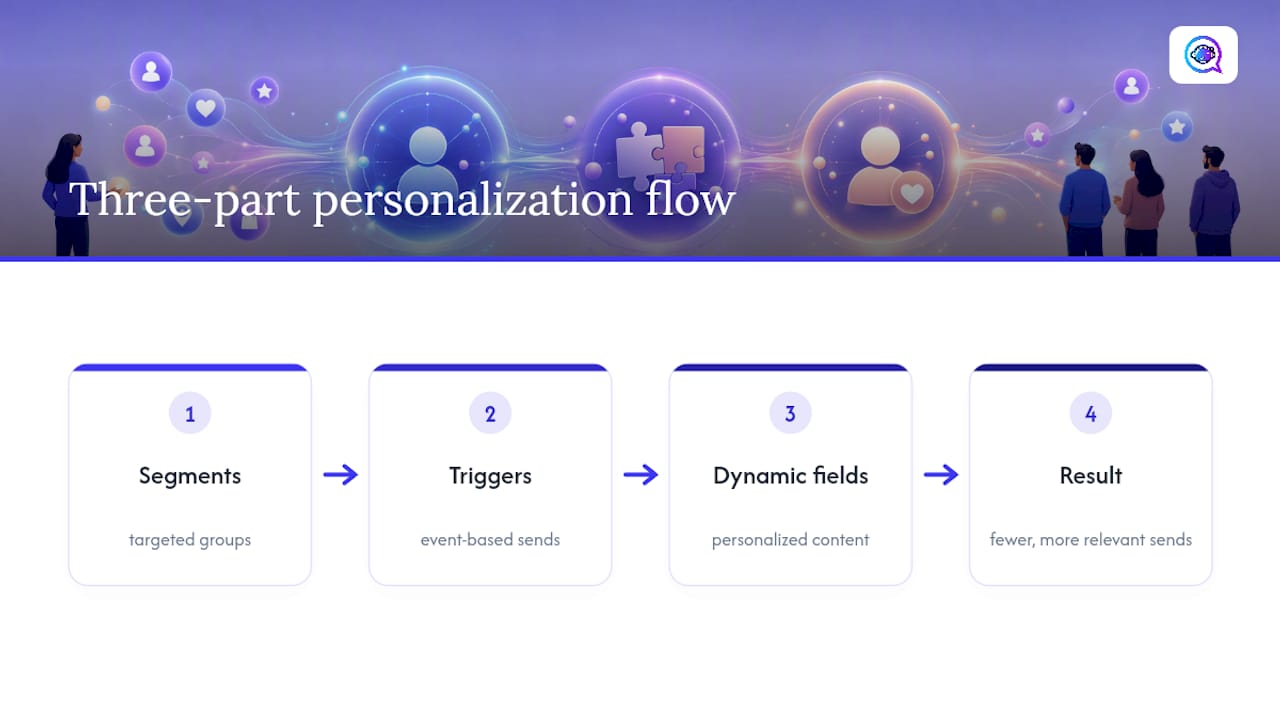
Real personalization isn’t a single tactic. It’s a system built from three layers working together, and skipping any one of them caps how much lift you’ll see. Layering segments, triggers, and dynamic fields together has been shown to reduce total sends while increasing revenue per message, because you’re sending fewer, more relevant texts instead of blasting everyone the same script.
1. Segments: who you’re talking to
Start with behavior, not demographics. The segments that move revenue are usually built around:
High-intent behavior: viewed pricing, started checkout, requested a quote
Customer value tier: repeat clients, high-average-order customers, referral sources
Preference signals: service type selected, communication frequency chosen at opt-in
Engagement tier: active responders versus subscribers who haven’t clicked in 90 days
Engagement tiers matter more than most teams realize. A subscriber who hasn’t opened or clicked anything in three months needs a different cadence and tone than someone who just replied to your last text.
2. Triggers: when the message fires
Triggers should be behavioral, not calendar-based, whenever possible. A short catalog of high-performing triggers:
Cart or booking abandonment: fire 15 to 30 minutes after exit
Back-in-stock: fire within minutes of inventory update
Replenishment: fire based on typical usage cycle (30, 60, or 90 days depending on product)
Post-purchase or post-appointment follow-up: fire 24 to 48 hours after service completion
3. Dynamic fields: what the message says
Prioritize fields that change the meaning of the message, not just its appearance. Service name, appointment time, remaining inventory count, and specific product viewed all matter more than a first name. Every dynamic field needs a fallback value. If a customer’s first name is missing from your CRM, the message should default to something natural like “there” or the business name, not a broken token that prints “{{firstName}}” directly into the text.
Link personalization deserves the same attention as the copy itself. A deep link straight to the abandoned cart or the specific booking page consistently outperforms a generic homepage link, because it removes the extra step of the customer having to re-find what they were looking at.
Pro Tip: Build your fallback values before you build your triggers. A campaign that fires flawlessly but sends “Hi {{firstName}}, your {{serviceType}} appointment” to a customer with missing data fields will do more damage than no campaign at all.
Timing, Time Zones, and Quiet Hours
Behavioral triggers beat calendar-based sends because they match the moment someone is already thinking about you. A cart abandonment text sent 20 minutes after checkout catches genuine hesitation. The same message sent the next morning at 9 AM catches someone who has already moved on mentally, even if they haven’t unsubscribed.
Suggested windows vary by use case, and getting them wrong is one of the fastest ways to tank engagement:
Cart or booking abandonment: 15 to 30 minutes after exit, with a second send at 24 hours if no response
Back-in-stock alerts: within 30 minutes of the inventory update, since interest decays fast
Appointment reminders: 24 hours before, then a second confirmation 2 to 3 hours before
Replenishment nudges: timed to the customer’s historical usage cycle, not a fixed calendar date
Per-subscriber send-time optimization takes this further by learning when an individual person typically opens and responds to texts, then adjusting delivery to that window rather than a blanket time slot for the whole list. This is where AI-driven timing tools add real value over static rules.
Time zone handling is non-negotiable. If your subscriber list spans multiple regions, sends must be calculated against each subscriber’s local time, not your office clock. Pair that with a quiet-hours policy, typically no promotional sends before 8 AM or after 9 PM local time, to avoid the kind of late-night text that generates instant opt-outs.
Transactional messages are the one exception. Appointment confirmations, delivery updates, and security codes can and should send outside quiet hours when the customer is expecting time-sensitive information, since suppressing those defeats their purpose.
Three Personalization Recipes You Can Launch This Week
These three recipes are built from the segment, trigger, and dynamic-field pattern covered above, and each one is simple enough to launch without a developer.
Cart recovery. Use two-step timing: a soft nudge 20 to 30 minutes after abandonment referencing the specific item, followed by a second message at 24 hours if there’s still no response. Required tokens: item name, price, and a direct cart link. Resist leading with a discount. Opening with “Still thinking about [item]? Here’s your cart” performs better long-term than training customers to wait for a coupon before buying.
Back-in-stock. Keep the copy service-minded rather than salesy: “The [item] you wanted is back. Grab it before it’s gone again.” Deep-link straight to the product page, not the category or homepage, since the extra click is often where interest dies.
Appointment reminders. Include a secure booking link so customers can reschedule without a phone call, and make clear that replying “C” confirms or “R” requests a reschedule. That reply-handling step alone is one of the most effective no-show reduction tactics available to service businesses, because it turns a passive reminder into an action the customer has to take.
Recipe | Trigger Timing | Required Tokens | Primary Goal |
|---|---|---|---|
Cart recovery | 20 to 30 minutes, then 24 hours | Item name, price, cart link | Recover lost revenue |
Back-in-stock | Within 30 minutes of restock | Item name, product link | Capture existing demand |
Appointment reminder | 24 hours before, then 2 to 3 hours before | Service, time, booking link | Reduce no-shows |
Building the Infrastructure Behind Personalized SMS
None of this works without clean data flowing into your messaging system in real time. Get the infrastructure wrong, and even a well-designed campaign sends broken tokens or fires at the wrong moment.
Build the data model first. Every contact record needs standardized fields: name, phone in E.164 format, time zone, last interaction date, and a fallback value for every personalized token you plan to use.
Connect your CRM as the source of truth. The most reliable pattern routes data from CRM to an event stream, then to your SMS platform through APIs or webhooks, so updates in one system propagate everywhere else automatically. This kind of CRM-to-SMS integration is what keeps personalization accurate instead of stale.
Preview and test before production. Send test messages to internal numbers with deliberately incomplete data to confirm your fallback logic actually works, not just your happy-path scenario.
Govern your templates. Validate every token against your data model, count characters against the 160-character GSM 03.38 limit before adding a link, and require a test send for any new template before it goes live.
Handle operations deliberately. Unsubscribes need to sync back to your CRM instantly, two-way replies need clear routing (booking changes go one place, general questions another), and staging environments should be walled off from production numbers so a test never lands in a real customer’s inbox.
Pro Tip: Run a “broken data” test before every new campaign launch. Pull ten random contact records with missing fields and send your template against them. If any message reads awkwardly or shows a raw token, fix the fallback before you scale to the full list.
Measuring What Works: A Testing Plan That Isolates Real Impact
Track five numbers on every SMS campaign: delivery rate, click-through rate, conversion rate, opt-out rate, and revenue per message. Revenue per message is the metric most teams skip and the one that actually tells you whether personalization is paying for itself.
Run your tests in a fixed order rather than changing everything at once. A tested sequence that isolates the impact of each lever looks like this:
Test segments first: same message, different audiences, to confirm you’re targeting the right people
Test timing second: same segment and message, different send windows
Test dynamic tokens third: same segment and timing, different personalized content
Test offer strategy last: only once the first three variables are settled
Because a large share of SMS conversions happen within minutes of delivery, you don’t need weeks to get a read on a timing test. Run experiments on rolling cohorts and you can often draw a confident conclusion within a single send cycle rather than waiting for a full campaign to finish.
Attribution gets easier when every link carries a stable UTM parameter and points to a specific page, not a homepage. Track deep-link clicks separately from generic link clicks so you can see whether the personalization itself, not just the offer, is driving the lift.
Common Mistakes and a Short Compliance Checklist
The fastest way to ruin a good personalization strategy is to make it feel invasive. Referencing a customer’s exact browsing history or a sensitive purchase category in a text message crosses a line that most people notice immediately, even if they can’t articulate why it bothers them. Favor service-first triggers, like order updates and back-in-stock alerts, and keep purely promotional texts rare.
Cadence mistakes are just as common. Sending daily promotional texts to a subscriber who hasn’t clicked anything in two months is a fast route to an opt-out. Build engagement-based fatigue controls that automatically slow down or pause sends to unresponsive contacts.
On the compliance side, the basics aren’t optional. Every promotional text needs a clear opt-out, and “Reply STOP” instructions have to be honored immediately, not within a few days. For the specifics of U.S. requirements, Astreaux’s TCPA compliance guide covers the opt-in language and documentation that regulators expect.
A quick checklist before any campaign launches:
Opt-out language present and functional on every promotional send
Quiet-hours policy enforced across all time zones in your list
Fallback values tested for every dynamic field
Cadence caps in place for low-engagement segments
Data hygiene check run within the last 30 days to catch outdated numbers or missing fields
How Astreaux Approaches Personalization for Service Teams
Most personalization advice comes from ecommerce, and it doesn’t fully translate to service businesses. A real estate agent, a therapist, or a contractor isn’t sending a product photo. They’re managing a relationship where the timing of one message can be the difference between a booked appointment and a lead that goes cold.
That’s the gap Astreaux was built to close. Rather than asking a business owner to manually build segments and trigger rules, Astreaux’s conversational AI learns the voice of the business and applies personalized responses the moment a new lead comes in, which matters because response speed is often the single biggest lever in whether a lead converts at all. The platform integrates with more than 7,000 apps, so the CRM-to-SMS data flow described earlier in this article doesn’t have to be built by hand.
In practice, this looks like instant, personalized replies to new leads instead of a generic auto-response, automated appointment scheduling that reduces no-shows without manual follow-up, and nurturing sequences that adjust based on how a prospect has actually engaged rather than a fixed drip schedule. Contractors using automated appointment confirmations tend to see fewer no-shows simply because the reminder feels specific to their job, not like a mass text.
The lesson from working with service businesses across real estate, therapy, and contracting is consistent: personalization succeeds when it removes friction from a real decision point, not when it adds decorative detail to a message nobody was going to read closely anyway. The teams that win aren’t the ones with the cleverest merge tags. They’re the ones who show up at the right moment with something the recipient actually needed to hear.
— Jamaal
Put SMS Personalization on Autopilot With Astreaux
Astreaux is the alternative to building this system by hand, one spreadsheet segment and one Zapier workflow at a time. Instead of manually setting up triggers, tokens, and fallback logic across separate tools, Astreaux’s conversational AI learns your business’s voice and handles instant, personalized replies, appointment booking, and two-way message routing inside one platform connected to over 7,000 apps.

For service professionals, that means the cart recovery, appointment reminder, and follow-up recipes covered in this article don’t require a developer or a marketing agency to run. A real estate agent can have a new lead greeted and scheduled within minutes of an inquiry. A contractor can send an appointment reminder that already knows the job type and address. If you want to see how this looks for your specific business, book a demo of Astreaux and ask to see the appointment-reminder workflow in action. Contractors specifically can explore the contractor-focused booking tools built around estimate requests and scheduling.
Sources
For readers who want to go deeper on the mechanics behind this article, the segment, trigger, and dynamic field framework covers additional recipe examples and testing sequences referenced throughout. Anyone building templates should also understand the GSM 03.38 character encoding standard that sets the 160-character limit shaping most SMS copy decisions.
On the internal side, Astreaux’s guides on TCPA compliance and SMS deliverability both expand on topics touched on above, from opt-in wording to the carrier filtering that can quietly suppress even a well-personalized campaign.
FAQ
Is SMS getting phased out?
No. SMS remains one of the most consistently opened marketing channels, and its universal delivery, no app or internet connection required, keeps it relevant even as messaging apps grow in other contexts.
How do you customize SMS on Android?
Customization on the device level (fonts, notification tones, message backgrounds) happens in the phone’s Messages app settings, but that’s separate from marketing personalization, which happens on the sender’s platform through segments, triggers, and dynamic fields.
How do you personalize text messages for marketing?
Combine three elements: a behavioral segment (who the customer is), a trigger event (what they just did), and dynamic content (a token like appointment time or product name) with a tested fallback value for missing data.
Is SMS marketing legal in the USA?
Yes, when businesses follow the Telephone Consumer Protection Act, which requires clear opt-in consent and immediate honoring of STOP requests; Astreaux’s TCPA compliance guide breaks down the specific requirements.


