
Service Pros: Book Jobs From Missed Call Texts Sent Within 60 Seconds
Yes: you can send an immediate automated text when you miss a call, and pairing that text with a booking link or a quick qualifying question recovers leads you would otherwise lose. A study of 14,354 missed-call text messages across 192 home service businesses found a 32.7% reply rate, with 1,619 conversations converting into billable leads. Enable instant text-back today, attach one next action, and start capturing calls you’re currently sending to voicemail.
TL;DR:
Trigger options include VoIP/webhook, native CRM features, or device apps, each with different reliability and setup complexities.
Follow-up texts should be short, personable, and include only one clear action link or question to maximize reply rates.
Sending volume must comply with TCPA rules by avoiding promotional content, including opt-out instructions, and monitoring delivery performance.
Integrating booking links and CRM automation into replies significantly increases the chance of converting recovered conversations into booked appointments.
How Does Missed-Call Text-Back Actually Work?
Every missed-call automation runs on the same loop: trigger, send, reply, next step, as detailed by Emergent IT’s AI Automation Solutions. Something detects the missed call, fires an SMS within seconds, waits for the caller to respond, and routes that reply toward a booking or a live person. The mechanics differ by platform, but the sequence stays consistent.
The trigger usually comes from one of three places: a call-status webhook from your VoIP or SaaS phone line, a built-in “missed call” feature inside your CRM or lead software, or a device-level trigger on the phone itself. Each has trade-offs.
VoIP/SaaS webhook triggers fire reliably and work even when your phone is off or in another room.
Platform-native missed-call features (built into many lead management tools) need no extra setup once your number is connected.
Device-level triggers depend on the phone staying powered, connected, and running the automation app in the background.
Sender identity matters just as much as the trigger. Texting from your existing business line keeps the conversation recognizable to the caller, while a dedicated SMS number can offer more automation flexibility but risks looking unfamiliar. Speed decides which choice matters most: the same study found most callers who replied did so within five minutes, and after-hours reply rates were nearly as high as daytime performance. A text that lands 20 minutes late is a text that misses the window when the caller is still thinking about you.
How Do You Set Up Automatic Text Replies for Missed Calls?
You have three realistic paths, ranging from fully managed to fully manual. Pick based on how much control you want versus how fast you need to launch.
SaaS lead management workflow. Enable the missed-call trigger inside your platform, attach an SMS action, personalize the message with the caller’s number or name, set business hours logic so after-hours texts read differently than daytime ones, then run a live test call.
Zapier or Make paired with Twilio. Get an SMS-capable number through Twilio, build a trigger for “missed call” or “no answer” from your phone system, add a “send SMS” action, and layer in conditional logic so the message text changes based on time of day. This route gives you full control over wording and logic but requires someone comfortable building automations. Guides on this setup recommend firing the text within about 60 seconds of the missed call for the best reply rates.
Mobile app or IFTTT. Install a device-level auto-reply app or build an IFTTT applet that triggers on missed Android calls and sends an SMS action. This works for solo operators testing the concept, but reliability depends on the phone staying on, connected, and unrestricted by battery-saving settings. Treat it as a proof of concept, not a permanent fix for a growing business.
Before you trust any of these in production, run through a short checklist: place a live missed-call test from a second phone, verify the reply arrives from the sender ID you expect, confirm delivery actually reaches the caller’s carrier, and check that the reply lands in your CRM or shared inbox instead of disappearing into a single employee’s personal phone.
Pro Tip: Monitor your first 72 hours closely. Track delivery success, reply timing, and whether opt-outs are logging correctly before you treat the automation as “set and forget.”
What Should a Missed-Call Text Actually Say?
Keep it short, human, and pointed at one action. A text that reads like a legal notice gets ignored; a text that reads like a person typing on their phone gets a reply. Use the caller’s name when your system captures caller ID data, and never stack more than one question or link in the first message.
Three templates cover most service businesses:
Booking-focused: “Hi, sorry we missed your call! This is [Business Name]. Want to grab a time on our calendar? [booking link]”
Urgent job: “Hey, we missed your call at [Business Name] — is this urgent? Reply YES and we’ll call you back in the next few minutes.”
After-hours: “Thanks for calling [Business Name]! We’re closed right now but will text you first thing tomorrow. Need something today? Reply URGENT.”
The same 192-business dataset that produced the 32.7% reply rate also confirms the pattern behind these templates: replies came fastest when the message asked for one clear response rather than presenting multiple options. A missed-call text is a lead-recovery tool, not a full intake form, so save the detailed questions for the human or AI follow-up that comes after the caller replies.
What Are the Compliance Rules for Automated Missed-Call Texts?
Automated replies sent directly to someone who just called your business number generally carry lower TCPA exposure than cold outbound marketing texts, because the caller initiated contact. That said, “lower risk” isn’t “no risk,” and safe defaults protect you either way.
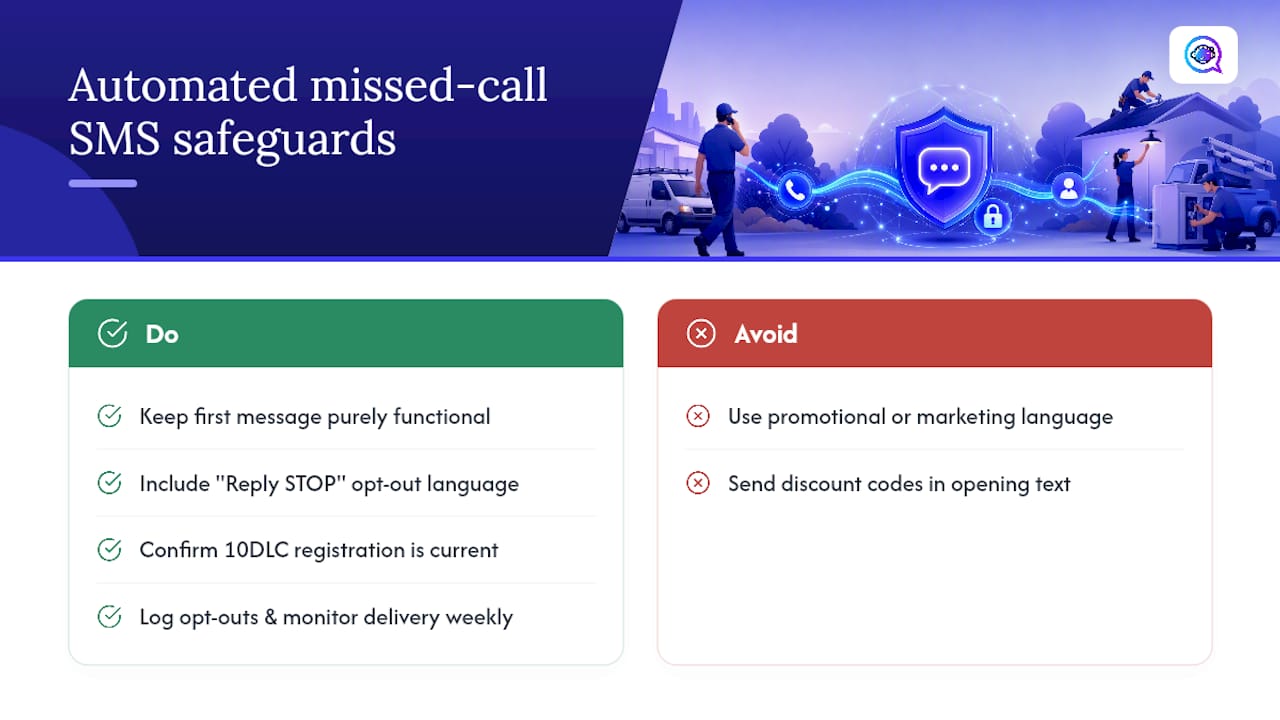
Keep the first message purely functional, not promotional, avoid discount codes or marketing language in that opening text, and include opt-out language (“Reply STOP to opt out”) from the start. If you’re sending volume through a 10DLC-registered number, confirm your carrier registration is current, since unregistered numbers face filtering and delivery throttling. Log every opt-out and monitor delivery reports weekly. Astreaux’s guides on TCPA compliance for SMS and SMS double opt-in practices walk through the specifics in more depth than a single section can.
How Do You Turn a Text Reply Into a Booked Appointment?
The reply itself is only half the job. What happens next determines whether it becomes revenue.
Attach a booking link or calendar so the caller can pick a time directly from the SMS thread without waiting on a callback.
Push every reply into your CRM automatically, creating a contact record instead of leaving the conversation stranded in a phone’s message app.
Use scripted AI questions to pre-qualify the lead (job type, urgency, budget range) before routing it to a staff member’s queue.
Track three numbers weekly: reply rate, average response time, and booked appointments traced back to recovered calls.
Astreaux’s lead follow-up playbook covers how to structure that qualification flow so recovered conversations don’t stall out after the first reply.
Publisher Perspective: When Automation Beats Live Reception
Instant auto-text wins for high call volume and after-hours gaps; live reception still matters for complex, high-ticket sales conversations. The rule I’d give any owner: never send a text without one easy next action, whether that’s a booking link or a simple yes/no qualifying question. Skip that, and you’ve automated the greeting but not the outcome.
— Jamaal
Get Branded, AI-Qualified Text-Back With Astreaux
You can use an integrated platform that offers instant branded replies, AI-driven qualification questions trained on your business’s own voice, and booking integration in one connected workflow, avoiding the need to cobble together multiple tools. It connects with over 7,000 apps, so your existing CRM, calendar, or ad platform slots in without a separate integration project.

This fits real estate agents fielding showing requests, contractors triaging urgent jobs versus routine estimates, and therapists managing intake calls that need a gentle, non-salesy tone. If your call volume outgrew a DIY Zapier stack or a device app that drops texts when your phone dies, this is the upgrade path. Contractors specifically can see how AI lead response and estimate booking works before committing to anything. Start a trial or book a demo at Astreaux and see your first missed-call reply go out within minutes of setup.
Sources
FAQ
Can I set up an automatic text message to respond to a missed call?
Yes. You can build this through a SaaS lead management workflow, a Zapier or Make automation paired with Twilio, or a device-level app like an IFTTT applet, and it works on any standard business phone line.
Does *69 automatically call back?
No. Call Return features like *69 only dial the last number that called you; they don’t send a text or automate a reply, so they solve a different problem than missed-call text-back automation.
Can you set up automated text responses for missed calls generally?
Yes, and most service businesses use one of three routes: a dedicated platform like Astreaux, a Zapier/Twilio build, or a mobile auto-reply app, with reply rates around 32.7% in one large study of home service businesses.
How do I set up an automatic text message for missed calls on my iPhone?
Native iOS doesn’t include missed-call auto-text, so iPhone users typically connect their business line to a SaaS platform or a Zapier and Twilio workflow rather than relying on a device-only app the way some Android users do with IFTTT.